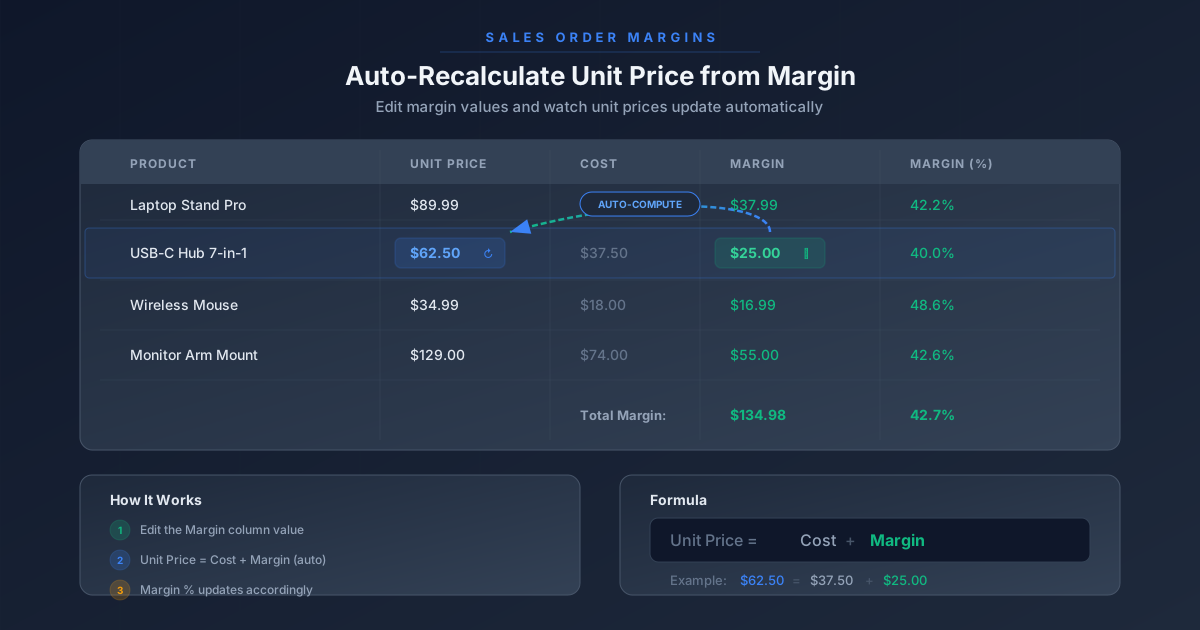
If you have ever watched a salesperson pull out a calculator app mid-call to figure out what unit price would give them a 30% margin on a product that costs $42.50, you understand the problem Odoo just solved. The margin column on a sales order line is no longer just a number you stare at after setting a price — it is now a field you can type into, and the unit price adjusts itself to match.
This is a small change on paper. In practice, it flips the pricing workflow for any business that thinks in margins rather than markups. Instead of starting with a unit price and hoping the margin lands in the right neighborhood, you start with the margin you want and let the system back-calculate the price that gets you there.
How It Works
Open any sales order or quotation and add a product that has a cost defined. The order line now shows both the Margin column (in currency) and the Margin(%) column. Both are editable. Change the margin amount, and the unit price recalculates. Change the margin percentage, and the unit price recalculates. Change the unit price manually, and the margins recalculate in the other direction. It is a two-way binding that stays consistent no matter which end you grab.
The system locks this relationship down at a specific point: once an invoice is created for the order, the margin fields become read-only. This prevents after-the-fact margin tampering on orders that have already hit the accounting ledger, while still giving sales teams full flexibility during the quoting and negotiation phase.
The Zero-Cost Edge Case
There is one scenario where the math breaks down, and Odoo handles it explicitly. When a product’s cost is zero — either because the cost field was never filled in, or because it is a service product with no material cost — the Margin(%) column becomes read-only. The reason is straightforward: a percentage margin on a zero-cost product is mathematically undefined (any price produces an infinite margin percentage), so the system disables that input rather than letting users type a number that cannot be honored.
The absolute margin column still works in this case. You can set a dollar-value margin on a zero-cost product, and the unit price will adjust accordingly. It is only the percentage calculation that gets locked out.
Pricelists and the “Update Prices” Button
The interaction between margins and pricelists got attention in this update as well. When a pricelist applies a discount to an order line, the margin columns reflect the discounted price, not the list price. If a salesperson overrides the margin after a pricelist has been applied, the unit price changes to hit that margin target, effectively overriding the pricelist discount for that specific line.
The “Update Prices” button on the sales order reapplies the pricelist to all lines, resetting any manual margin overrides. This gives managers a clean way to snap an order back to standard pricing after a negotiation goes through multiple rounds of manual adjustments. It is a deliberate design choice: pricelist rules represent the business’s pricing policy, and there should always be a one-click path back to policy pricing.
Why This Matters for Sales Teams
The real value here is not in the formula — any spreadsheet can divide margin by cost. The value is in where the calculation happens. By embedding margin-driven pricing directly into the sales order form, Odoo removes the context switch between “what does the customer want to pay” and “what does this deal need to earn.” A salesperson can negotiate on price, flip to negotiating on margin, and flip back, all within the same form, all with the system keeping the arithmetic honest.
For businesses that set margin floors — “nothing goes out the door below 25%” — this makes compliance visible at the point of sale rather than in a post-hoc report. The margin percentage is right there on the line, updating in real time, making it significantly harder to accidentally approve a deal that loses money.
Enabling It
The feature requires the Marginssetting to be enabled in the Sales app configuration. Once activated, the Margin and Margin(%) columns appear on all sales order and quotation line items. Products need a cost value defined in their product form for the calculations to work — without a cost, the system has no baseline to calculate margin against, and the margin fields will show zero.
For existing Odoo installations, the behavior change is immediate after enabling the setting. There is no migration step, no data transformation, and no impact on existing orders. Historical orders retain their original margin values; the new editability only applies going forward.