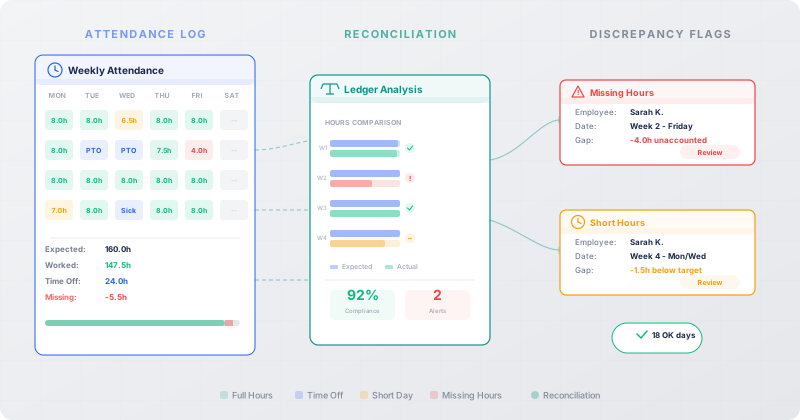
Every HR manager has their version of the same miserable ritual. At the end of the month — or worse, at the end of the quarter — they export attendance data into a spreadsheet, pull up the employee schedules in another tab, and start cross-referencing. Row by row, name by name, they’re looking for the same thing: gaps. Hours that should be there but aren’t. Days where someone clearly worked but the system shows zero. Mornings where an employee walked in, sat at their desk, and simply forgot to tap the attendance kiosk.
This process has been the unofficial dark side of attendance management in every ERP system for years. The data exists in two separate places — scheduled hours over here, actual attendance over there — and nobody built the bridge between them. Until now, the only bridge was a human being with a spreadsheet and too much patience.
Odoo 19 introduces the Time Off Ledger, a report that lives inside the Attendances module and does exactly what HR teams have been doing manually: it compares expected hours against worked hours and approved time off, then flags the difference.
Where to Find It and What It Shows
The Time Off Ledger sits under Reporting in the Attendances app. It isn’t buried three menus deep or hidden behind an obscure configuration setting — it’s a first-class report alongside the existing attendance analysis tools.
The report is organized into six columns: Employee, Date, Expected Hours, Worked Hours, Approved Time Off, and Difference. The first five are data. The sixth is the insight. That Difference column is where the entire value of this report lives — it shows you the mathematical gap between what should have happened and what actually did.
If an employee was scheduled for eight hours, worked eight hours, and had no time off, the difference is zero. If they were scheduled for eight hours, worked six, and had two hours of approved leave, the difference is still zero. But if they were scheduled for eight hours, worked five, and had no approved time off — there’s a three-hour gap staring back at you, no spreadsheet required.
The Four Scenarios This Report Actually Catches
Attendance gaps aren’t all the same, and the Time Off Ledger is useful precisely because it surfaces four distinct patterns that previously required different investigation methods.
The first and most common: the forgotten sign-in. An employee arrives at work, gets immediately pulled into a meeting, and never taps the kiosk or opens the attendance app on their phone. Their manager knows they were there — they sat three seats away during the standup — but the system shows zero worked hours for that day. Without the Ledger, this only surfaces when someone manually audits attendance records, which in most organizations means it surfaces never, or at payroll time when it’s already creating problems.
The second scenario is time off taken but never formally requested. Everyone has seen this: a manager verbally approves a Friday off, the employee stays home, but nobody submits the actual leave request in the system. The worked hours show zero, the approved time off shows zero, and the Difference column lights up with a full day of missing hours. The verbal agreement happened in real life. It just never made it into the software.
Third, partial-day absences that slip through the cracks. An employee leaves two hours early for a dentist appointment. They mentioned it to their team lead, who nodded and forgot about it. No time off request filed, no attendance record adjusted. Two hours of expected work simply vanish from the record. In isolation, this is trivial. Across a team of twenty people over six months, these untracked partial absences add up to a meaningful distortion in workforce data.
The fourth pattern is the most subtle: consistent underreporting. When the same employee shows a 30-minute or one-hour gap on most workdays, it’s no longer a series of individual oversights — it’s a pattern. Maybe their badge reader is malfunctioning. Maybe they’re consistently arriving late but not flagging it. Maybe the scheduled hours in the system don’t match their actual agreed-upon schedule. The Time Off Ledger turns this from an invisible drift into a visible trend that a manager can actually investigate and resolve.
From Flagging to Fixing
Identifying the gap is only half the problem. The other half is doing something about it — and Odoo 19 doesn’t leave managers stranded at the “well, now I know” stage.
When a discrepancy surfaces in the Ledger, managers can resolve it by creating retroactive time off requests directly within the system. This is the practical bridge between “this person has unexplained missing hours” and “this person took a half-day that we’ve now properly recorded.”
The time off form supports everything you’d need for after-the-fact corrections: specifying the employee, selecting the time off type, setting the payslip state so payroll isn’t affected incorrectly, entering the exact dates, adding a description that explains the context, and attaching supporting files if documentation is needed. It’s not a workaround or a hack — it’s a designed workflow for a situation that every HR department encounters regularly but few systems acknowledge.
This matters because the alternative — the status quo in most organizations — involves a chain of emails, a verbal approval, a note in someone’s personal spreadsheet, and a prayer that payroll gets the memo. The retroactive request formalized through the system creates an auditable record that flows into payroll, leave balances, and reporting without any manual forwarding.
Why This Report Didn’t Exist Before
The question worth asking is why it took this long. Attendance data and time off data have coexisted in Odoo for years. The Expected Hours field has been calculable from employee schedules. The Worked Hours field comes straight from attendance records. Approved Time Off is logged in the leave management module. All three numbers have been sitting in the database, waiting for someone to subtract them.
The answer, most likely, is that the problem wasn’t visible at the software layer. HR managers experienced it as a monthly ritual — painful but familiar — and accepted it as part of the job. The spreadsheet reconciliation wasn’t a bug anyone reported; it was a workflow people silently built around a gap in the tool.
What changed is probably a combination of scale and feedback. As Odoo deployments grow larger — organizations with hundreds or thousands of employees rather than dozens — the manual reconciliation stops being a mild inconvenience and starts being a genuine operational bottleneck. An HR coordinator managing attendance for 30 people can reconcile gaps in an afternoon. The same coordinator managing 300 people needs a week, and by the time they finish, new gaps have already appeared.
The Practical Impact on Payroll Accuracy
Attendance accuracy isn’t just an HR housekeeping concern — it flows directly into payroll. When worked hours are wrong, pay calculations are wrong. When time off isn’t recorded, leave balances are wrong. When both are wrong simultaneously, the payroll team inherits a mess that takes even longer to untangle than the original attendance review.
The Time Off Ledger creates a checkpoint before payroll processing. Instead of discovering attendance problems after paychecks go out — leading to corrections, adjustments, and the occasional awkward conversation about why someone’s pay was different than expected — managers can catch and resolve discrepancies while they’re still just data problems rather than money problems.
For organizations in regulated industries where attendance records are subject to audit, the report also provides a compliance tool. Being able to demonstrate that expected hours, worked hours, and approved time off reconcile to zero across the workforce is exactly the kind of evidence that auditors want to see. The alternative — producing that evidence from a patchwork of spreadsheets and email approvals — is the kind of exercise that makes compliance officers age prematurely.
A Quiet Fix for a Loud Problem
The Time Off Ledger isn’t flashy. It doesn’t use machine learning. It doesn’t have a dashboard with animated charts. It’s a table with six columns and some basic arithmetic. But it solves a problem that HR managers across every industry have been silently wrestling with for as long as digital attendance tracking has existed.
The best features in enterprise software are often the ones that eliminate a manual process so routine that people forgot it was manual. Nobody describes “reconciling attendance against schedules” as a pain point in software evaluation meetings because it doesn’t feel like a software problem — it feels like the job. The Time Off Ledger in Odoo 19 reframes it as what it always was: a missing report. And now the report exists.