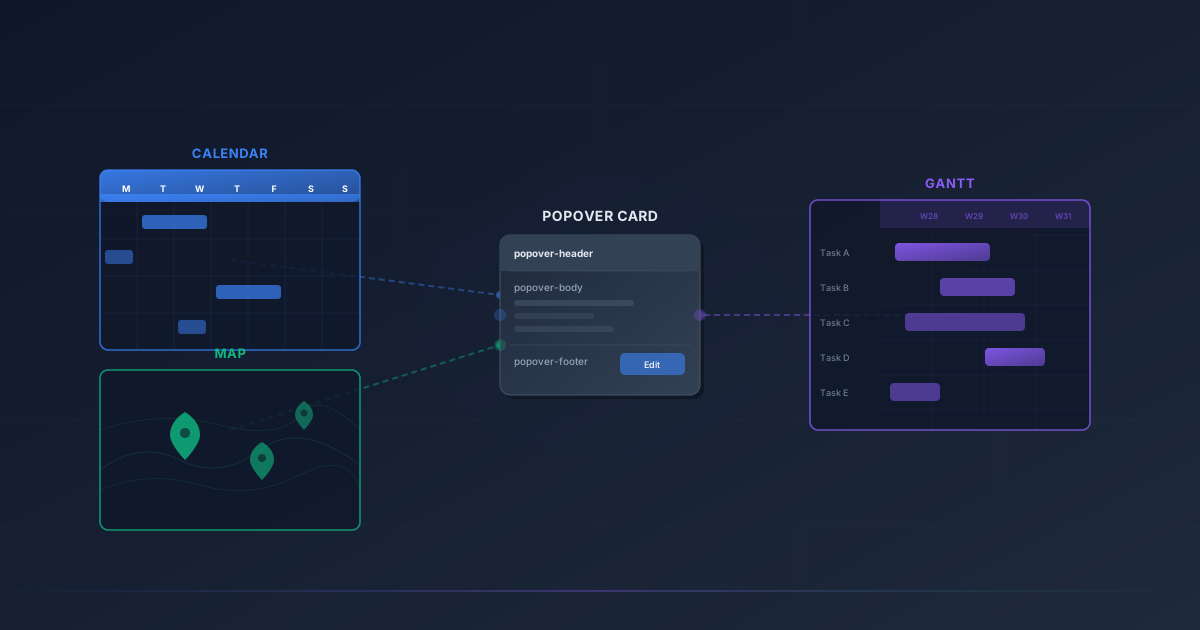
When Odoo introduced a card-based popover API for its gantt view earlier this year, the move looked like a targeted improvement — a cleaner way to define how record previews appear when users hover over timeline bars. But the gantt change was really the first phase of something broader. As of this week, the same three-slot popover system has landed in both the calendar and map views, completing a quiet unification that gives every spatial view in Odoo’s framework a consistent, composable API for rendering record cards.
The practical effect: developers who build custom modules now define popovers the same way regardless of whether a record appears on a calendar grid, a geographic map, or a gantt timeline. One pattern, three views, zero context-switching.
The Three-Slot System
The unified API revolves around a <popover>child element that sits inside the view’s root XML definition. Within it, a <templates> block houses up to three named template slots: popover-header, popover-body, and popover-footer. Each slot maps to a distinct region of the popover that appears when a user interacts with a record.
This is the same structure the gantt view adopted first. Templates inside these slots have access to the full range of field nodes, widget attributes, t-ifconditionals, and dynamic attribute binding that the card view system supports. A popover header might show the record’s display name alongside a status badge. The body might render a few key fields with conditional formatting. The footer might contain action buttons. The point is that developers control the layout explicitly rather than accepting whatever the framework decides to show.
<calendar date_start="date" date_stop="date_end" color="partner_id">
  <popover>
    <templates>
      <t t-name="popover-header">
        <field name="display_name"/>
        <field name="state" widget="badge"/>
      </t>
      <t t-name="popover-body">
        <field name="partner_id"/>
        <field name="date" widget="date"/>
        <field name="expected_revenue" t-if="record.expected_revenue.raw_value"/>
      </t>
      <t t-name="popover-footer">
        <button type="object" name="action_confirm" string="Confirm"/>
      </t>
    </templates>
  </popover>
</calendar>
Calendar Gets Full Popover Control
The calendar view’s popover has historically been functional but rigid. It displayed a fixed set of fields with minimal customization options. Module developers who wanted to change what appeared in the popover when a user clicked a calendar event had limited recourse — they could hide fields, but restructuring the layout or adding conditional logic required workarounds.
The new API replaces that constraint entirely. The <calendar> element now accepts a <popover>child with the standard three-slot template structure. Developers get the same power they have in card views: arbitrary field placement, widget overrides, conditional rendering based on record state, and dynamic attributes. If a CRM module wants to show expected revenue only when it’s non-zero, a t-if on the field node handles it.
The previous calendar popover API still works for now, but it’s deprecated. Modules relying on the old approach will need to migrate to the new <popover>syntax before it’s removed. Given that the new API is strictly more capable, migration should be straightforward in most cases — the old behavior can be reproduced exactly within the new template structure, then extended from there.
Map View Popovers and the Default Footer Pattern
The map view, part of Odoo’s enterprise web_map module, renders records as pins on a geographic map. Clicking a pin opens a popover showing record details. Until now, the content of that popover was largely automatic. The new API brings the same three-slot system to the <map> element, giving developers explicit control over what appears when users interact with map pins.
The map implementation introduces one notable refinement: the footer slot ships with a default Edit/View button. This makes sense for a spatial view where the primary action is usually navigating to the full record form. Developers who want to add custom buttons alongside the default can use the replace=“0” attribute on their footer template, which appends custom content rather than replacing the built-in button.
<map res_partner="partner_id" routing="true">
  <popover>
    <templates>
      <t t-name="popover-header">
        <field name="display_name"/>
      </t>
      <t t-name="popover-body">
        <field name="partner_id"/>
        <field name="planned_date_begin" widget="date"/>
      </t>
      <t t-name="popover-footer" replace="0">
        <button type="object" name="action_start" string="Start"/>
      </t>
    </templates>
  </popover>
</map>
That replace=“0”pattern is a small but thoughtful design choice. It acknowledges that map popovers have a natural default action — opening the record — that developers almost always want to keep. Rather than forcing every map popover definition to re-declare that button, the framework provides it and lets developers decide whether to augment or replace it.
The card_id Shortcut
All three views — calendar, map, and gantt — also support a card_id attribute on the <popover> element. This integer attribute references an existing card view record by ID, and the framework uses that card view’s templates to render the popover body. It’s the same mechanism that lets kanban boards and gantt charts share a single card definition.
The card_id approach is particularly valuable for modules that already define card views for their records. A project management module that has a card view for tasks can reference it from the calendar popover, the map popover, and the gantt popover without writing any additional template code. If the card design changes, every consumer picks up the update. The header and footer slots remain independently customizable even when card_idhandles the body, so views can still adapt the popover’s framing to their specific context.
Why Cross-View Consistency Matters
Odoo’s framework supports a dozen view types, and records regularly appear across several of them. A sales opportunity might show up on a kanban board, a calendar, a gantt chart, and — if the team tracks customer locations — a map. Before this unification, each of those surfaces had its own popover mechanism with its own quirks: different template syntax, different available features, different levels of customizability.
The result was predictable. Developers wrote different popover definitions for different views, even when they wanted to show the same information. Changes to one view’s popover didn’t propagate to others. Visual inconsistencies accumulated across modules. And new view types that wanted popover functionality had to invent their own approach rather than plugging into an existing system.
The three-slot popover API eliminates that fragmentation. Calendar, map, and gantt now share not just the same conceptual model but the same actual code path for rendering popovers. A developer who learns the pattern for one view knows it for all three. A template that works in a calendar popover works identically in a map popover, modulo the view-specific defaults like the map’s built-in footer button.
What Developers Should Do Now
For module maintainers, the migration path is clear. Calendar views using the old popover API should transition to the new <popover> child element before the deprecated syntax is removed. Map views that rely on automatic popover content can now be customized explicitly. And any module that already defines card views should consider referencing them via card_id in calendar and map popovers, reducing template duplication and ensuring visual consistency.
The broader pattern here is worth watching. Odoo has been systematically extracting view-specific features into shared abstractions — the card view type, the popover API, the template slot system. Each extraction makes the framework more composable and reduces the surface area that module developers need to learn. With calendar and map now on the unified popover API, the remaining question is which views come next — and whether the pattern eventually extends beyond popovers to other cross-view rendering concerns.