Migrating an online store has always been the part of an ERP switch that nobody looks forward to. You export a CSV from Shopify or WooCommerce, massage the columns until they sort of match, upload it into Odoo, realize half the images didn’t come through, fix those manually, and then spend the next two hours wondering why the product descriptions are rendering HTML tags as plain text. It’s a rite of passage that nobody should have to repeat in 2026.
Odoo 19 just removed a significant chunk of that pain with a cluster of new eCommerce product management features. The headline is a direct import tool that pulls product catalogs from any live website, but the supporting features — scheduled publishing, automated product suggestions, and storefront packaging restrictions — are arguably just as important for day-to-day operations.
Importing a Catalog Straight From a Live Website
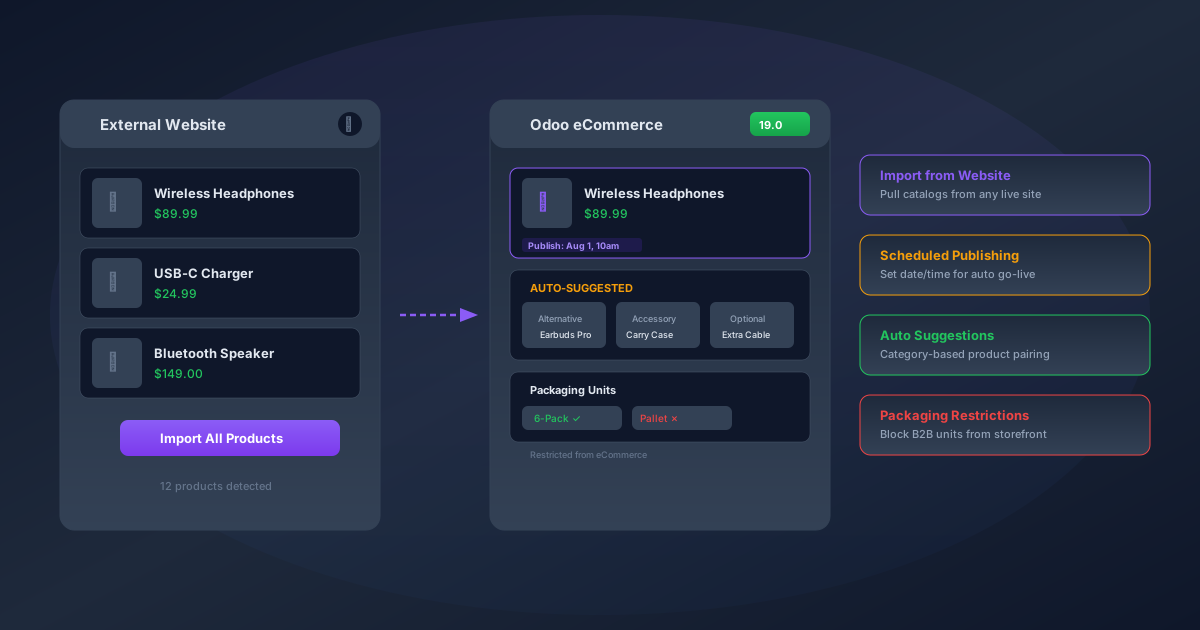
The new import-from-website feature works exactly the way you’d hope it does. During the standard product import flow, there’s now a globe icon that opens a new option: import directly from an external URL. Point it at a competitor’s site, your own legacy storefront, or any publicly accessible product catalog, and Odoo scrapes the product data — names, prices, descriptions, images — and maps it into the standard product template format.
This isn’t a replacement for a proper data migration with field mapping and transformation rules. It’s more of a fast-start tool for getting products into the system quickly, especially when you’re standing up a new storefront and need a product catalog that isn’t empty. The imported data still needs review — weights, tax categories, and internal references won’t carry over automatically from an arbitrary website — but having the names, prices, descriptions, and images populated saves a genuinely significant amount of manual entry.
Where this really shines is for businesses that sell across multiple platforms and want to consolidate into Odoo. Instead of exporting from each platform individually, you can point the importer at each storefront in sequence and build up your catalog incrementally. It won’t deduplicate across sources automatically, but it gets the raw material into the system faster than any CSV-based workflow.
Scheduled Publishing: Pick a Date, Pick a Time, Walk Away
Product launches on eCommerce platforms have traditionally been a manual affair. You prepare everything in draft, then someone has to physically toggle the published switch at the right moment. For a single product, that’s fine. For a seasonal collection drop with fifty items that all need to go live at midnight on Black Friday, it’s a recipe for someone staying up until 11:59 PM with their finger hovering over the save button.
Odoo 19 adds a Publish onfield to the product form. Set a date and time, and the product automatically goes live at that moment. No cron job to configure, no custom automation to build — it’s a native field on the product record. You can also use the standard published toggle for immediate publishing, so the two approaches coexist without conflicting.
The practical value here extends beyond product launches. Think about time-limited promotions, pre-order windows that need to open at a specific hour across time zones, or embargo periods for products tied to partner agreements. Having publish scheduling built into the product form rather than buried in a marketing automation workflow means the people managing products — not the people managing marketing campaigns — can handle their own timelines.
Automated Product Suggestions by Category
Cross-selling and upselling have been possible in Odoo eCommerce for years, but the setup was entirely manual. For each product, you’d go to the Sales tab and add optional products, accessory products, and alternative products one by one. With a catalog of a hundred items, that’s manageable. With a thousand, it’s the kind of task that gets started enthusiastically and then quietly abandoned after someone finishes the first fifty.
The new automation feature changes the economics of that setup. Enable it in the website settings, and Odoo automatically populates the optional, accessory, and alternative product fields based on eCommerce category associations. Products in the same category become alternatives. Products in related categories become accessories or optional add-ons, depending on the relationship defined in the category hierarchy.
The result is that a customer browsing wireless headphones will automatically see earbuds as alternatives, carry cases as accessories, and replacement cables as optional products — without anyone having to manually create those associations for every item. For stores with large catalogs, this is the difference between having a cross-selling strategy and having a theoretical cross-selling strategy that never actually gets implemented.
Packaging Restrictions: Keep B2B Units Off the Storefront
This one solves a problem that’s specific to companies that sell through both B2B and B2C channels. A product might have multiple packaging units defined — individual units for retail customers, 6-packs for small businesses, and full pallets for distributors. In previous versions, all of those packaging options were visible on the eCommerce storefront, which meant retail customers could accidentally order a pallet of coffee mugs or a case of 144 phone chargers.
The new packaging restriction setting lets you designate specific packaging units as unavailable for eCommerce sales. The pallet and case options still exist in the system for B2B orders processed through the Sales module, but they’re hidden from the storefront. It’s a simple toggle per packaging unit, and it respects the channel distinction that most hybrid B2B/B2C companies need.
What This Means for Store Operations
Individually, these are quality-of-life improvements. Together, they represent a shift in how Odoo treats the eCommerce product catalog — less as a static list of items and more as a managed, automated system with its own scheduling, intelligence, and channel awareness. The import tool gets products in faster. Scheduled publishing removes the manual go-live step. Auto-suggestions handle cross-selling at scale. And packaging restrictions keep B2B complexity from leaking into the consumer experience.
For teams running their storefront on Odoo, the combined effect is less time spent on catalog maintenance and more time spent on the parts of eCommerce that actually require human judgment — pricing strategy, photography, and copywriting. The mechanical work of connecting products to each other and getting them live at the right time is now the system’s job.