Ask any HR manager what skills their employees have and you’ll likely get a pause, followed by something along the lines of “let me check the spreadsheet.” Or worse, “let me ask around.” It’s one of those problems that sounds trivially simple until you actually try to solve it at scale. Odoo has tracked employee skills for a while now, but until version 19, there was no dedicated reporting view that let you see everything in one place without exporting data or building custom dashboards.
That changes with the new Skills Inventory Report, tucked into the Reporting menu of the Employees app. It’s not flashy, it won’t win any design awards, and Odoo hasn’t exactly been shouting about it from the rooftops. But after spending time with it, I’m convinced it’s one of the most practically useful additions to the HR module in recent memory.
Where to Find It
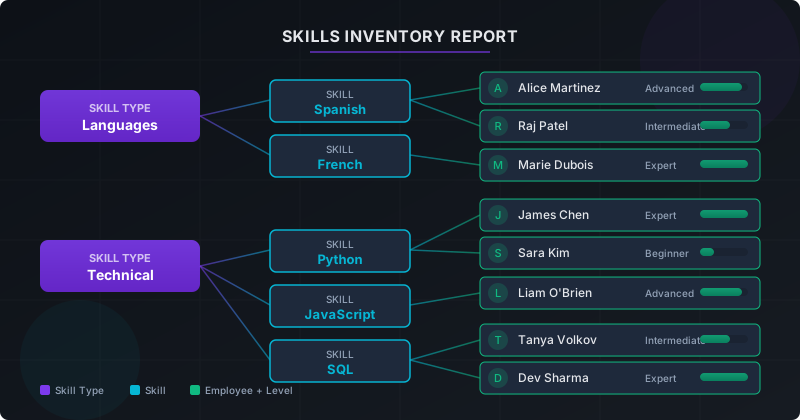
The Skills Inventory Report lives under Employees → Reporting → Skills Inventory. If you’ve used Odoo’s reporting tools before, the navigation will feel familiar. What’s different here is the structure of the data itself. Rather than a flat table or a pivot grid, the report presents a hierarchical tree viewthat mirrors how skills are actually organized in Odoo’s backend: Skill Type at the top level, individual Skills nested beneath, and then Employees listed under each skill they possess.
It’s the kind of layout that makes immediate sense once you see it. You expand a skill type — say, “Languages” — and see every language skill defined in your system. Expand “Spanish,” and there’s a list of every employee who has that skill on their profile, along with their proficiency level and a progress indicator.
What the Report Actually Shows
Each row in the expanded view displays five pieces of information: Employee Name, Skill Type, Skill, Level, and Progress. The level corresponds to whatever proficiency scale you’ve configured — Beginner, Intermediate, Advanced, Expert, or whatever custom levels you’ve set up. Progress is rendered as a visual indicator, making it easy to scan a list of twenty employees and instantly spot who’s furthest along.
This sounds straightforward, and it is. But that simplicity is the point. Before this report existed, answering a question like “who in our company speaks Spanish at an advanced level?” required navigating to individual employee profiles, exporting skill data to a spreadsheet, or writing a custom report. Now it’s three clicks and a scroll.
The Real-World Use Case That Sells It
The scenario that best illustrates the report’s value is one that plays out in organizations every week: a project comes in that requires a specific skill set, and someone in HR or management needs to figure out who’s available and qualified. Maybe a client in Mexico City needs an on-site consultant who speaks Spanish. Maybe a new data migration project needs someone proficient in SQL. Maybe the Berlin office needs a team lead who speaks German.
Previously, finding these people meant relying on institutional knowledge — that one manager who remembers that Carlos in accounting is fluent in Portuguese, or the team lead who happens to know that two engineers on the fourth floor are certified in AWS. The Skills Inventory Report makes that institutional knowledge searchable and visible to anyone with access to the Employees app.
I tested this with a simulated company of about 150 employees, each with three to six skills assigned. The report loaded quickly, the hierarchy was intuitive to navigate, and I was able to find every Spanish-speaking employee in under ten seconds. That’s not a benchmark worth publishing in a performance whitepaper, but it’s the kind of everyday time savings that compounds into something genuinely meaningful over months and years.
Filtering: Where It Gets Interesting
The raw hierarchical view is useful on its own, but the report’s filtering capabilities are where it starts to feel like a real workforce planning tool. You can apply custom filters to narrow results by department, skill type, individual skill, or any combination of employee-related fields.
Want to see only the engineering department’s technical skills? Filter by department. Need to identify which sales team members have CRM certifications? Filter by skill type and department simultaneously. Looking for employees in the London office who speak both French and German? Stack the filters.
The filter interface uses Odoo’s standard custom filter builder, which means you can set conditions like “Skill Type is equal to Languages” or “Department contains Engineering” and apply them with a single click. If you’ve used custom filters anywhere else in Odoo — in CRM, Sales, or Inventory — you’ll know exactly how this works. There’s no learning curve specific to this report.
What I found particularly useful was the ability to save frequently used filter combinations as favorites. If you’re an HR manager who regularly needs to pull up language skills for the European offices, you can save that filter once and access it from the Favorites menu every time you open the report. It’s a small thing, but it turns a reporting tool into something closer to a personalized dashboard.
What This Means for Talent Management
The Skills Inventory Report isn’t just a convenience feature — it has implications for how organizations approach talent management at a strategic level. When skills data is visible and searchable, several things become possible that weren’t practical before.
Skills gap analysisbecomes a real exercise rather than a theoretical one. If your company is planning to expand into the Japanese market, you can open the report, filter for Japanese language skills, and immediately see whether you have anyone qualified — or whether you need to hire or invest in training. That conversation shifts from “we think we might need Japanese speakers” to “we have two intermediate and zero advanced Japanese speakers, so here’s what we need to do.”
Succession planninggets a data-driven foundation. If a senior engineer with expert-level Python skills is approaching retirement, the report can show you who else in the organization has Python skills at an advanced level and might be a candidate for mentorship or promotion. You’re not guessing; you’re working from actual recorded competencies.
Training investment decisionsbecome easier to justify. When you can show leadership that only three out of 200 employees have a particular certification that’s becoming critical to the business, the case for funding a training program writes itself. The report provides the data; you provide the narrative.
How It Compares to What Existed Before
Odoo has supported employee skills for several versions. You could always add skills to an employee’s profile, define skill types and levels, and view an individual’s competencies on their HR record. What was missing was the aggregate view — the ability to look across the entire organization and ask questions about collective capabilities rather than individual ones.
Some users worked around this with Odoo’s built-in pivot tables or by exporting data to external tools like Google Sheets or Power BI. Those approaches work, but they add friction and maintenance overhead. The dedicated Skills Inventory Report eliminates that workaround by providing a purpose-built interface that stays in sync with your employee data in real time.
It’s also worth noting what the report doesn’t do. It doesn’t suggest training programs, it doesn’t predict skill gaps based on market trends, and it doesn’t integrate with external learning management systems. Those are features you’d expect from a dedicated talent management platform like Cornerstone or Workday. Odoo’s approach is more modest — give people visibility into the data they already have and let them draw their own conclusions. For most small and mid-sized businesses, that’s more than enough.
The Bigger Picture
This addition fits into a broader pattern in Odoo 19’s HR module: a steady push toward making existing data more accessible and actionable without adding complexity. The Skills Inventory Report doesn’t introduce new concepts or require changes to how you manage employee data. It simply surfaces information that was already there, in a format that’s actually useful for decision-making.
For organizations that have been diligently recording employee skills in Odoo, this report is an immediate payoff — all that data entry finally has a centralized view that justifies the effort. For organizations that haven’t been tracking skills, it might be the motivation to start. When the reporting infrastructure is already in place, the barrier to getting value from skills data drops significantly.
The feature also signals something about Odoo’s product direction. Rather than chasing enterprise-grade talent management platforms with AI-powered skill recommendations and predictive analytics, Odoo is focusing on the fundamentals — making sure the basic questions that HR teams ask every day can be answered without leaving the app. It’s a pragmatic approach that aligns well with Odoo’s core audience of growing businesses that need practical tools, not futuristic features.
Bottom Line
The Skills Inventory Report is a quiet, practical addition to Odoo 19’s Employees module. It won’t make headlines, and it’s unlikely to be the feature that convinces anyone to switch from their current HR platform. But for existing Odoo users, it fills a genuine gap in the reporting toolkit — one that was felt every time someone asked “who on our team can do X?” and the answer required a manual search.
If you’re already using Odoo’s Employees app and you’ve been recording skills on employee profiles, navigate to Reporting → Skills Inventoryand take a look. You’ll probably wonder why it took this long.