Every event generates a list of people who showed up. And in most companies, that list gets exported to a spreadsheet, emailed to the sales team with a vague subject line like “leads from last week’s conference,” and then quietly ignored. The contacts are real. The intent was there — these people registered, possibly paid, and in many cases physically attended. But without a systematic way to route those contacts into a sales pipeline, the follow-up never happens, or it happens too late, or it happens without any context about which event, which ticket type, or which channel brought the person in.
Odoo 19 tackles this gap directly. The Events module now ships with a built-in lead generation engine that automatically creates CRM leads from event attendees based on rules you define. It is not a bolt-on integration or a Zapier workaround. The engine lives inside the Events module itself, and it understands the difference between someone who registered and someone who actually showed up.
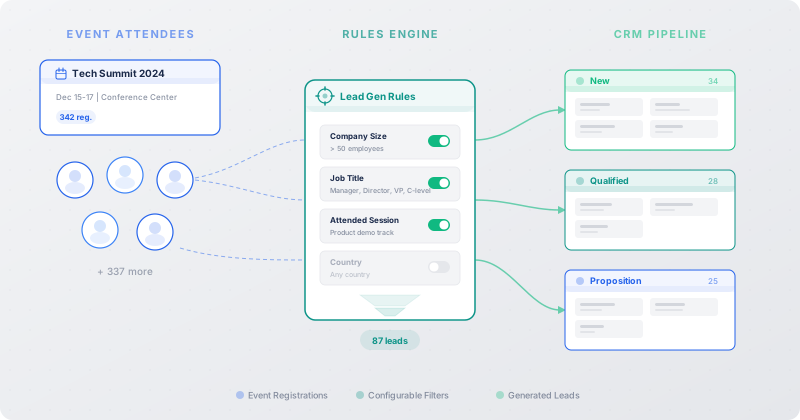
Lead Generation Rules: The Control Layer
The system works through configurable rules, accessible from Events > Configuration. Each rule defines what should happen when certain conditions are met during an event’s lifecycle. The design is deliberately granular — Odoo isn’t trying to dump every attendee into the CRM and call it a day. Instead, organizers decide exactly which attendees become leads, when those leads are created, and how they should be categorized once they land in the pipeline.
The first decision is scope. Rules can be set to generate leads “Per Attendee” or “Per Order.” The distinction matters more than it might seem. A Per Attendee rule creates one lead for every individual registration — useful when each person represents a potential customer, as with B2B conferences or professional training sessions. A Per Order rule creates a single lead for each group booking, which makes more sense for corporate outings, team workshops, or situations where one buyer registers multiple people and you want to follow up with the purchaser, not every individual seat.
Three Triggers, Three Different Moments
Timing is the second layer of control. Each rule supports one of three trigger conditions: when attendees are created in the system, when they register for the event, or when they actually attend. These are not interchangeable moments, and the fact that Odoo distinguishes between them reveals a level of thought about real event workflows.
Creating a lead at registration time is the aggressive play — you want sales involved immediately, perhaps to send a pre-event email or schedule a booth visit. Triggering on attendance is the conservative approach: you wait until you know the person actually showed up before you spend sales capacity on outreach. The middle option, triggering on attendee creation, covers cases where registrations are entered manually by event staff or imported from external platforms, and you want the CRM to pick them up regardless of how they arrived.
For most organizations, the attended trigger will be the sweet spot. No-show rates at events can run anywhere from 20 to 50 percent, and generating leads for people who never walked through the door wastes the sales team’s time and poisons pipeline metrics with dead weight.
Filtering: Event-Level and Attendee-Level
Not every event justifies lead generation, and not every attendee at a qualifying event deserves a follow-up call. Odoo 19 handles both of these realities with a two-tier filtering system.
Event-level filters let you restrict a rule to specific event types. You might want lead generation for conferences and trade shows but not for internal webinars or community meetups. Rather than creating separate rules that you have to remember to toggle, you define the event category once, and the rule ignores everything else.
Attendee-level filters add a second gate. These operate on the individual registration — ticket type, registration source, or any other attendee attribute. A rule configured with a VIP ticket filter, for example, will only generate leads for attendees who purchased VIP access, skipping general admission entirely. This is where the system starts to feel genuinely useful rather than just automated. Sales teams do not want a flat list of every warm body that scanned a badge. They want the subset that signals buying intent, and ticket tier is often the simplest proxy for that.
Default Values: Pre-Routing Leads Into the Right Hands
Once a lead is generated, it needs to land somewhere useful. Raw leads without context, team assignment, or categorization tend to sit in a queue until someone triages them, which in many organizations means they sit indefinitely.
Each lead generation rule in Odoo 19 can assign default values that are stamped onto every lead it creates. These include the lead type — whether the record should enter the CRM as a lead (requiring qualification) or jump straight to opportunity status — along with the sales team, a specific salesperson, and any tags you want attached. The tags are particularly handy for downstream reporting: tag every lead from your annual user conference differently from those generated by regional meetups, and your pipeline analysis immediately gains a new dimension.
To make this concrete, consider a company called Stealthy Wood that runs product launch events. They create a rule named “Social Media Attendees” that triggers when someone actually attends their event and came through a social media channel. The rule is configured to generate opportunities rather than raw leads, assign them to the digital sales team, and tag each one with a “social-event” label. When the event wraps, the digital team’s pipeline is already populated with pre-qualified, properly tagged opportunities — no CSV export, no manual assignment, no lost context.
Manual Generation and the Generate Leads Button
Automation handles the steady state, but events are messy. Attendees get added late. Registration data gets corrected after the fact. Sometimes you simply want to re-run lead generation after adjusting a rule’s filters. For all of these cases, Odoo 19 includes a “Generate Leads” button directly on the event form.
Clicking it triggers lead creation based on the current rules and the current attendee data, giving organizers a manual override without requiring them to dig into configuration screens or automation logs. It is a small feature, but it closes an important gap: automated systems are only trustworthy when you can also run them on demand to verify that they are doing what you expect.
A Full CRM Dashboard for Event-Generated Leads
Generated leads do not disappear into a generic CRM list. Odoo 19 gives event-sourced leads their own dashboard with the full suite of views: List, Kanban, Graph, Pivot, Calendar, and Activity. This means event managers and sales teams can analyze event leads independently from other pipeline sources without building custom filters or saved searches.
The Kanban view is the obvious daily driver — drag leads through stages as follow-up progresses. But the Graph and Pivot views are where the strategic value lives. An event organizer can compare lead generation rates across events, ticket types, and time periods. A sales manager can see which events produce leads that actually convert versus those that generate volume without revenue. The Calendar and Activity views keep follow-up tasks from falling through the cracks, tying each lead back to scheduled calls, emails, or meetings.
Why This Matters Beyond the Feature List
The deeper story here is about closing the loop between marketing events and sales execution. Most ERP systems treat events as a standalone module — you plan the event, manage registrations, track attendance, and then you are on your own when it comes to doing anything useful with the data. The handoff to sales is an export, an email, a hope that someone follows up.
Odoo 19’s approach eliminates that handoff entirely. By embedding lead generation rules inside the Events module and routing results directly into the CRM, the system ensures that the connection between “this person attended our event” and “this person is being contacted by sales” is automatic, auditable, and configurable without writing code.
For companies that run a significant number of events — user conferences, partner summits, regional meetups, product demos, training sessions — this is not a nice-to-have. It is the difference between events that feel expensive and events that visibly contribute to revenue. The attendee data was always there. Now there is a system that actually does something with it.