If you’ve ever walked a warehouse floor during the afternoon shipping rush, you know what controlled chaos looks like. Picking teams race to finish orders. Trucks idle at loading docks waiting for pallets that aren’t ready. A carrier shows up an hour early and there’s nowhere to put them. Meanwhile, the warehouse manager is juggling spreadsheets, radio calls, and a whiteboard schedule that was outdated before lunch.
Odoo 19 just shipped a feature that attacks this problem directly. The new Dispatch Management System, built into the Inventory module, gives warehouse operations a centralized command center for outbound shipments — one screen where managers can schedule dispatches, group orders by carrier or destination, assign dock time windows, and track everything in real time. It’s the kind of functionality that large third-party warehouse management systems have charged six figures for, and Odoo is folding it into its standard inventory toolset.
The Problem With Outbound: It’s Always the Last Mile Inside the Building
Most ERP systems handle inbound receiving reasonably well. Products arrive, get scanned, and land in storage locations. The process is sequential and predictable. Outbound operations are a different animal. A typical warehouse might process hundreds of delivery orders per day across a dozen carriers, each with different pickup windows, vehicle sizes, and routing requirements. The complexity isn’t in any single shipment — it’s in coordinating all of them simultaneously against a fixed number of loading docks and a finite number of picking team hours.
Before this update, Odoo handled outbound the way most mid-market ERPs do: individual delivery orders moved through a workflow from confirmed to picked to packed to shipped. Each order was its own island. A warehouse manager who wanted to batch those orders by carrier, schedule them against dock availability, or coordinate the sequence of picking waves to align with truck departure times had to build that orchestration layer themselves — usually with spreadsheets, custom reports, or expensive third-party integrations.
The Dispatch Board: A Control Tower for Shipping
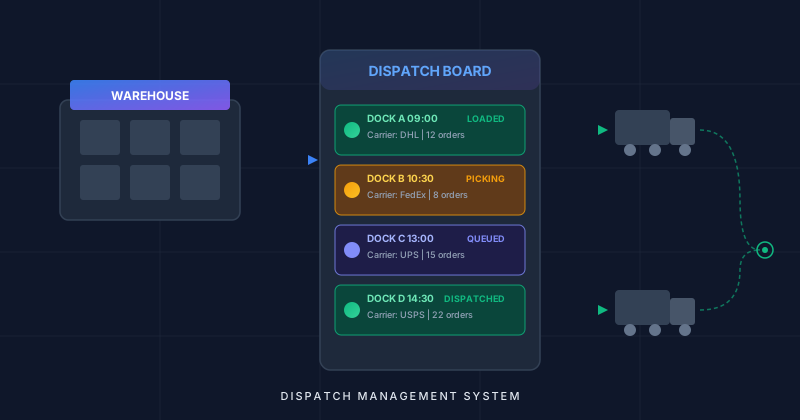
The centerpiece of the new system is the dispatch board, a centralized view that aggregates all pending outbound shipments and lets managers organize them into dispatch groups. Think of it as a scheduling calendar crossed with a load planner. Each dispatch represents a logical unit of outbound work — a truck departure, a carrier pickup, a route consolidation — and the board shows all of them on a single timeline.
Managers can drag delivery orders into dispatch groups, set departure times, and assign specific loading docks. The board updates in real time as orders move through the picking and packing stages, so a dispatcher can see at a glance which shipments are ready to load, which are still being picked, and which are at risk of missing their window.
The visual design matters here. Warehouse dispatching is a real-time coordination problem, and the people doing it need information density without clutter. The dispatch board delivers that — color-coded status indicators, carrier groupings, and time windows all visible without drilling into individual records. It’s the difference between managing shipping from a list of orders and managing it from an operational dashboard.
Carrier and Route Grouping: Loading Trucks Intelligently
One of the most practical aspects of the dispatch system is automatic grouping by carrier, route, or destination. Instead of manually sorting through delivery orders to figure out which ones should go on the same truck, the system can consolidate shipments headed to the same region, serviced by the same carrier, or following the same delivery route.
This directly addresses a pain point that warehouse managers know intimately: vehicle capacity utilization. A half-empty truck is wasted money. By surfacing consolidation opportunities at the dispatch planning stage, the system lets managers make loading decisions before picking even begins. If three separate delivery orders are going to customers within the same postal code and the carrier has a single truck scheduled for that zone, the dispatch board makes that grouping obvious and actionable.
The routing intelligence also works in the other direction. When a carrier has limited vehicle capacity, the system helps managers prioritize which orders make the cut for today’s dispatch and which get bumped to tomorrow — with full visibility into the downstream impact on delivery promises.
Dock Scheduling and Time Windows: No More Truck Queues
Anyone who has managed a busy warehouse knows that loading dock congestion is a silent killer of operational efficiency. Trucks stack up, drivers wait, and the entire outbound flow backs up because two carriers were scheduled for the same dock at the same time — or more commonly, because nobody was scheduling docks at all.
The dispatch system introduces formal dock assignment with time windows. Each dispatch can be assigned to a specific dock with a defined loading window, and the system prevents double-booking. Managers can see dock utilization across the day, identify gaps where additional dispatches could be squeezed in, and shift assignments when delays inevitably occur.
This is particularly valuable for warehouses that serve as distribution hubs with high truck throughput. When you’re processing twenty or thirty outbound loads per day across four or five docks, the scheduling alone can recover hours of lost productivity that previously vanished into idle wait times and dock conflicts.
Wave Picking Integration: Aligning the Floor With the Schedule
The dispatch system doesn’t exist in isolation. It ties directly into Odoo’s wave picking capabilities, creating a feedback loop between dispatch scheduling and warehouse floor operations. When a dispatcher sets a departure time for a truck, the system can work backward to determine when picking needs to start, which zones need to be covered, and how many pickers should be allocated.
This integration solves a coordination problem that has plagued warehouse operations for decades: the disconnect between what the shipping desk promises and what the floor can deliver. Without dispatch-aware picking, teams often pick orders in whatever sequence seems convenient, which means the truck that’s leaving at 2:00 PM might have its orders picked last because they happened to be in a far corner of the warehouse. With dispatch integration, picking waves are organized around departure schedules, ensuring that the orders for the next truck out are always prioritized.
The real-time status tracking means dispatchers can see picking progress as it happens. If a wave is running behind, they know immediately and can adjust — reassign pickers, push back a departure time, or split a dispatch into what’s ready now and what will go on the next truck.
Why This Matters Beyond the Warehouse
Dispatch management might sound like a niche warehouse concern, but the ripple effects touch every part of the business. When outbound operations run on schedule, delivery promises become reliable. When vehicle capacity is optimized, shipping costs drop. When dock scheduling eliminates congestion, warehouses can handle higher throughput without adding physical infrastructure. These aren’t marginal improvements — for distribution-heavy businesses, dispatch efficiency directly impacts the bottom line.
What makes Odoo’s implementation notable is that it’s integrated into the same system that handles purchasing, sales, manufacturing, and accounting. The dispatch board isn’t a standalone tool that needs to be connected to everything else through APIs and middleware. It reads from the same delivery orders, carrier configurations, and route definitions that the rest of the Inventory module already uses. For businesses already running on Odoo, this is a capability upgrade, not a system integration project.
The competitive context matters too. Dedicated warehouse management systems from vendors like Manhattan Associates or Blue Yonder have offered dispatch planning for years, but at price points and complexity levels that put them out of reach for most mid-market companies. By building dispatch management into its standard Inventory module, Odoo is bringing enterprise warehouse coordination capabilities to businesses that previously had to choose between expensive standalone WMS platforms and managing their shipping floor with clipboards and gut instinct.
For warehouse managers who have been asking their ERP to do more than just track orders — to actually help them orchestrate the physical flow of goods out the door — this is the feature that finally delivers.