Inventory software lives and dies on the details of how physical goods get grouped, labeled, and moved through a warehouse. Package management—the process of defining what a box, pallet, or crate looks like, how much it holds, and what it contains—sits at the intersection of nearly every warehouse operation. Get it right, and picking, shipping, and receiving hum along without surprises. Get it wrong, and you end up with mismatched dimensions, unlabeled parcels, and receiving teams that do not know what they are looking at.
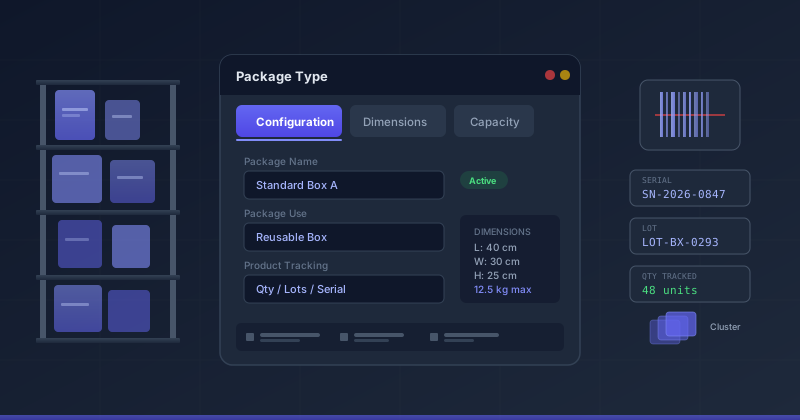
Odoo’s inventory module has just received a significant update to how package types are defined and managed. The changes touch the form layout, the language used to describe package applicability, the location of key configuration fields, the default dashboard view, and a new clustering feature. Taken together, they represent a clear effort to impose structure on what was previously a relatively flat configuration experience.
Three Tabs Replace a Single Flat Form
The most visible change is the reorganization of the package type form into three distinct tabs: Configuration, Dimensions, and Capacity. Previously, all of these settings lived on a single surface, requiring users to scroll through a mix of naming fields, physical measurements, and storage specifications without clear separation between concerns.
The Configuration tab now serves as the home for the package name, the package barcode, and the Package Use field. It is where you define what the package type is and how it will be used within the warehouse workflow. The Dimensions tab handles physical measurements: length, width, height, and weight. The Capacity tab addresses how much the package can hold—maximum weight limits, volume constraints, and any product-specific packing rules.
This kind of tab-based restructuring may seem cosmetic, but it reflects a deeper shift in how Odoo is thinking about package type configuration. By separating identity from physical specifications from capacity constraints, the form now guides warehouse managers through a natural progression: name and classify the package, specify its physical characteristics, then define what it can carry. That progression mirrors the actual decision sequence most teams follow when introducing a new package type into their operations.
From “Storable Products” to a Broader Tracking Model
A seemingly small wording change carries significant implications. Packages were previously described as applying to “storable products.” The updated language says they apply to “products tracked by quantity, lots, or serial numbers.” This is not just a documentation preference—it is a semantic expansion of what package management actually covers in Odoo’s inventory module.
The old phrasing tied packages specifically to Odoo’s product type classification. A product had to be explicitly set as “storable” for packages to apply. The new description focuses on the tracking mechanism instead of the product type. If a product is tracked by quantity, it qualifies. If it is tracked by lot numbers, it qualifies. If it is tracked by serial numbers, it qualifies. This broadened definition better reflects the actual behavior of the system and closes a gap where users might have assumed that only classic storable goods could be packaged.
For warehouse teams dealing with mixed inventories—where some items are tracked by individual serial numbers, others by production lots, and others simply by count—this clarification means the package management system applies uniformly across all of them. There is no longer a question of whether lot-tracked items or serial-tracked items fit into the packaging workflow. They do.
Package Use Moves to Its Proper Home
The Package Use field—which determines whether a package type is intended for disposable use or reusable circulation—has been correctly documented as living on the package type form rather than on individual package records. This distinction matters because it changes how administrators set up their packaging workflows.
When the field sits on the package type, it means the disposable or reusable designation is defined once at the template level and inherited by every package created from that type. This eliminates the tedious process of setting the use case on each individual package and prevents inconsistencies where packages of the same type end up with different use designations. The field also only appears when specific inventory features are enabled, which avoids cluttering the form for warehouses that do not distinguish between disposable and reusable packaging.
Kanban Falls, List View Rises
The default packages dashboard has switched from a Kanban board to a list view. This is a pragmatic change that acknowledges how most warehouse teams actually interact with package data. Kanban views excel at visualizing workflow stages—moving cards from “To Do” to “In Progress” to “Done.” But packages are not workflow items. They are inventory objects with properties that need to be compared, filtered, and sorted.
A list view provides exactly the information density that package management demands. Teams can see package names, types, locations, tracking numbers, and contents in a scannable table format. Sorting by any column becomes trivial. Filtering by package type or location happens in place. The switch reflects a maturation in how Odoo is thinking about which view types match which data patterns, rather than defaulting to the Kanban view that has become the platform’s visual signature.
Cluster Packages Enter the Picture
The update introduces documentation for cluster package functionality, a feature that addresses the real-world reality of packages that contain other packages. In warehouse logistics, a pallet might hold twelve boxes, each box containing six individual product packages. Cluster packages let Odoo model this nesting explicitly.
Rather than treating a pallet as a single flat container of products, the cluster package approach preserves the hierarchy. The system knows that the pallet contains boxes, and the boxes contain products. This hierarchical awareness matters during receiving, where a single pallet scan should be able to register the arrival of all nested packages and their contents. It also matters during shipping, where a manifest needs to reflect the actual physical structure of the shipment rather than just listing products in a flat sequence.
For warehouses that operate at scale, cluster packages eliminate a common workaround: manually creating parent-child relationships between packages using notes or custom fields. The native support means the system can track, validate, and report on multi-level packaging structures without bolt-on customizations.
New Visual Assets Across the Board
Alongside the structural changes, Odoo has introduced fresh visual assets that document the new interface. Screenshots now cover the package type configuration form with its three-tab layout, the dimensions tab with measurement fields, the cluster package configuration, and the new list-view packages dashboard. These are not incidental additions—they signal that the documentation team is actively maintaining visual parity with the product, rather than leaving stale screenshots from previous versions to mislead users who are trying to follow along.
What This Means for Warehouse Operations
The combined effect of these changes is a package management system that is more structured, more inclusive, and more aligned with how physical warehouses actually operate. The tab-based form imposes useful discipline on configuration. The broadened tracking language ensures that no trackable product falls outside the packaging workflow. The relocated Package Use field enforces consistency at the template level. The list view provides the information density that inventory management requires. And cluster packages bring native support for the multi-level packaging hierarchies that large warehouses have been working around for years.
None of these features are individually groundbreaking. But taken together, they demonstrate a warehouse module that is growing up —moving from a system that could handle packages to one that has a clear opinion about how packages should be managed. That opinionated approach, when it aligns with operational reality, is exactly what transforms an inventory tool from adequate to genuinely useful.