Warehouse software tends to accumulate complexity the way a stockroom accumulates dust—slowly, invisibly, and in places nobody thinks to look until something goes wrong. Two changes landing in Odoo 19’s Inventory module this cycle address exactly that kind of silent friction. Neither is flashy. Neither will headline a keynote. But taken together, they represent a deliberate effort to push configuration decisions to the right level of abstraction and to fill a documentation gap that has quietly frustrated warehouse managers for years.
Package Use Moves Up a Level
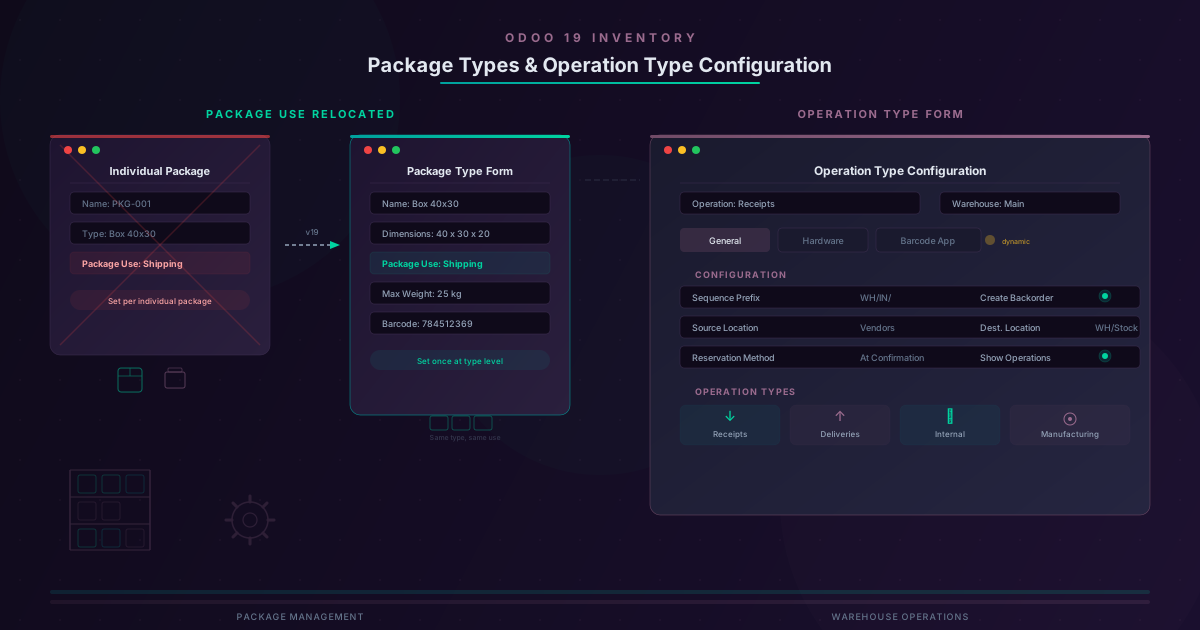
Every physical package in Odoo has historically carried a field called Package Use, which determined whether that specific package was destined for shipping or for internal storage. The distinction matters: a shipping package travels to a customer, while an internal package might simply group items on a shelf for easier picking. But setting this attribute on every single package, one at a time, was always a little odd. If you use the same type of cardboard box for every outbound shipment, why should each instance of that box need its own shipping designation?
Odoo 19 answers that question by relocating the Package Use field to the package type form. Now, when a warehouse manager defines a package type—say, a standard 40×30×20 cm box with a maximum weight of 25 kilograms—they also specify whether that type of package is used for shipping or for internal purposes. Every package created under that type inherits the designation automatically. The change sounds minor in isolation, but anyone who has managed hundreds or thousands of packages across a busy distribution center knows how those small per-record decisions compound into real administrative overhead.
The relocation also brings Package Use into closer alignment with the other attributes that already live on the package type form: dimensions, weight limits, barcodes, and carrier compatibility. Conceptually, the question “is this a shipping container or an internal bin?” belongs alongside “how big is it?” and “what carrier accepts it?”—not alongside “which specific items are inside right now?” The updated task flows and interface screenshots throughout the packaging documentation reflect this new hierarchy, including revised views for cluster packages, package type configuration panels, dimension entry forms, and the main packages list.
Why the Distinction Between Packages and Package Types Matters
It is worth pausing on the structural significance of this shift, because it mirrors a broader pattern in how Odoo has been rethinking its data model in recent versions. The platform has been steadily moving configuration out of transactional records and into type-level definitions wherever the setting genuinely describes a category rather than an instance. Purchase agreement types, manufacturing operation types, and even product types have all undergone similar promotions in recent cycles.
For package management specifically, the benefit is twofold. First, consistency improves because every package of a given type behaves the same way without relying on warehouse staff to remember a dropdown selection during the packing process. Second, it simplifies reporting and filtering. Queries that once needed to inspect individual package records to determine shipping versus internal usage can now reference the type directly, which is both faster and less error-prone in environments where packages number in the tens of thousands.
Operation Types Get Their First Real Documentation
The second change is less about code and more about institutional knowledge finally making it onto the page. Odoo’s Inventory module relies on operation types to define how different warehouse workflows behave—receipts, deliveries, internal transfers, manufacturing operations, and more. Each operation type carries a substantial set of configuration options: sequence prefixes, source and destination locations, reservation methods, backorder policies, and settings that control what appears in the Barcode app. Despite their importance, operation type forms had never received comprehensive documentation. Users learned by experimenting, by reading forum posts, or by asking implementation partners to explain fields that the interface described only with terse labels.
That gap has now been filled with a thorough walkthrough of the operation type form. The documentation covers every tab and field—from the General tab’s foundational settings like sequence prefix and reservation method, through to the Hardware and Barcode App tabs that control scanner behavior and peripheral integration. Notably, those latter two tabs are described as “slightly dynamic,” meaning their contents shift depending on which modules are installed and how the warehouse is configured. A company using only basic inventory will see fewer options than one running barcode scanning with IoT-connected scales and label printers.
What This Means for Warehouse Configuration Workflows
Together, these two changes simplify the mental model that warehouse managers need to hold when configuring Odoo Inventory. The package type change reduces the number of decisions made at the transactional level, pushing a categorical choice to where it belongs. The operation type documentation reduces the number of configuration fields that require guesswork or external help to understand.
For implementation consultants and Odoo partners, the operation type documentation is arguably the more significant of the two. Operation type configuration is one of the first things set up during an Inventory module deployment, and mistakes at that stage cascade through every warehouse workflow that follows. Having a canonical reference that explains not just what each field does, but how the Hardware and Barcode App tabs change shape based on context, should reduce the number of misconfigured deployments that need to be untangled weeks into production use.
For day-to-day warehouse operators, the package type change is the one they will notice—or rather, stop noticing, because a step they previously had to remember during packing now happens automatically. That is the hallmark of good configuration design in enterprise software: when the right behavior stops requiring human attention at all.
The Quiet Side of ERP Evolution
Neither of these changes will generate the kind of excitement that an AI feature or a new mobile app command. They are the sort of improvements that show up in a release and get a brief nod from the people who happen to work with packages and operation types every day. But collectively, this is how an ERP platform matures. It is not always about adding capabilities; sometimes it is about moving a dropdown three levels up in the hierarchy, or finally writing down what a form does after a decade of assuming everyone already knew. The warehouses that run on Odoo will be fractionally easier to configure after this update, and in a system where thousands of companies configure thousands of warehouses, fractions add up.