Here’s a scenario that plays out in warehouses every single day. A truck pulls up to the loading dock with a purchase order shipment. The receiving team scans it in, the goods land in general stock, and the system treats them like any other inventory. Meanwhile, three sales orders are sitting in the queue waiting for exactly those items — one of them urgent, promised to a customer who’s been calling every afternoon asking where their order is. But nobody on the warehouse floor has any visibility into that. The stock just goes onto the shelves and gets picked up later on a first-come, first-served basis, regardless of priority.
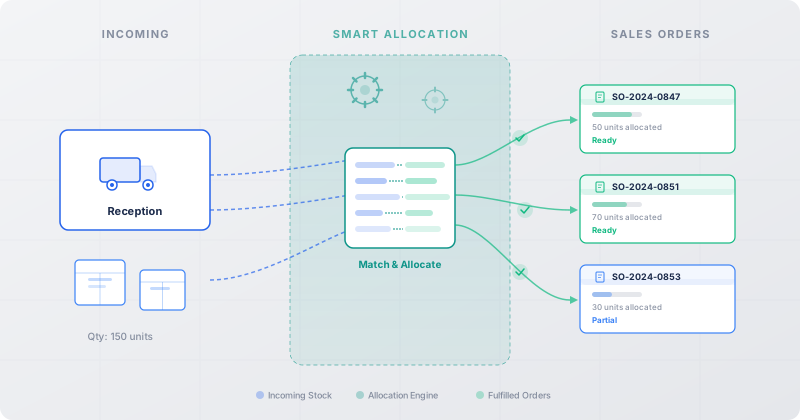
Odoo 19 has a new feature that changes this dynamic entirely. The Reception Report, built into the Inventory module, gives warehouse staff a clear view of which pending sales orders are waiting for incoming stock — and lets them allocate that stock to specific delivery orders before the goods are even formally received. It’s a deceptively simple concept that solves a workflow problem that has frustrated warehouse managers for years.
The Black Hole Between Purchasing and Sales Fulfillment
To understand why this matters, you need to appreciate the gap that has traditionally existed between the purchasing side and the sales side of warehouse operations. In most ERP systems — and in previous versions of Odoo — these two workflows operate in parallel but rarely communicate in real time at the operational level. Purchasing creates purchase orders. Vendors ship goods. The warehouse receives them into stock. Separately, the sales team creates sales orders that generate delivery orders. The warehouse picks from available stock to fulfill those deliveries.
The problem is that “available stock” is a blunt instrument. When a shipment arrives, the system knows the goods are there, but it doesn’t surface the connection between what just arrived and what’s been waiting for it. A warehouse worker receiving goods from Vendor A has no easy way to know that three pallets of that exact SKU are needed to fulfill a high-priority order for Customer X, and that Customer Y’s less urgent order can wait. Everything goes into the same pool, and the allocation engine processes deliveries in whatever order the system decides.
How the Reception Report Works
The Reception Report is enabled through the Inventory module’s settings — a single toggle that activates the feature across your warehouse operations. Once turned on, the system starts tracking the relationship between incoming purchase order shipments and pending delivery orders that are waiting for those same products.
When a purchase order shipment arrives, warehouse staff can pull up the reception report to see an allocation page that lists every pending sales order delivery that needs stock from this particular shipment. The interface shows the incoming quantities alongside the demand from each waiting delivery order, making it immediately clear how supply maps to demand. If ten units of Product A just arrived and there are three delivery orders waiting for a combined total of fifteen units, the warehouse team can see that at a glance and make informed decisions about who gets what.
The allocation itself is manual and intentional — exactly how it should be. Staff can drag quantities to specific delivery orders, prioritizing the customers or situations that matter most. That urgent order for Customer X? Allocate the full quantity there first. The less time-sensitive order for Customer Y? It can wait for the next shipment. This gives warehouse managers the kind of operational control that automated first-in-first-out allocation systems systematically deny them.
Priority Fulfillment: When Not All Orders Are Created Equal
The real power of the reception report becomes apparent in scenarios where supply is constrained. Consider a common situation: you’ve placed purchase orders with two vendors for the same product. Vendor A’s shipment arrives on time, but Vendor B’s is delayed by a week. You have enough stock from Vendor A to fulfill some of your pending sales orders, but not all of them. Without the reception report, those goods go into general stock and the system allocates them based on whatever logic the default reservation engine uses — typically order date or delivery deadline, with no regard for customer importance, margin, or strategic priority.
With the reception report, the warehouse team can look at the full picture and make a judgment call. Maybe the highest-margin order gets fulfilled first. Maybe the customer who’s been waiting the longest takes priority. Maybe there’s a contractual obligation that overrides everything else. The point is that a human with context is making the decision, not an algorithm running on order sequence numbers.
This is particularly valuable for businesses that deal with seasonal inventory, limited-run products, or any situation where demand routinely outstrips supply for certain items. In those environments, allocation decisions directly impact customer relationships and revenue, and leaving them to an automated queue is a calculated risk that many warehouse managers would prefer not to take.
After Allocation: Validation, Labels, and Getting Goods Out the Door
The reception report doesn’t stop at allocation. Once warehouse staff have matched incoming quantities to specific delivery orders, the system flows naturally into the next steps. Receipts can be validated to formally bring the goods into inventory, and the corresponding delivery orders can be validated to move them toward shipment. The workflow is streamlined enough that goods can effectively skip the “sit on the shelf” stage entirely — they go from the receiving dock to the shipping staging area with a clear purpose already assigned.
Labels can also be printed directly from the allocation screen for the items that have been matched to specific deliveries. This is a small detail that makes a big difference on the warehouse floor. When a receiving team member scans in a shipment, allocates portions to three different delivery orders, and immediately prints labels for each allocation, those goods can be routed to the correct staging lanes without ever going to general storage. It’s cross-docking logic made accessible through a simple interface, without requiring a dedicated cross-dock setup or complex warehouse routing rules.
What This Replaces: The Spreadsheet and the Shouting
Talk to warehouse managers about how they handled this workflow before, and you’ll hear variations of the same story. Someone from the sales team sends a message — usually via chat, email, or just walking over to the warehouse — asking whether a particular purchase order has arrived yet. The warehouse team checks. If it has, they try to manually push those goods toward the right delivery order, often by adjusting reservations by hand or simply moving the product physically and hoping the system catches up.
In more organized operations, there’s a spreadsheet. Someone maintains a list of “hot” orders and checks incoming shipments against it. When there’s a match, they intervene in the standard workflow to make sure those goods get where they need to go. It works, sort of, but it’s fragile, labor-intensive, and completely dependent on one person remembering to update the spreadsheet.
The reception report replaces all of that with a structured workflow that lives inside the system where the purchase orders and sales orders already exist. There’s no external tracking required, no manual cross-referencing, and no risk that a priority order slips through the cracks because someone forgot to check the spreadsheet on a busy afternoon.
The Bigger Picture: Inventory as an Active Routing Layer
What makes this feature interesting beyond its immediate utility is what it says about Odoo’s evolving approach to inventory management. Traditional ERP inventory modules are passive — they track what’s in stock, where it is, and how much is reserved. The reception report turns the inventory module into something more active: a routing layer that connects supply to demand at the moment goods enter the building, rather than after they’ve been shelved and processed through standard reservation logic.
This aligns with a broader trend in warehouse management toward what practitioners call “demand-driven receiving.” Instead of treating receiving as a purely inbound function and fulfillment as a purely outbound one, the two are connected in real time. The warehouse becomes less of a storage facility and more of a throughput engine, with goods spending less time at rest and more time in motion toward customers.
For businesses running on Odoo, the practical benefit is immediate. Enable the feature in Inventory settings, train your receiving team on the allocation interface, and you’ve closed a workflow gap that previously required either manual intervention, custom development, or an expensive third-party WMS overlay. It’s the kind of feature that won’t make headlines the way AI integrations do, but it will make a tangible difference in the daily operations of every warehouse that turns it on.