
Subcontracting in manufacturing has always involved a certain amount of configuration overhead. You set up the product, define the Bill of Materials, assign a subcontractor — and then, for every single component, you had to go in and manually configure the inventory route. Miss one, and the whole workflow breaks silently. The resupply doesn’t trigger. The components sit in your warehouse instead of shipping to the assembler. And you spend an afternoon figuring out why.
Odoo 19 has quietly fixed this. The Bill of Materials now handles component routing automatically for resupply subcontracting, and the dropship-to-subcontractor path has been trimmed to a single checkbox per component instead of a multi-step route assignment. It’s the kind of change that doesn’t make headlines but saves real time for anyone running outsourced production.
Resupply Subcontracting No Longer Requires Per-Component Route Setup
The resupply workflow is the more common of the two subcontracting patterns. A company ships its own components to a third-party assembler, who manufactures the product and sends the finished goods back. In previous versions, configuring this required two distinct steps: first, setting up a subcontracting-type Bill of Materials with the subcontractor and all components listed; second, going into each individual component and enabling the “Resupply Subcontractor on Order” route on its Inventory tab.
That second step is gone. In Odoo 19, creating a subcontracting Bill of Materials automatically configures the component routing. The system understands that if a component is listed on a subcontracting BoM, it needs to be sent to the subcontractor when a purchase order is confirmed. No manual route toggle required.
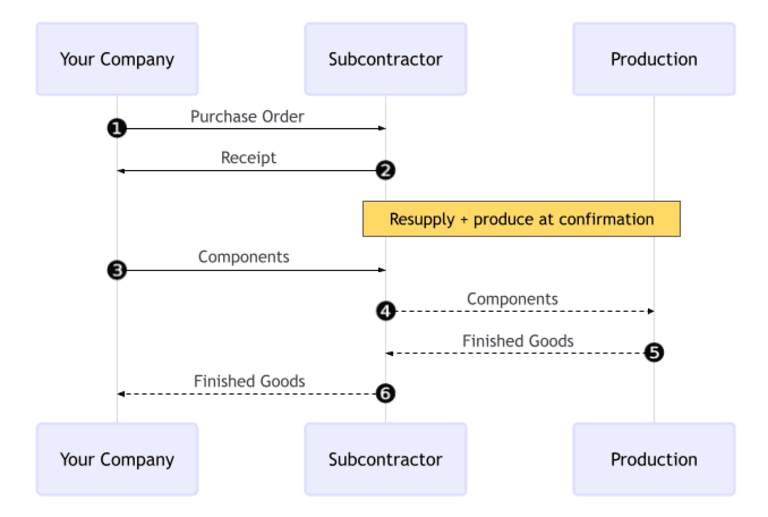
The workflow itself remains the same: create a purchase order for the finished product, confirm it, validate the resupply transfer to send components out, then receive the finished goods when the subcontractor ships them back. What’s different is that the setup is now two steps instead of three — or, more accurately, two steps instead of three-plus-N, where N was the number of components you had to individually configure.
For products with a handful of components, this was a minor inconvenience. For complex assemblies with dozens of parts, it was a genuine source of errors. One missed route meant one component that didn’t ship, which meant a subcontractor waiting on materials, which meant a delayed delivery. The kind of cascading failure that software should prevent, not enable.
Dropship-to-Subcontractor Gets a Cleaner Path
The second subcontracting pattern — dropshipping components directly from a vendor to the subcontractor, bypassing the company’s warehouse entirely — has also been streamlined. The changes here are smaller but meaningful.
Previously, each component needed the “Dropship Subcontractor on Order” route enabled. That’s been simplified. Components now just need the standard “Dropship” route selected on their Inventory tab. One checkbox, clearly labeled, no ambiguity about which of the several routing options applies.
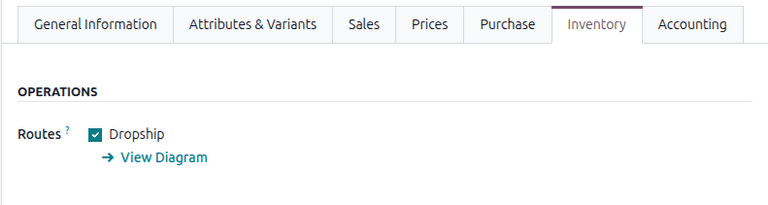
There is one new prerequisite: the Dropshipping feature itself must be enabled in system settings before this workflow becomes available. This lives under the Logistics section in either the Inventory or Purchase app settings. It’s a one-time toggle, but it’s worth knowing about because the route option won’t appear on components until it’s turned on.
The dropship workflow still follows the same six-step sequence: create a purchase order for the subcontractor, confirm it, confirm the vendor request for quotation, validate the dropship delivery to the subcontractor, wait for manufacturing, then receive the finished product. Each step generates the right documents automatically. What’s changed is that getting to step one requires less configuration than it used to.
Inventory Tracking Stays Transparent
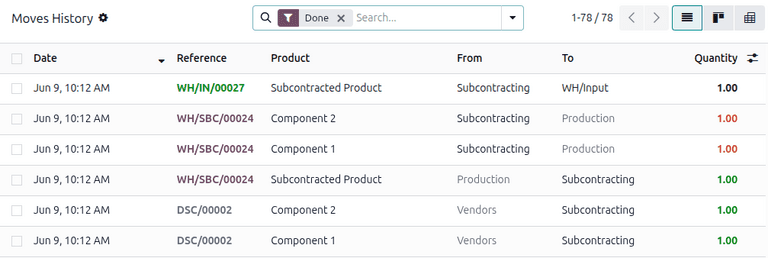
Both workflows still generate complete inventory move histories. Components flow through dedicated locations — a Subcontracting location where parts arrive, and a Production location where they’re consumed and transformed into finished goods. The finished product then moves back through Subcontracting before entering the company’s stock when the receipt is validated.
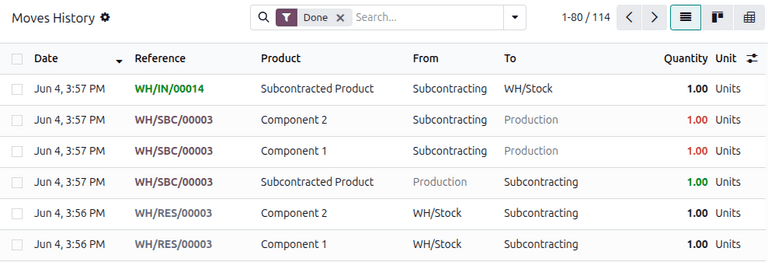
This means the full chain of custody is preserved even though the setup is simpler. Every transfer is logged, every location change is recorded, and the Moves History report under Inventory shows exactly where each component and finished product went at every stage. Less configuration upfront, same auditability on the back end.
Terminology Gets Standardized Too
A smaller but welcome change: Odoo 19 standardizes the language across all subcontracting workflows. The system now consistently uses “company” to refer to the internal organization and “subcontractor” for the external vendor handling production. Previous versions mixed terms like “contractor,” “contracting company,” and “company” interchangeably, which made it harder than necessary to follow the flow of materials and responsibilities.
Field labels have been updated too. “Price” is now “Unit Price” and “Delivery Lead Time” is now simply “Lead Time” — reflecting what the fields actually represent in a subcontracting context, where lead time covers the full cycle from component receipt to finished goods delivery, not just shipping duration.
Why This Matters for Growing Manufacturers
Subcontracting is how small and mid-size manufacturers scale without building new production lines. You design the product, source the components, and let a specialized assembler handle production. The economics make sense. The logistics are the hard part — and the software is supposed to make the logistics easier, not add its own layer of configuration complexity on top.
By making Bill of Materials the single source of truth for component routing, Odoo 19 removes the most common failure point in subcontracting setup. If a component is on the BoM, it routes correctly. If you add a new component to the BoM later, it routes correctly too. No secondary configuration step to remember, no per-component route toggles to audit when something goes wrong.
For the dropship variant, the simplification is smaller but follows the same principle: reduce the number of places where a user can make a configuration mistake. One checkbox instead of a multi-option route selector. One prerequisite feature toggle instead of an implicit dependency. The workflow is the same; the friction getting there is lower.
These aren’t the kind of changes that drive upgrade decisions on their own. But they’re the kind that make existing users measurably faster at setting up new products, and that prevent the quiet failures — the missing resupply, the unshipped component, the confused subcontractor — that cost time disproportionate to their cause.