There’s a persistent gap in most manufacturing software between the people who design products and the people who build them. Engineers draft bills of materials in quiet offices. Operators on the production floor discover problems — a part that doesn’t fit quite right, a step that wastes fifteen minutes per unit, a component that keeps arriving damaged. Historically, closing that loop meant walking across the building, writing something on a whiteboard, or sending an email that sits unread for a week.
Odoo has addressed this with a direct connection between its Shop Floor module and its PLM (Product Lifecycle Management) system. Operators can now propose engineering changes — modifications to assembly steps, component substitutions, process improvements — directly from the work order they’re currently executing. No context switching, no separate ticketing system, no delay.
How It Works on the Floor
The interaction is deliberately simple, designed for someone wearing gloves and standing at a workstation. While working through a manufacturing order in the Shop Floor interface, an operator opens the options menu on their current work order card and selects “Update Instructions.” From there, they choose what kind of change they’re suggesting:
- Add or modify a step— they can propose inserting a new assembly step, like adding a quality check after a particular operation, or modifying the instructions on an existing one.
- Delete a step— if a step has become redundant or is causing problems, they can flag it for removal.
- Update instructions— they can refine the written guidance attached to any existing step.
The operator fills in a brief form describing their proposed change and hits “Propose Change.” Behind the scenes, this creates a formal engineering change order in the PLM app, complete with the product reference, the affected bill of materials, and the operator’s description. The manufacturing order continues uninterrupted.
From Suggestion to Controlled Revision
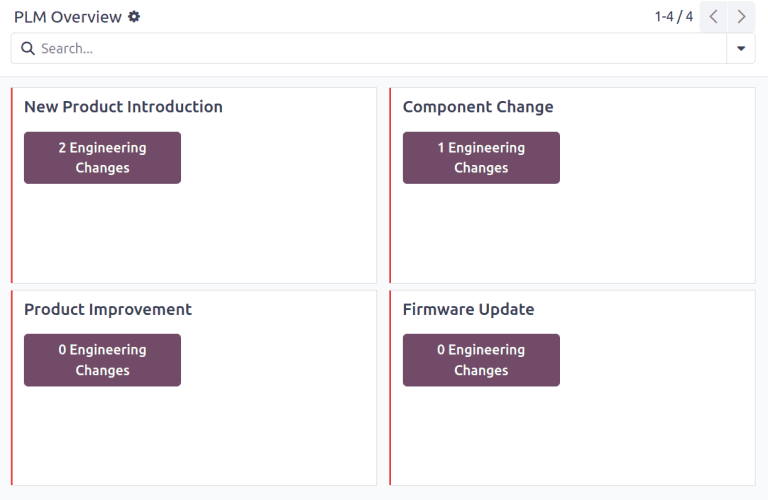
What makes this more than a glorified suggestion box is where those proposals land. Each engineering change order enters the PLM module’s stage-based review pipeline. ECO types — categories like “BOM Updates,” “New Product Introduction,” or “Process Improvement” — determine which review stages the proposal passes through before it can be applied.
Engineers review the proposed change, make adjustments if needed, and advance it through the approval stages. When an authorized reviewer approves the final stage, the revised bill of materials replaces the production version. The version history tracks every iteration, so rolling back is always possible.
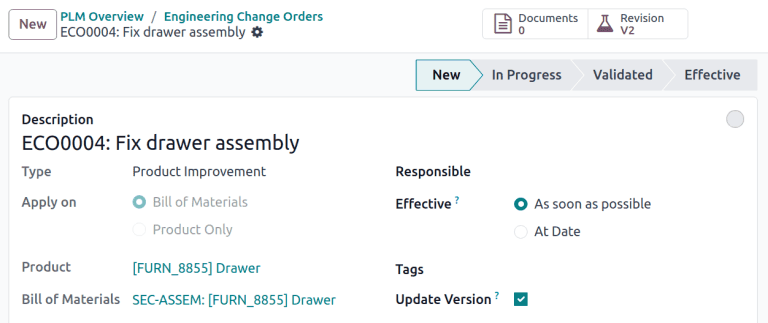
The system also introduces an “Update Version” checkbox on the ECO form, giving teams explicit control over whether a change bumps the BOM or product version number. Minor corrections might not warrant a new version; a fundamental redesign obviously does. That distinction matters when tracking which version of a product a particular manufacturing order produced.
Why This Changes the Improvement Loop
The traditional engineering change process in manufacturing tends to be top-down: engineers design, operators execute. Feedback flows uphill slowly, if at all. The people with the most hands-on knowledge of what’s actually happening during production — which steps are awkward, which components cause rework, which sequences could be reordered — often have the least direct input into the design process.
By embedding the change proposal mechanism directly into the production interface, Odoo removes the friction that kills most continuous improvement initiatives. An operator who notices a problem at 2 PM can propose a fix at 2:01 PM, from the same screen they’re already using. The context is fresh, the details are specific, and the proposal lands in a formal review system rather than a forgotten sticky note.
This also creates an auditable trail of improvement ideas originating from the floor. Managers can see which work centers generate the most change requests, which types of changes are most common, and how quickly proposals move through review. It turns anecdotal “the floor team thinks we should change this” conversations into structured, trackable engineering workflows.
The Broader ECO Overhaul
The Shop Floor integration is part of a larger refresh to how Odoo handles engineering change orders. The ECO form itself has been streamlined — field labels are clearer, the “Effective Date” field replaces the old “Effective” dropdown with a proper date-time picker, and the “Review Changes” button now appears immediately after starting a revision rather than requiring navigation to a separate view.
The revision workflow has also been tightened. Starting a revision now triggers four actions instead of three: the documents smart button appears, a BOM copy is versioned, the review changes button becomes available, and the ECO stages display at the top of the form. It’s a small change in terms of code, but it puts the most-used action — reviewing what actually changed — one click away instead of buried in the form.
For manufacturing companies running Odoo’s PLM alongside their production system, the message is clear: the wall between design and production just got thinner. And the people best positioned to make products better — the ones who build them every day — now have a direct line into the engineering process.