Payroll runs have a dirty secret: the numbers are only as good as the attendance and time-off data feeding them. An employee forgets to clock in on a Tuesday. Another takes a half-day but never submits the time-off request. A third has a pending leave approval sitting in a manager’s inbox that never got actioned. None of these are malicious — they are the kind of mundane friction that accumulates across any team larger than a handful of people — but each one represents hours that don’t add up when payroll closes.
Odoo’s Attendances module now has a report built specifically to catch these gaps before they become payroll errors. The Time Off Ledger is a rolling two-month view that compares three numbers for every employee on every workday: how many hours they were expected to work, how many they actually logged, and how much approved time off covers the rest. When the math does not balance, the discrepancy shows up on the report.
What the Report Shows
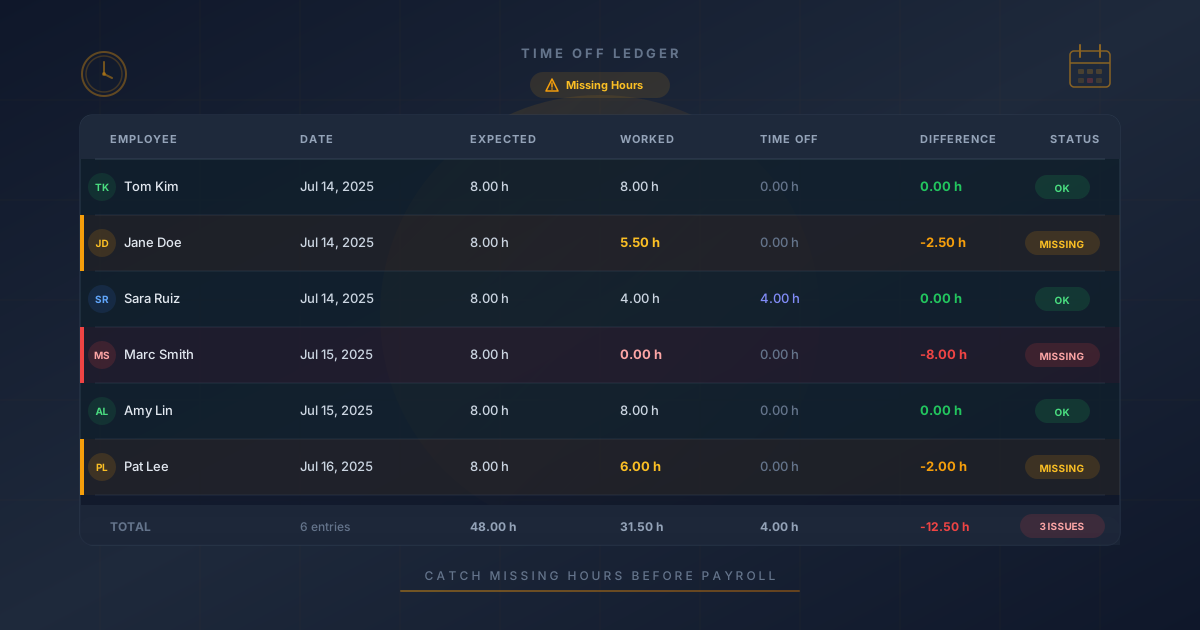
The Time Off Ledger organizes data hierarchically, grouped first by month and then by employee. Each row represents a single workday and displays five columns: the employee name, the date, the expected hours from their work schedule, the hours actually worked according to attendance records, and the hours covered by approved time off. A sixth column — the difference — shows the gap between what was expected and what was accounted for.
A difference of zero means the day is fully reconciled: the employee either worked their full schedule, took approved time off for the full schedule, or some combination of both that adds up. A positive difference means hours are missing — time that was neither worked nor covered by approved leave. That is the signal managers are looking for.
Four Scenarios, Four Fixes
The report does not just surface problems — it categorizes them into actionable buckets. Odoo identifies four common scenarios that cause missing hours, each with a different resolution path.
Forgot to log attendance. The employee was physically present and working but never checked in through the attendance system. The fix is to create a manual attendance record for the missing day, which a manager can do directly from the Attendances module.
Forgot to request time off.The employee was absent but never submitted a leave request. Managers can now create a time-off request retroactively on behalf of the employee, filling in the missing day so the ledger balances. This is a new workflow addition — previously, retroactive time-off requests required the employee to initiate them.
Time off request sitting unapproved. The employee submitted a leave request, but it was never approved. The hours show as missing because only approved time off counts in the ledger calculation. The fix is to find and approve the pending request.
Partial day not fully covered.The employee took a half-day of time off but did not log attendance for the other half. This creates a partial gap — four hours covered by leave, four hours unaccounted for. The fix is to either create an attendance record for the worked portion or extend the time-off request to cover the full day.
Why Two Months
The report’s fixed two-month lookback window is a deliberate design choice. It is long enough to catch discrepancies that span across pay periods — an unapproved leave request from three weeks ago, a forgotten check-in from last month — without drowning managers in historical data they cannot act on. Most payroll corrections become impractical or impossible after a couple of pay cycles, so the report focuses on the window where intervention still makes sense.
The hierarchical grouping by month and employee also means managers can scan quickly. Instead of reading every row, they can collapse months that have already been reconciled and focus on the current period. Employees with no discrepancies do not clutter the view — if every day adds up, the employee simply does not appear in the report.
The Bigger Picture
This report sits at the intersection of three Odoo modules — Attendances, Time Off, and Payroll — and it works because all three share the same underlying employee and calendar data. The expected hours come from the employee’s work schedule, the worked hours come from attendance records, and the time-off hours come from approved leave requests. The ledger is essentially a join across these three data sources, surfacing the rows where they disagree.
For companies running payroll through Odoo, this closes a gap that previously required either manual cross-referencing or after-the-fact corrections when employees flagged errors on their pay stubs. The Time Off Ledger makes that reconciliation proactive rather than reactive, and it puts it in the hands of the people who can actually fix it — managers with the authority to create attendance records, approve leave requests, and adjust schedules.