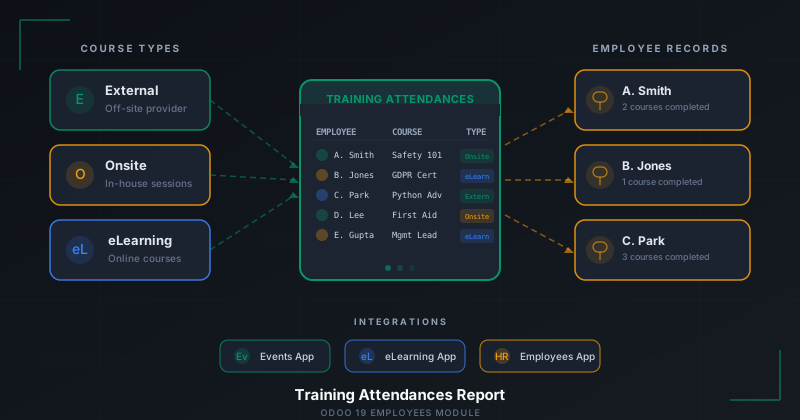
If you’ve ever tried to answer the question “which employees have completed their mandatory safety training?” inside a traditional ERP, you already know the pain. The data lives in three different places, none of them talk to each other, and the only reliable answer comes from a spreadsheet that someone in HR updates by hand every Friday. Odoo 19 takes a direct swing at that problem with a brand-new feature in the Employees app: the Training Attendances report.
I spent a few days putting the feature through its paces, and the short version is this — it works exactly the way you wish every training tracker worked. One screen, every employee, every course, every completion status. No digging through individual profiles. No exporting CSVs into a pivot table. Just a clean, filterable report that HR teams can open and immediately understand.
What the Training Attendances Report Actually Shows
The report lives under the Employees app’s reporting menu, which is a smart placement decision. It means HR managers don’t need to jump between the eLearning module, the Events module, and the employee directory to piece together who has done what. Everything is surfaced in a single list view.
Each row in the report represents a training record. You get the employee’s name, the course title, the type of training, and the relevant details about when and how it was completed. The course type field is particularly useful because it distinguishes between three categories: External training delivered by an outside provider, Onsite sessions run in-house, and eLearning courses taken through Odoo’s own online learning platform.
That three-way split matters more than it might seem at first glance. Compliance auditors routinely ask for breakdowns by delivery method — regulatory bodies want to know whether an employee sat through an in-person first aid course or clicked through a twenty-minute online module. Having the course type baked into the report means HR can filter by type and generate exactly the view an auditor needs in a few seconds.
Two Ways to Add Training Records
One of the things that impressed me most about this feature is the flexibility in how training data gets into the system. There are two distinct paths, and each one makes sense for a different workflow.
The first is the approach you’d expect: open an individual employee’s record and add a training entry directly to their profile. This is the natural flow for situations where a manager just sent an employee to a conference or a certification course and wants to log it right away. You fill in the course name, select the type, add the relevant dates and details, and save. The record immediately shows up in the centralized report.
The second path is more interesting. You can add training records directly from the report view itself. This is designed for the HR administrator who is doing bulk data entry — maybe processing a stack of completion certificates from a company-wide safety training day, or entering records for a group of new hires who all went through the same onboarding course. Instead of opening each employee’s profile one by one, you stay in the report and add entries in sequence. It’s a small workflow optimization, but for organizations with hundreds of employees, it saves real time.
The Training Entry Form
When you create a new training record — whether from an employee’s profile or from the report — you get a clean entry form that captures all the relevant information. The form includes the course name, the course type selector with the three options (External, Onsite, eLearning), and fields for associating the record with the right employee.
What’s nice is that the form doesn’t try to do too much. There’s no bloated wizard with fifteen optional fields that nobody ever fills in. It’s focused on the data that actually matters for reporting and compliance: who took the training, what was it, and how was it delivered. If you need to track more granular details — like certification numbers or expiration dates — the underlying record structure supports it, but the form doesn’t overwhelm you with fields you don’t need for basic tracking.
Integration with Events and eLearning
The Training Attendances report doesn’t exist in isolation. It’s wired into two other Odoo apps — Events and eLearning — which means it can pull training data from multiple sources automatically.
If your organization runs onsite training sessions and tracks them through Odoo’s Events app, attendance records from those events can feed into the Training Attendances report. Similarly, if you’re using Odoo’s eLearning module for online courses, completion data flows into the same report. This cross-app integration is where the feature starts to feel like more than just a list view — it becomes a genuine compliance hub.
Consider the scenario: your company requires all employees to complete an annual data protection course online and a biannual fire safety drill in person. The eLearning app tracks who finished the data protection module. The Events app tracks who attended the fire safety session. The Training Attendances report pulls both into a single view, so an HR manager can see at a glance which employees are current on both requirements and which ones need a reminder.
Why This Matters for Compliance
Training compliance is one of those areas where most ERP systems technically have the data but make it absurdly difficult to access. The information is scattered across modules, buried in individual records, and usually requires a custom report or a BI tool to consolidate. Odoo’s approach with the Training Attendances report is refreshingly direct: put everything in one place and make it filterable.
For industries with strict training requirements — manufacturing, healthcare, finance, construction — this kind of centralized view is not a nice-to-have. It’s the difference between passing an audit with confidence and scrambling to produce documentation at the last minute. When an auditor asks for proof that all warehouse staff completed forklift safety certification, the answer should take seconds, not days.
The report also helps with proactive compliance management. Because all training records are visible in one place, HR teams can spot gaps before they become problems. If a new hire has been onboarded but hasn’t been enrolled in mandatory training, that gap is visible in the report. If an entire department is missing a required certification, the report makes it obvious.
The Practical Experience
After working with the Training Attendances report for several days, what stands out most is how well it fits into the daily workflow of an HR team. It’s not a feature that requires training to use — which is somewhat ironic given the subject matter. You open the report, you see the data, you filter or search as needed, and you add new records when they come in.
The dual-path entry system (from employee profiles and from the report itself) means that different team members can use the system in whatever way fits their role. A department manager logging a single training session can do it from the employee’s profile without ever touching the report. An HR administrator processing training records in bulk can work entirely from the report view. Both workflows end up in the same place.
The course type classification — External, Onsite, and eLearning — is simple but effective. It covers the vast majority of training delivery methods that organizations actually use, and it’s granular enough to satisfy most compliance reporting requirements. Some organizations with highly specialized training programs might wish for additional custom types, but for the standard use case, three categories are the right call.
Where It Fits in the Bigger Picture
The Training Attendances report is part of a broader trend in Odoo’s HR module toward giving organizations better visibility into workforce development. Rather than treating training as an afterthought — something that gets logged once and forgotten — this feature makes it a first-class data point in the employee lifecycle.
It also reflects a practical understanding of how HR teams actually work. The people responsible for training compliance are rarely the ones administering the eLearning platform or organizing events. They need a reporting layer that sits above those operational tools and gives them a consolidated view. That’s exactly what the Training Attendances report provides.
For organizations evaluating Odoo 19 for their HR needs, this feature is worth paying attention to. It’s not the flashiest addition to the platform, but it solves a real, persistent problem that affects every company with more than a handful of employees. And it does so without requiring custom development, third-party integrations, or a dedicated BI tool. The data is there, the report is there, and it works the way you’d expect it to. In enterprise software, that’s worth more than it sounds.