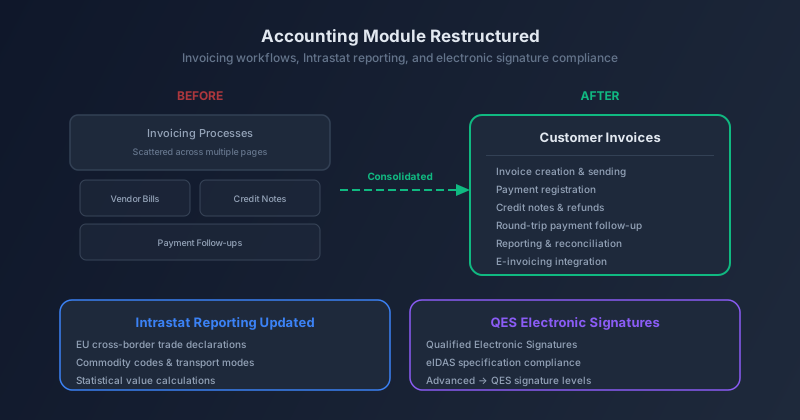
Invoicing Gets a Single Address
Odoo’s accounting documentation had a problem that’s common in long-lived software: information about how invoicing works was scattered across multiple pages. If you wanted to understand the full invoice lifecycle — from creation through sending, payment registration, credit notes, and reconciliation — you were bouncing between an overview page, a customer invoices page, and various localization-specific sections that each repeated some of the basics differently.
That structure has been collapsed. The overview page is gone, and its content has been consolidated into a single, expanded Customer Invoices page that covers the complete round-trip. The new page includes a fresh “Invoice from orders” section that documents the five pathways an invoice can originate from: Sales orders, Contracts, Subscriptions, eCommerce transactions, and Point of Sale sessions. What was previously called “Invoice creation” is now “Manual invoice creation” — a small rename that makes a meaningful distinction, since most invoices in a modern Odoo deployment are triggered by other documents rather than created from scratch.
The default journal for draft invoices has also shifted from the Customer Invoices journal to the Sales journal, reflecting how most organizations actually use the accounting module when invoices are generated from sales workflows rather than created manually.
Material Symbols Replace Font Awesome Across the Board
In what might be the most visually noticeable change to land this cycle, Odoo has completed its migration from Font Awesome to Google’s Material Symbols icon system. This isn’t a simple font swap. The migration involved over 4,000 lines of changes, including new font subset files (WOFF and WOFF2), new SCSS stylesheets, and compatibility mapping layers that translate legacy Font Awesome and Odoo Icon class names to their Material Symbols equivalents.
The implementation is thoughtful about backwards compatibility. Two mapping files — one for Font Awesome icons and one for Odoo Icons — ensure that existing themes and custom modules referencing old icon classes continue to render correctly. An RTL icon configuration handles bidirectional icon mirroring for right-to-left languages. And a new icon search tool in the developer documentation lets you browse the available subset, making it easier to find the right icon when building custom views or themes.
The switch to Material Symbols is more than cosmetic. Google’s icon system provides consistent weight, fill, and optical sizing across the entire set, which means icons scale better on high-DPI screens and maintain visual harmony at different sizes. For a platform that runs on everything from warehouse tablets to executive dashboards, that consistency matters.
Electronic Signatures Now Support QES Under eIDAS
Odoo’s Sign module has quietly upgraded its compliance posture. The documentation for electronic signature validity now references Qualified Electronic Signatures — the highest tier under the EU’s eIDAS regulation. What was previously described as a “simple” signature has been reclassified as “advanced,” based on the actual eIDAS specification, and the new QES tier is documented alongside it.
This matters for any organization operating in the European Union or doing business with EU entities. eIDAS defines three signature levels — simple, advanced, and qualified — with increasing legal weight. A qualified electronic signature carries the same legal standing as a handwritten signature in all EU member states. Previously, Odoo’s documentation didn’t make these distinctions clearly. Now it does, which means compliance teams can map their signing workflows to the correct eIDAS tier without ambiguity.
Intrastat Reporting Gets a Missing Prerequisite
A small but important clarification was added to the Intrastat reporting documentation: the Intrastat option in the accounting module only appears after the account_intrastatmodule is installed. This sounds obvious in retrospect, but for businesses setting up EU cross-border trade reporting for the first time, the missing configuration option was a common source of confusion. The documentation now includes a direct link to the module installation guide, closing the loop between “I need Intrastat” and “here’s where to turn it on.”
The Owl 3 Tutorial Gets a Ground-Up Rewrite
On the developer side, the JavaScript framework tutorial — the entry point for anyone learning to build client-side components in Odoo — has been completely rewritten for Owl 3. Since Odoo 20.0 runs on Owl 3 exclusively, the old tutorial based on Owl 2 syntax (useState, the old services API, Owl 2 template directives) was training developers to write code that wouldn’t compile.
The rewrite is based on the material from the 2026 JS masterclass, which means it reflects the actual patterns that Odoo’s own developers use in production code. The tutorial walks through component creation, reactivity, services, and building a functional dashboard with statistics and charts. Over 30 screenshots were updated to show the current interface, and the exercises now use the Owl Playground — an in-browser sandbox where developers can experiment with components without setting up a full development environment.
A companion change merges what was previously two separate tutorial pages into a single client_framework_101 page, sitting alongside server_framework_101 as the two starting points for Odoo development. The structure is cleaner, and the content flows better as one continuous learning path.
The Details That Round Out the Week
A handful of smaller changes also shipped. On-premise installation guides now mention that PDF reports need an emoji font installed on the server — without one, wkhtmltopdf renders most emoji as empty boxes. The fix suggests fonts-symbola for Debian/Ubuntu or dropping NotoEmoji-Regular.ttfinto the system fonts directory. The recruitment module documentation was refreshed with updated screenshots and a streamlined dashboard layout. And the expense card documentation now notes that iOS users cannot add expense cards to Apple Wallet — a platform limitation that was previously undocumented and likely caused confusion for iPhone users trying to digitize their corporate cards.
None of these are headline features. But collectively, they represent the kind of continuous polish that separates software documentation that people actually use from documentation that people learn to work around.