If you tried building an AI agent in Odoo 19, you remember the form. A single page with a Sources tab on one side, a fixed list of preconfigured skills you couldn’t really customize, a set of response style toggles, and a Test button that let you poke the agent before releasing it into the wild. It worked, but it was clearly a first draft — a monolithic setup screen for a feature that was growing faster than its interface could keep up with.
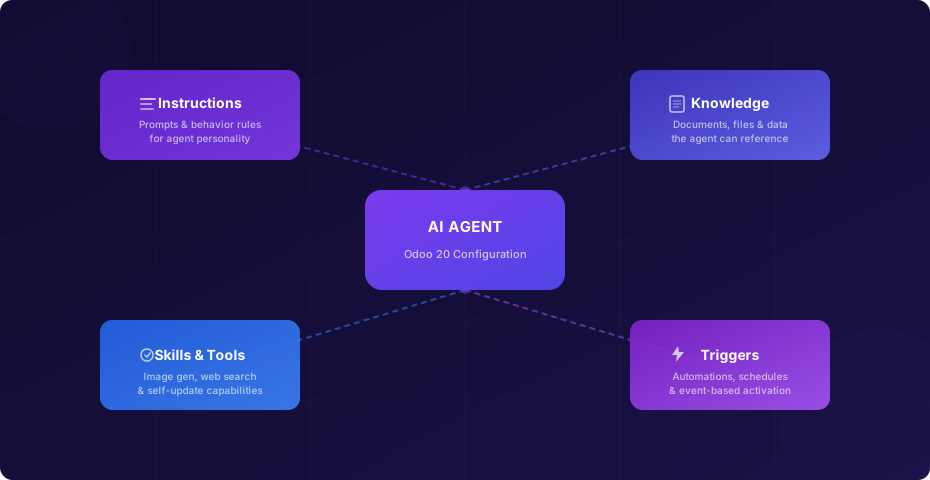
Odoo 20 tears that form apart and reassembles it around four explicit concepts: Instructions, Knowledge, Skills and Tools, and Triggers. Each one gets its own tab. Each one does exactly one job. And together, they give administrators a level of control over agent behavior that the old layout simply couldn’t express.
Instructions: Where the Agent Gets Its Personality
The first tab is Instructions, and it’s where you define what the agent actually is. In the old form, prompts were scattered across the configuration without a clear home. Now they live in a dedicated space where you write the behavioral rules the agent follows: its tone, its scope, what it should and shouldn’t do, and how it should handle edge cases.
This is more than a cosmetic reshuffle. By giving instructions their own section, Odoo is making it explicit that prompt engineering is a first-class configuration task, not an afterthought stuffed into a description field. If you’re running multiple agents — one for customer support, another for internal IT requests, a third for sales qualification — each one needs fundamentally different behavioral guardrails. The dedicated Instructions tab makes those differences visible at a glance instead of buried in a shared form layout.
The old response style toggles are gone entirely. Instead of picking from a preset menu of personality types, you write exactly what you want. It’s a trade-off: more flexibility, but also more responsibility. Administrators who relied on the presets will need to think through their agent’s behavior in plain language, which is ultimately a better outcome even if it takes more effort upfront.
Knowledge Replaces Sources — and Gains a Broader Reach
The tab formerly called Sources is now Knowledge, and the rename isn’t just semantic. In version 19, sources were files you uploaded directly to the agent — PDFs, text documents, spreadsheets — that it could reference when answering questions. The concept was straightforward but limited: you were essentially building a private document library per agent.
The new Knowledge tab connects agents to Odoo’s Documents and Knowledge applications. Instead of manually uploading files into each agent’s configuration, you can point the agent at existing knowledge bases, document workspaces, and shared repositories that your organization already maintains. The supported file formats have been updated to match what those apps handle, which means the agent inherits whatever your team is already storing without duplication.
Reprocessing — the mechanism that re-indexes knowledge sources when they change — has been rewritten as a clear, numbered step-by-step procedure. In the old setup, reprocessing was somewhat opaque: you knew it happened, but the workflow for triggering it manually wasn’t well-documented. Now it’s an explicit action with defined steps, which matters when you need to refresh an agent’s understanding after a bulk document update.
The old “Uploaded files” and “Gain insights from previewed files” sections are gone. Those were relics of the self-contained upload model. With the Knowledge integration, file management happens in the apps designed for it, and the agent simply reads from them.
Skills and Tools: Extensible Capabilities Instead of a Fixed List
This is where the most visible change lands. The old agent form included a curated list of preconfigured skills — essentially a checkbox menu of things the agent could do. It was useful for getting started but hit a ceiling quickly. You couldn’t add skills that weren’t on the list, and the descriptions were static.
Odoo 20 replaces that static list with a dynamic Skills section and introduces a separate concept called Agent Tools. The Skills section is shorter and more focused, pointing administrators to the capabilities that are relevant for their use case rather than presenting a catalog to scroll through. The anchor in the documentation has even changed from “topics” to “skills,” signaling a conceptual shift from subject-matter categories to functional abilities.
Agent Tools are the headline addition. Three ship with the initial release:
- Generate Imagelets the agent create visuals on demand — product mockups, marketing assets, placeholder imagery for presentations. It consumes IAP credits per generation.
- Web Search gives the agent the ability to look up current information online, which is critical for agents that need to answer questions about competitors, market conditions, or anything that changes faster than a static knowledge base can track.
- Self Updateis the most intriguing. It allows the agent to modify its own configuration based on what it learns during interactions. The documentation is deliberately brief on this one, but the implication is that agents can evolve their behavior over time without manual reconfiguration — a step toward genuine autonomous adaptation.
The tool architecture suggests that this list will grow. By separating tools from skills and giving them their own dedicated section, Odoo has created a natural extension point. Third-party modules and custom developments can add new tools without cluttering the skills interface.
Triggers: The Agent Learns When to Wake Up
The most strategically significant addition is the Triggers tab. Previous versions of Odoo’s AI agents were fundamentally passive: they sat in a chat panel and waited for someone to type. You could wire them into automations through server actions, but that required navigating a completely separate part of the system and connecting the dots yourself.
The new Triggers tab brings that configuration directly into the agent form. Four trigger types are available at launch, covering the main patterns for agent activation: event-based triggers that fire when something happens in the system, scheduled triggers that run on a recurring cadence, condition-based triggers that watch for specific states, and manual triggers that let users invoke the agent on demand from within a workflow.
Odoo includes a helper for choosing the right trigger type, which is a practical acknowledgment that most administrators aren’t thinking in terms of trigger taxonomies. They’re thinking “I want this agent to check overdue invoices every morning” or “I want it to respond whenever a lead is tagged as high-priority.” The helper bridges that gap between intent and implementation.
There’s also a direct link to AI server actions from within the Triggers tab, acknowledging that power users will want to go deeper than the four built-in types allow. It’s a smart layering decision: simple triggers are self-contained in the agent form, complex ones link out to the full automation engine.
The Tabbed Form: A Better Mental Model
The “Create a new agent” workflow has been rewritten to match the tabbed structure. Instead of filling out a single long form with sections that blurred into each other, you now move through tabs that correspond to the four pillars. It’s a UI change, but it’s also a conceptual one: the interface now teaches you how agents work as you set them up.
The old Test button is gone, which might surprise people who relied on it for quick sanity checks. The removal suggests that Odoo expects agents to be tested through their actual trigger mechanisms rather than a synthetic testing interface. In practice, this means you configure the agent, set up a trigger, and observe the results in the real system — a more realistic testing approach, even if it’s slightly less convenient for rapid iteration.
IAP Credits: The Meter Is Always Running
Every tool invocation, every knowledge query, every triggered run burns IAP credits. This was true before, but Odoo 20 makes it more explicit by adding a credits note directly into the agent configuration documentation. The message is clear: these agents aren’t free to operate, and the more autonomous you make them, the more credits they consume.
This is the tension at the heart of the new trigger system. An agent that runs on a schedule or fires on every incoming lead is enormously useful — but it’s also a recurring cost that scales with your business volume. Organizations adopting triggered agents will need to think about credit budgets the same way they think about compute costs or API rate limits.
For teams just getting started, the prudent approach is to begin with manual triggers and low-frequency schedules. Monitor credit consumption for a billing cycle, understand the per-action economics, and then open the throttle on event-based triggers once you have a clear picture of the cost curve.
What This Means in Practice
The four-pillar architecture isn’t just a better way to organize a settings page. It’s a statement about how Odoo thinks AI agents should be built: with explicit separation between what the agent knows, what it can do, how it behaves, and when it activates. Each dimension can evolve independently — you can expand an agent’s knowledge without touching its skills, or add a new trigger without rewriting its instructions.
For administrators managing multiple agents across departments, this separation makes governance tractable. You can audit each pillar independently: review what knowledge an agent has access to, check which tools it can use, verify its trigger conditions, and inspect its instructions — all without scrolling through a monolithic form trying to find the relevant setting.
The removal of the preconfigured skills list and response style presets will require more upfront thought from administrators, but it also removes artificial constraints. The old checkboxes were training wheels. The new interface assumes you know what you want your agent to do and gives you the controls to make it happen.
Whether this rewrite delivers on its promise depends on execution details that will only become clear with real-world usage: how reliably triggers fire under load, how quickly the Knowledge integration reflects document changes, and whether the Self Update tool is genuinely useful or just a curiosity. But the architectural foundation is sound. Odoo 20 doesn’t just give you better AI agents — it gives you a better way to think about what an AI agent is.