For the past two years, “AI in ERP” mostly meant a chatbot bolted onto the side of an application. You could ask it questions, maybe get a summary, and then go back to clicking through menus to actually do anything. Odoo 20, unveiled at Odoo Experience in Brussels last month and now generally available, takes a fundamentally different position: the AI doesn’t just answer — it acts.
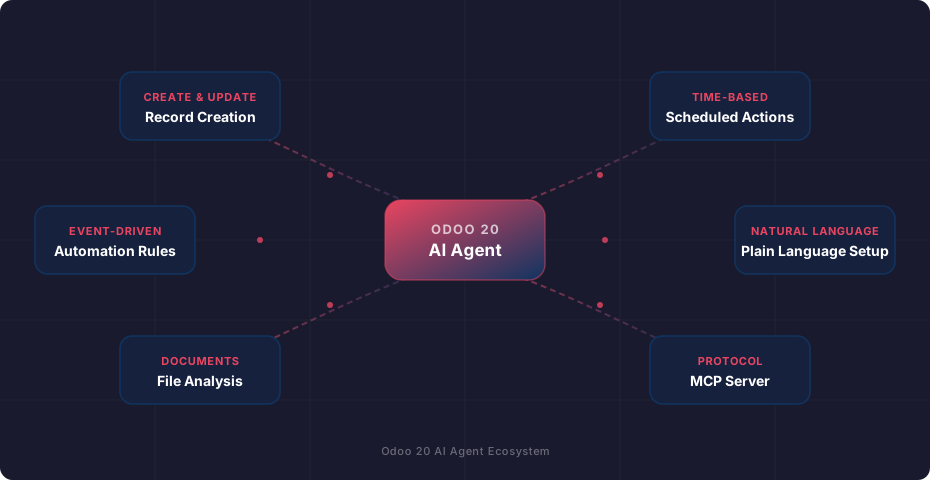
The headline feature is AI agents that operate inside the automation framework itself. They fire on event triggers, run on schedules, create and modify records, analyze documents, and generate images. A separate but related addition opens Odoo to external AI tools through the Model Context Protocol. Together, these changes turn what was a passive assistant into something closer to a junior employee with system access.
Agents That Run Without Being Asked
The most consequential change in Odoo 20’s AI stack is where agents live. In version 19, the AI was fundamentally reactive — you opened a chat panel, typed a question, and got a response. The agent couldn’t do anything unless you were sitting there prompting it.
Version 20 plugs agents directly into the automation engine. An AI agent can now be attached to any automation rule as a triggered action, which means it fires whenever the rule’s conditions are met: a new lead arrives with a deal value above a threshold, a purchase order is confirmed, an employee submits a reimbursement claim. The agent executes its task — updating fields, sending notifications, creating follow-up records — without human intervention.
Scheduled execution is the other half. Agents can be configured to run on a cron-like schedule: daily reconciliation checks, weekly inventory audits, monthly report generation. Each run produces a log that administrators can review, and if something goes wrong, the system preserves the full conversation so you can see exactly what the agent tried and where it went sideways. You can even reply to the log to correct its approach for next time.
Plain English Replaces the Configuration Maze
Odoo’s automation rules have always been powerful but intimidating. Setting up a multi-step workflow meant navigating through trigger conditions, filter domains, action types, and server action code blocks. Business users typically needed a consultant just to automate a straightforward approval chain.
The new plain-language setup inverts this. Describe what you want in conversational terms — “When a sales order over $10,000 is confirmed, notify the regional manager and create a quality check task” — and the agent translates that into the appropriate automation rule, complete with trigger conditions, action steps, and field mappings. It’s not just filling in form fields from parsed text; the agent understands the data model well enough to wire up relational fields and set appropriate defaults.
In practice, this collapses what used to be a 20-minute configuration session into a single sentence. The agent builds the automation, and you can review and tweak the result through the standard interface. It’s a genuine usability leap for the kind of operational automation that Odoo has always technically supported but that most small teams never bothered to set up.
Records, Files, Images, and Views
Beyond automation triggers, Odoo 20 agents gain a broad set of operational capabilities. They can create new records across any model in the system — contacts, invoices, tasks, manufacturing orders — and update existing ones based on contextual information. Ask the agent to “mark all overdue tasks in Project X as high priority” and it queries the relevant records, applies the change, and reports back.
Document analysis is the capability that will probably get the most daily use. Upload a PDF vendor contract, a scanned receipt, or a technical specification, and the agent can answer questions about its contents without you having to read through it. This feeds naturally into the accounting workflow, where the AI assistant can now audit bank reconciliation entries, flag anomalies, and explain why it matched a specific bank statement line to a journal entry.
Image generation and filtered view building round out the toolkit. The image generation is straightforward — product mockups, marketing visuals, placeholder imagery — while the view builder lets you ask for “a Kanban of all leads from the last quarter grouped by salesperson” and get a functioning saved filter rather than having to navigate the filter panel yourself.
The MCP Server Opens the Door to External AI
The Model Context Protocol server is the most technically interesting addition, even if most users won’t interact with it directly. MCP is an open standard that lets AI assistants connect to external tools and data sources through a structured interface. Odoo 20 ships a native MCP server on the Enterprise edition, meaning any AI tool that speaks MCP — Claude, custom-built agents, third-party orchestrators — can query your Odoo instance.
The initial release is read-only, which is the right call. Letting an external AI pull information from your ERP is useful and relatively low-risk; letting it write records introduces a category of problems that need more careful access controls. Read-only MCP gives teams the ability to build AI workflows that reference live business data — generating reports, answering customer questions with real order statuses, feeding inventory levels into planning tools — without opening the write path.
It’s a calculated bet on interoperability. Rather than trying to be the only AI layer in the stack, Odoo is positioning itself as a data source that any competent AI system can tap into. If the protocol gains broader adoption, this could become one of the more strategically important features in the release.
The Credits Question
Every AI feature in Odoo 20 runs on prepaid IAP credits, purchased separately from user licenses. This is a departure from the bundled approach that many competitors use, and it introduces real operational considerations.
On one hand, the per-usage model means you only pay for what you actually consume, which keeps costs predictable for light users. On the other, it means that a busy automation — say, an agent that processes every incoming invoice or runs reconciliation checks every hour — can burn through credits faster than expected. Teams will need to monitor consumption, especially during the initial rollout when they’re experimenting with what agents can do.
Odoo hasn’t published detailed per-action pricing yet, which makes it hard to estimate costs for specific workflows. The prudent approach is to start with low-frequency automations, track credit usage for a billing cycle, and scale up once you understand the unit economics.
The Bigger Picture
Odoo 20’s AI strategy is less about adding intelligence to individual screens and more about making the entire platform programmable through natural language. The combination of autonomous agents, plain-language configuration, and an open protocol layer creates a system where the barrier between “knowing what you want the ERP to do” and “making the ERP do it” is meaningfully lower than before.
Whether that potential translates into real operational gains depends on execution — the accuracy of the agents, the reliability of scheduled runs, and whether the credit pricing makes high-frequency automation economically viable. But the architectural direction is clear: Odoo isn’t building a smarter chatbot. It’s building a system where the AI is a first-class operator with its own login, its own task list, and its own audit trail.