Analytic accounting is one of those features that every growing business needs and almost nobody gets excited about. The concept is straightforward — tag expenses and revenues to internal cost centers so you can see where money actually goes — but the execution in most ERP systems is tedious enough that people avoid it until the CFO starts asking hard questions.
Odoo 20 quietly ships a set of changes to its analytic distribution system that make the whole thing significantly easier to set up and maintain, especially for companies that don’t follow the European-style numbered chart of accounts.
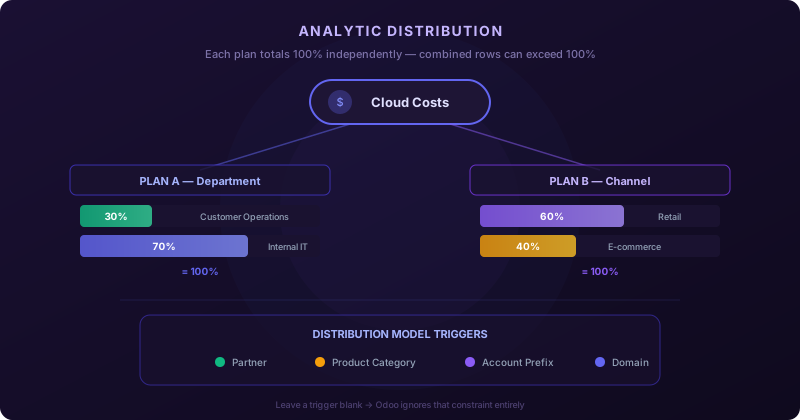
How Percentages Actually Work Now
The biggest source of confusion with Odoo’s analytic distribution has always been the percentage math. If you have two analytic plans — say, Department and Sales Channel — and you split an expense 60/40 across departments and 30/70 across channels, the combined row in the distribution widget can show numbers that add up to more than 100%. That looks wrong, and it used to trip up accountants who assumed the total across all columns had to equal 100.
Odoo 20 now makes this explicit: each plan column is evaluated independently. Department needs to total 100%. Sales Channel needs to total 100%. But the cross-product of those allocations — when you’re looking at both columns together — will naturally exceed 100%, and that’s correct behavior, not a rounding error. It’s a small documentation clarification that saves a lot of second-guessing during setup.
Distribution Models That Work Without Numbered Accounts
Here’s where things get genuinely useful for US-based and other companies that don’t use numeric prefixes in their chart of accounts. Distribution models in Odoo let you define rules that automatically split costs across analytic plans when certain conditions are met. Previously, the primary trigger was the account prefix — “any journal entry hitting an account starting with 6 gets split this way.” That works perfectly for French or Belgian accounting where expense accounts reliably start with 6, but it’s useless if your chart of accounts uses descriptive names instead of numeric codes.
Odoo 20 introduces a critical flexibility: if you leave the Accounts Prefixes field empty, Odoo simply ignores that constraint. You can trigger the distribution model entirely through the Partner field, the Product Category field, or a combination of both. An empty trigger field means “don’t filter on this criterion,” not “match nothing.”
Real-World Splitting Scenarios
To make the feature tangible, Odoo now ships with examples that mirror common US business patterns:
Retail and e-commerce overhead.A company running both physical stores and an online shop creates a distribution model triggered by the product category “Bills & Utilities.” Any invoice matching that category automatically splits 60% to the Retail analytic account and 40% to E-commerce. No account prefix needed — the product category alone drives the allocation.
Cloud infrastructure costs.A second model triggers on the vendor: any bill from Amazon Web Services gets split 30% to Customer Operations and 70% to Internal IT. The accountant doesn’t have to remember the split or manually tag each AWS invoice. The model fires automatically the moment the vendor matches.
These aren’t academic examples. They represent the kind of cost allocation that a controller at a 50-person SaaS company or a multi-location retailer actually needs, and they work out of the box without touching account codes.
Plan Applicability Gets a Domain Field
Analytic plans in Odoo can be restricted to specific account types — you might want a “Marketing Channel” plan to appear only on expense lines, not revenue. Previously, this required setting Financial Accounts Prefixes in the plan’s applicability configuration, which again assumed numeric account codes.
Now there’s a Domain field that lets you define the restriction using any criteria Odoo understands. If your expense accounts don’t share a numeric prefix, you leave Financial Accounts Prefixes blank and write a domain filter that targets the account type directly. The plan’s visibility rules work the same way; they’re just no longer bottlenecked by a single field format.
Bulk Editing Instead of Line-by-Line
The workflow for applying analytic distributions to multiple journal entries has been tightened up. Where previous versions described the feature as applying distributions “en masse,” Odoo 20 calls it what it is: bulk editing. More importantly, the shortcut for creating a new distribution model now appears in exactly two places — when you’re creating an invoice or bill, and when you’re bulk editing journal entries. The narrower scope means fewer accidental model creations from unexpected contexts.
A Note on Anglo-Saxon Migration for Odoo 20
Separately, Odoo 20 updates the migration path for companies switching from Continental to Anglo-Saxon inventory valuation. The upgrade process — which involves converting stock input and output accounts to the new system — is now fully documented for the Odoo 19 to Odoo 20 transition. Companies jumping directly from Odoo 18 to Odoo 20 can skip the manual migration entirely; the upgrade process handles the conversion automatically.
This matters for businesses that postponed their Anglo-Saxon migration during the 19 cycle. The server action and manual journal entry procedures are the same conceptually, but all the version-specific references and steps now reflect the Odoo 20 target. If you’re planning a major version jump this quarter, check which source version you’re on before scheduling the inventory valuation cutover.
Why This Matters
None of these changes are individually dramatic, but together they represent a meaningful shift in who can use Odoo’s analytic accounting effectively. The feature was always powerful but implicitly designed around European accounting conventions. With flexible triggers, domain-based plan applicability, and real examples for non-numeric charts of accounts, Odoo 20 makes analytic distribution accessible to the accounting patterns that US, UK, and other English-speaking markets actually use.
For controllers and finance teams evaluating Odoo for multi-department cost tracking, the barrier to entry just dropped considerably. The system no longer assumes you think in numbered account prefixes — it meets you where your chart of accounts already is.