Two changes landed in Odoo 20 that sit at different ends of the accounting spectrum but share a common theme: simplifying what was unnecessarily complicated. One removes two accounts that most businesses using Anglo-Saxon inventory valuation never fully understood. The other adds a field that international companies have been faking with workarounds for years. Together, they represent the kind of quiet infrastructure work that rarely makes headlines but saves hours of confusion during audits and cross-border filings.
The End of Stock Input and Output Accounts
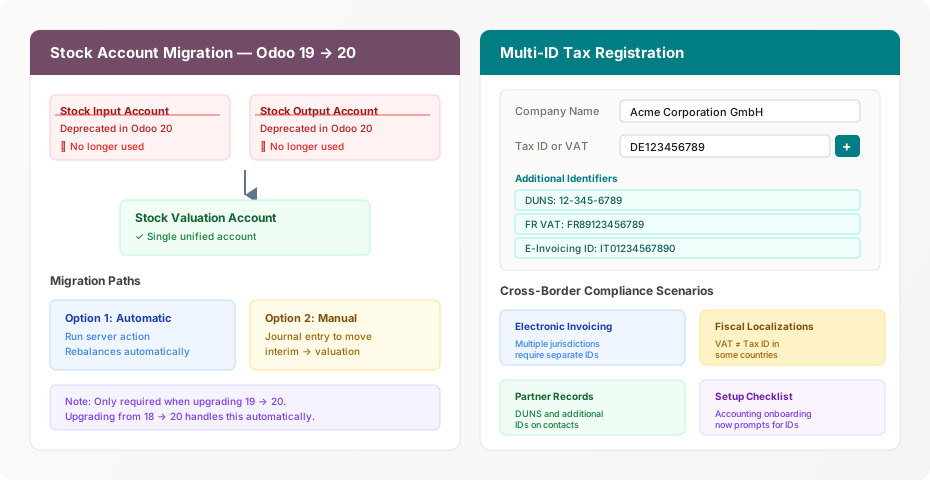
If you’ve ever configured Anglo-Saxon accounting in Odoo, you’ve encountered the stock input account and stock output account. These interim accounts sat between your purchase receipts and your vendor bills, holding the cost of goods in transit. The stock input account caught costs when goods were received but not yet billed. The stock output account did the reverse for goods shipped but not yet invoiced. In theory, both accounts should always return to zero once all documents were matched. In practice, they accumulated residual balances that confused accountants and complicated month-end closes.
Odoo 20 eliminates both. The entire Anglo-Saxon flow now runs through a single stock valuation account. The system still tracks the timing difference between goods movement and invoicing — that’s fundamental to Anglo-Saxon accounting and isn’t going anywhere — but it does so without splitting the interim state across two separate accounts that served no analytical purpose for most businesses.
Two Migration Paths, One Decision
For companies upgrading from Odoo 19, the transition requires moving any non-zero balance sitting in the old stock interim accounts into the stock valuation account. Odoo provides two ways to do this, and the choice depends on how much control your accounting team wants over the process.
The first option is a server action that automates the entire rebalancing. Run it, and the system generates the necessary journal entries to zero out the interim accounts and transfer their balances into stock valuation. For companies with clean books and straightforward inventory setups, this is the path of least resistance.
The second option is a manual journal entry. This is for accounting teams that want to inspect the balances before moving them, perhaps because they know the interim accounts contain stale entries from unmatched receipts or partially invoiced shipments. Creating the entry by hand lets you review what you’re moving and clean up any residual discrepancies in the same step.
One detail worth noting: this migration is only necessary when upgrading from version 19 to version 20. Companies jumping from Odoo 18 directly to 20 get the account consolidation handled automatically as part of the standard upgrade process. If you’re still on 18 and planning your upgrade path, skipping 19 entirely eliminates this manual step.
Why the Simplification Matters
The separate interim accounts were a faithful implementation of textbook Anglo-Saxon accounting, but they created ongoing maintenance work that the textbooks don’t mention. Every unmatched receipt or orphaned delivery left a balance in one of these accounts that had to be investigated and resolved. During audits, the auditor would flag non-zero interim balances as items requiring explanation, even when the underlying transactions were perfectly legitimate timing differences.
By routing everything through the stock valuation account, Odoo 20 doesn’t change the economics of the transactions. It changes how many accounts you have to monitor and reconcile. For a warehouse operation processing thousands of receipts per month, that’s the difference between two accounts that need constant attention and one account that tells the complete story.
Companies Can Now Register Multiple Tax Identifiers
On the compliance side, Odoo 20 addresses a problem that every international business has encountered: the single tax ID field isn’t enough. A German subsidiary trading across the EU needs a German VAT number for domestic transactions and might need separate registrations in France, Italy, or Spain for e-invoicing compliance. A US-based company selling into Europe needs a DUNS number for vendor onboarding and a VAT number for tax compliance. Until now, the workaround was either stuffing multiple numbers into the tax ID field with manual notation or creating custom fields that didn’t integrate with anything.
The tax identification field is now labeled “Tax ID or VAT” with a note explaining that some fiscal localizations may display it differently. More importantly, a plus icon next to the field opens a panel for registering additional identification types. You can add a DUNS number, a secondary VAT registration, an e-invoicing credential, or any other identifier that your jurisdiction requires.
Where the Multi-ID System Shows Up
The additional identifiers appear in three places. On company records, they let you register all the tax and business IDs that your organization holds across different jurisdictions. On contact records, they serve the same purpose for vendors and customers — particularly useful when a supplier has different tax numbers for different countries and your purchase orders need to reference the correct one.
The accounting setup checklist was also updated to include tax ID and company ID as explicit steps. Previously, the onboarding flow focused on company name, address, logo, and contact details, and tax identification was something you had to remember to configure separately. Now it’s part of the guided setup, which means new Odoo instances are less likely to go live with missing tax registration data — a mistake that typically surfaces as a rejected e-invoice three months into production.
The Electronic Invoicing Connection
The timing of this feature isn’t accidental. The European Union’s ViDA (VAT in the Digital Age) initiative is pushing member states toward mandatory electronic invoicing, and each country’s implementation requires different identification credentials. Italy uses the Codice Fiscale or Partita IVA. France uses the SIRET alongside the VAT number. Spain requires both a CIF and a VAT registration. A company operating across all three jurisdictions needs all of these numbers on file and linked to the correct transactions.
By building multi-ID support into the core company and contact records, Odoo 20 creates the infrastructure that fiscal localizations need to implement these requirements cleanly. Instead of each localization module adding its own custom field for its country’s specific identifier, they can all use the standard additional-identifier system. That means less custom code, fewer conflicts between localizations, and a consistent interface regardless of which countries you operate in.
What This Means for Upgrade Planning
If you’re running Odoo 19 with Anglo-Saxon inventory valuation, the stock account migration should be on your upgrade checklist. It’s not complex — the automated server action handles it cleanly for most companies — but it does need to happen, and your accounting team should verify the interim account balances are correct before running it. An incorrect balance that gets migrated into stock valuation is harder to identify after the fact than one sitting in a dedicated interim account.
For the multi-ID registration, there’s nothing to migrate. The feature is additive — your existing tax ID stays exactly where it is, and you can add supplementary identifiers at your own pace. But if you’re operating in multiple EU jurisdictions or preparing for mandatory e-invoicing requirements in 2027, setting up your additional identifiers during the upgrade rather than scrambling later is the obvious play.