For years, manufacturing planning in Odoo felt like it belonged to a different generation of software. You had your work centres, you had your routing, and you had a list view that told you roughly when things were supposed to happen. If you wanted to know who was actually doing the work, or whether two orders were about to collide on the same machine at the same time, you were left piecing it together from separate screens. Version 20 finally treats the shop floor like the visual, people-driven environment it is.
The headline changes — Kanban and Gantt views for work orders, scheduling by employee rather than work centre, and continuous production as a first-class option — aren’t incremental improvements bolted onto the old system. They represent a different philosophy about how manufacturing planning should work inside an ERP.
Gantt Charts That Actually Understand Your Shop Floor
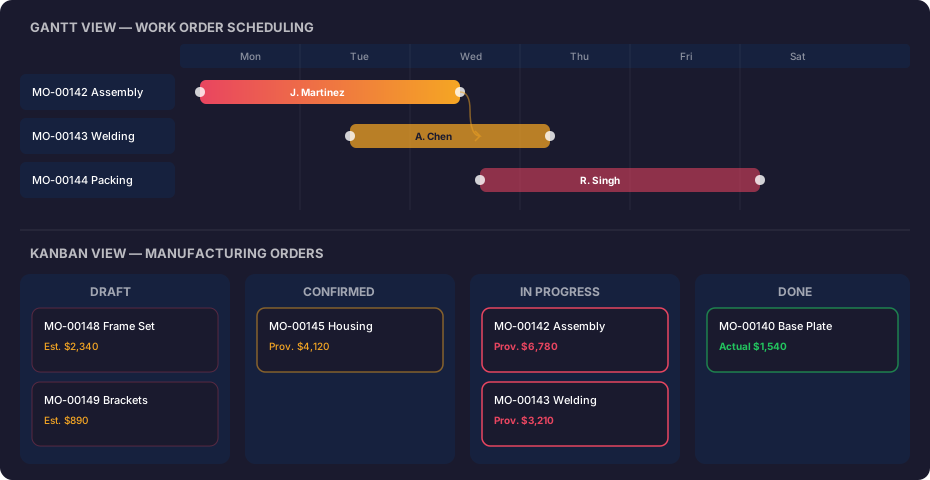
The new Gantt view for work orders does what production managers have been doing on whiteboards for decades: it lays out every operation on a timeline and makes conflicts visible at a glance. Each work order appears as a colour-coded bar, and the colours aren’t arbitrary — they’re tied to the manufacturing order they belong to, so you can instantly spot when two steps of the same product are running in parallel versus when one is blocking the other.
Drag-and-drop rescheduling is the part that matters most. Grab a bar, slide it to a different day or a different employee’s row, and the system recalculates downstream dependencies. No dialog boxes, no confirmation screens, no navigating to a separate scheduling wizard. The Gantt view also respects working hours and employee availability, so dragging an order into someone’s day off will snap it to the next available slot rather than silently overbooking them.
People Replace Machines as the Planning Axis
This is the change that will reshape how mid-size manufacturers think about capacity. Previous versions of Odoo tied scheduling to work centres — essentially, machines or stations. That works when your bottleneck is equipment, but plenty of operations are constrained by skilled labour. A CNC machine sitting idle because the only operator who can run it is already committed to a different order is a planning failure that work-centre scheduling can’t detect.
Version 20 lets you flip the axis. The Gantt chart can group by employee instead of work centre, showing each person’s workload across all operations. You can still plan by work centre when machine time is the real constraint, but the option to plan by employee means the system finally acknowledges that a factory runs on people, not just equipment. Combined with the drag-and-drop rescheduling, rebalancing a day’s work after someone calls in sick takes seconds instead of a full replanning session.
Continuous Production Becomes a Toggle, Not a Workaround
Manufacturers in process industries — chemicals, food, beverages, pharmaceuticals — have always struggled with Odoo’s discrete-manufacturing roots. Continuous production, where the line runs without fixed start and stop points for individual units, required creative workarounds involving oversized manufacturing orders and manual backflushing.
Odoo 20 adds a continuous production flag directly on the bill of materials. When enabled, the system treats the manufacturing order as an ongoing process rather than a batch. Materials are consumed continuously, and output is recorded as it flows off the line rather than in a single completion step. This pairs with weekly order planning, which lets production planners set targets for the week and let the system distribute work across available shifts without micromanaging individual orders.
Split manufacturing orders complement this by letting planners break a large MO into smaller runs when capacity or material availability doesn’t support producing everything at once. The split respects the BOM and carries forward any custom operations, so the smaller orders aren’t just quantity fragments — they’re fully independent production runs that can be tracked, costed, and completed on their own schedules.
Provisional Costing Ends the Guessing Game
Manufacturing order costing in earlier versions was essentially after-the-fact accounting. You’d complete the order, and the system would calculate what it cost based on consumed materials and logged time. While the order was running, the cost field sat empty or showed a planned figure that had nothing to do with reality.
Version 20 introduces provisional costing that updates as materials are consumed and labour is recorded. The manufacturing order displays a running cost figure that reflects actual consumption so far, clearly labelled as provisional. When the order completes, the label switches to the final actual cost. The difference sounds cosmetic, but it changes the economics of catching problems early. A production manager who can see that an order is already at 80% of its expected cost with only 60% of output completed can intervene before the order finishes over budget, rather than discovering the overrun in a monthly accounting review.
Field Service Folds Into the Planning Module
In a move that makes more sense than it initially sounds, the standalone Field Service app has been absorbed into the Planning module. Field service work — dispatching technicians to customer sites, managing their schedules, tracking completion — is fundamentally a planning problem. Keeping it in a separate app meant that companies with both manufacturing and field service operations had two different scheduling interfaces that couldn’t see each other’s commitments.
The merged module means a single view of employee capacity that spans both internal manufacturing shifts and external service calls. If your best welder is also your only on-site repair technician, the planning system now treats those as competing demands on the same resource rather than invisible conflicts in separate apps. It’s the kind of structural change that doesn’t show up in feature lists but quietly eliminates an entire category of scheduling mistakes.