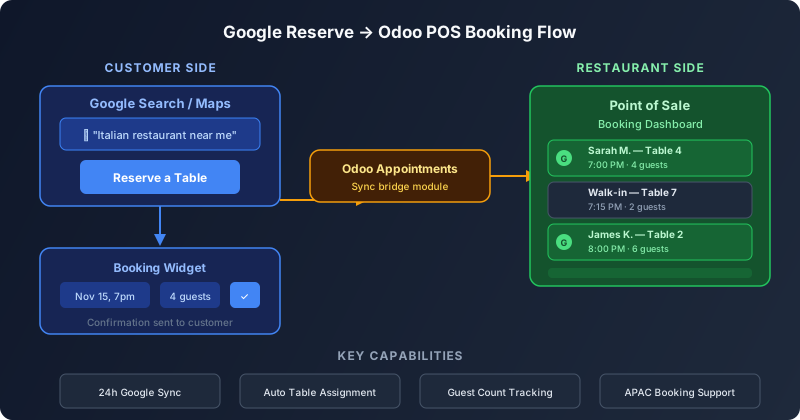
The Gap Between Where People Book and Where Restaurants Work
When someone searches “Italian restaurant near me” on Google and sees a “Reserve a Table” button, they expect the process to be instant and seamless. What they don’t see is the operational chaos on the other end: a booking lands in one system, the host station runs another, and the kitchen has no idea how many covers to expect because the reservation data lives in a silo that doesn’t talk to the point of sale. Odoo has quietly closed that gap. The restaurant Point of Sale module now integrates with Google Reserve, pulling online bookings directly into the same dashboard where staff manage walk-ins, table assignments, and seating capacity.
How the Pieces Connect
The integration works through Odoo’s Appointments module, which serves as the bridge between Google’s reservation infrastructure and the POS. When the Booking setting is enabled in Point of Sale configuration, Odoo automatically installs Appointments and exposes the Google Reserve connection. From there, setting up a Google Reserve merchant account and synchronizing it with Odoo makes the restaurant visible to Google’s reservation system. Google’s documentation warns that the initial synchronization can take up to 24 hours to propagate across Search and Maps — a one-time delay that reflects how Google caches business data rather than any limitation in Odoo’s sync mechanism.
Once connected, the flow is straightforward. A customer finds the restaurant on Google, taps the Reserve button, selects a date and time, specifies the party size, and confirms. That booking flows through Google’s infrastructure into Odoo Appointments, which routes it to the POS booking view. The reservation appears alongside manual entries and walk-ins, tagged with its origin so staff can distinguish between a Google booking and a phone reservation at a glance.
One Dashboard for Every Reservation Source
The real value isn’t the Google connection itself — third-party reservation tools have offered that for years. It’s that the booking appears in the same interface the host is already using. Restaurant staff don’t need to check a separate tablet, a different app, or a printout from yet another system. The POS booking dashboard shows every upcoming reservation regardless of how it was created: a Google Reserve booking, a call-in reservation entered manually, a website booking through Odoo’s own appointment page, or a walk-in added on the spot.
This consolidation solves a problem that most reservation tools actually make worse. Every new booking channel traditionally meant one more screen to monitor, one more source of double-bookings, and one more place where a no-show could go unnoticed. By funneling everything into the POS, Odoo makes the host station the single source of truth for table availability — which is exactly what it should have been all along.
The Merchant Setup and What It Requires
Getting Google Reserve working requires a few precise steps. The restaurant must create a Google Reserve merchant through the Appointments module, and the business address registered in Odoo must match the address on the restaurant’s Google Maps listing exactly. A mismatched address — even a minor formatting difference — can prevent Google from associating the Odoo booking system with the correct business listing, which means the Reserve button never appears on Search.
The synchronization process pulls the restaurant’s availability from Odoo and publishes it to Google, so the time slots a customer sees on Google are the actual open windows in the POS booking schedule. There’s no manual inventory of time slots to maintain on the Google side — Odoo manages availability, and Google reads it. This single-source model prevents the overbooking problem that plagues restaurants using separate reservation systems that each maintain their own capacity counts.
Why APAC Restaurants Benefit First
The documentation updates specifically reference APAC restaurant configurations, which makes sense given the region’s dining culture. Markets like Singapore, Hong Kong, Tokyo, and Sydney have some of the highest online reservation rates in the world, and Google Reserve is heavily promoted in those markets. Combined with Odoo’s recent additions of GoFood and GrabFood delivery integration for Southeast Asian restaurants, the POS module is clearly being shaped around the operational reality of APAC hospitality businesses — where a single restaurant might handle dine-in reservations from Google, delivery orders from Grab, and walk-in traffic from the street, all in the same service period.
What This Changes for Restaurant Operations
The immediate effect is operational simplification. A host who used to juggle two or three screens now works from one. The secondary effect is data consolidation: because every reservation flows through the POS, the restaurant gets accurate cover counts for kitchen prep, real no-show rates across all channels, and table utilization metrics that reflect actual seating patterns rather than just the reservations that happened to be entered into one particular system.
For restaurant groups running multiple locations on Odoo, the payoff compounds. Each location’s Google Reserve merchant is a separate configuration, but the reporting rolls up through the same Odoo instance. A regional manager can see reservation volume, source mix, and no-show rates across every location without leaving the dashboard — the kind of visibility that used to require a dedicated analytics tool bolted onto the side.