The Restaurant Floor Plan Gets a Visual Refresh
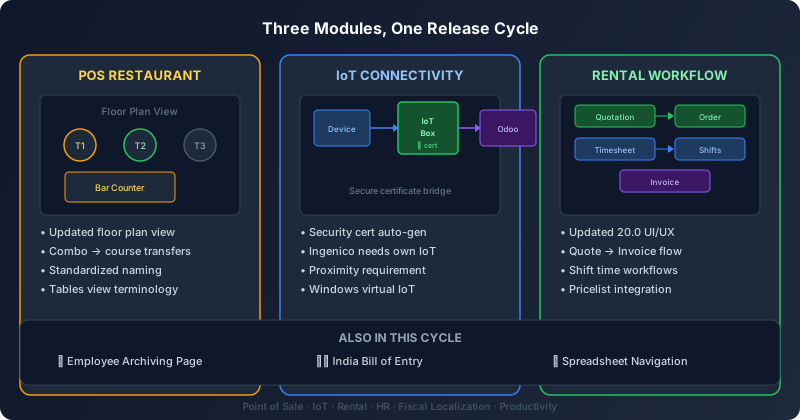
Odoo’s Point of Sale module has long been a quiet workhorse for restaurants, handling table management, kitchen orders, and split bills without much fanfare. The latest update brings a meaningful refresh to the restaurant-specific features, starting with the floor plan view that servers use to manage active tables. The interface now uses standardized terminology — “Floor plan view” and “Tables view” are now the consistent labels across all screens — which might sound trivial until you’ve watched a new server hunt for a feature that was called three different things in three different places.
More substantively, combo choices can now be transferred to courses. In a restaurant running multi-course meal service, this means a customer who orders a combo deal — say, an appetizer, main, and dessert bundle — will have each item routed to the kitchen at the appropriate time as part of the correct course, rather than arriving all at once as a single combo order. It’s the kind of operational detail that separates a POS system that technically handles restaurant orders from one that actually understands how restaurant service works.
IoT Connectivity Explained With Security Front and Center
The way Odoo connects to physical hardware — receipt printers, payment terminals, barcode scanners, kitchen displays — has always run through what it calls the IoT system. This release clarifies exactly what that system does and why it exists, with a much sharper focus on the security architecture. The IoT system is now explicitly positioned as a bridge: when Odoo cannot connect directly to a device using its IP address, the IoT box (or its Windows virtual equivalent) acts as an intermediary that establishes a secure connection by generating and managing its own security certificates.
That certificate management detail is important. It means the communication channel between your physical hardware and your Odoo instance is encrypted and authenticated at the device level, not just at the network level. Each IoT box generates its own certificate, which prevents one compromised device from giving an attacker access to the entire fleet. For businesses running Ingenico payment terminals — still one of the most widely deployed terminal brands in Europe — the documentation now makes it explicit that each terminal requires its own dedicated IoT connection, and that devices must be physically proximate to the IoT box for direct connections to work reliably.
The Windows Virtual IoT Option
Not every business wants to buy and maintain a dedicated IoT box for each POS station. Odoo has offered a Windows-based virtual IoT option for a while, but the updated documentation makes the distinction between the two deployment models much clearer. The physical IoT box is the recommended path for permanent installations where reliability and minimal maintenance are priorities. The Windows virtual IoT is positioned for scenarios where the hardware is already running Windows and adding another physical device doesn’t make sense — think pop-up retail, trade show booths, or small offices where the POS runs on the same machine as everything else.
Both options now link directly to their respective installation guides rather than to overview pages, which is a small navigational improvement that saves administrators from having to click through two or three pages just to find the setup instructions they need.
Rental Orders Rebuilt for the Version 20 Interface
Odoo’s Rental module has undergone one of its most comprehensive documentation rewrites in recent memory. The entire process of creating a rental order has been updated to match the version 20 interface, and the changes go well beyond cosmetic screenshot swaps. The workflow now covers the full lifecycle from quotation creation through order line entry, rental period and pricelist selection, timesheet entries for service components, and final invoicing — all as a single, coherent process rather than the fragmented set of instructions that existed before.
The shift time workflow is a notable addition. For businesses that rent equipment or spaces by the shift rather than by the day — construction equipment, event venues, industrial machinery — the documentation now walks through the specific steps for entering shift times on rental order lines. This was previously a feature that existed in the software but was barely documented, leaving users to figure it out through trial and error or community forum posts.
Employee Archiving Steps Out on Its Own
In a change that reflects how HR documentation is maturing in Odoo, the employee archiving process now has its own dedicated page rather than being tucked inside the offboarding documentation. The reasoning is straightforward: archiving an employee and offboarding an employee are related but distinct processes. Offboarding involves tasks like recovering equipment, revoking access, and processing final payroll. Archiving is a data management decision about what to do with the employee record after all that is done. Bundling them together meant that someone looking specifically for archiving instructions had to read through offboarding content to find them, and vice versa.
The separation also sets the stage for version-specific updates to the archiving workflow. Different Odoo versions handle employee record retention differently, and having a standalone document makes it practical to maintain version-specific instructions without cluttering the offboarding page with conditional notes about which version does what.
India’s Bill of Entry Gets Native Coverage
For businesses operating in India, Odoo has added dedicated documentation for the Bill of Entry — a customs document required for goods imported into the country. The BOE is a critical compliance requirement that affects accounting entries, tax calculations, and audit trails for any company bringing physical goods through Indian customs. Until now, handling this in Odoo required either community-developed workarounds or manual processes outside the system. The new documentation covers the BOE workflow within Odoo’s Indian fiscal localization, bringing it in line with the platform’s treatment of similar compliance requirements in other markets.
India has been one of Odoo’s fastest-growing markets, and the addition of BOE support reflects the platform’s ongoing investment in making its Indian localization comprehensive enough to replace specialized local software. Between GST invoicing, e-invoicing, and now customs documentation, the gap between what Odoo offers out of the box and what Indian businesses actually need continues to narrow.
Spreadsheet Navigation Gets a Quiet Upgrade
Rounding out this release cycle, Odoo’s spreadsheet module has received improved documentation for navigating and managing multiple sheets within a single spreadsheet. The changes cover sheet-level operations like reordering, renaming, and switching between tabs — the kind of fundamental spreadsheet skills that power users take for granted but that new users often struggle with when they first encounter Odoo’s browser-based spreadsheet environment. It’s not a headline feature, but for teams that use Odoo’s built-in spreadsheets for budgeting, forecasting, or reporting, having clear instructions for basic sheet management removes one more reason to export data to Excel and work on it there instead.