Hiring managers live inside their recruitment pipeline. Every morning starts with the same scan: who moved forward, who’s stuck, who fell off the radar. And for years, Odoo’s recruitment module gave them three colors to work with — green for in progress, red for blocked, purple for ready to advance. That works until your pipeline hits thirty or forty applicants and you realize there’s no way to distinguish between “blocked by a failed background check” and “waiting on the candidate to pick an interview slot.” One is a problem. The other is a pause. They look identical on a kanban board.
Odoo 20 fixes this with a fourth status, a decay timer, and a set of pipeline changes that collectively make the recruitment module feel like it was rebuilt by someone who actually hires people.
The Yellow Dot That Was Always Missing
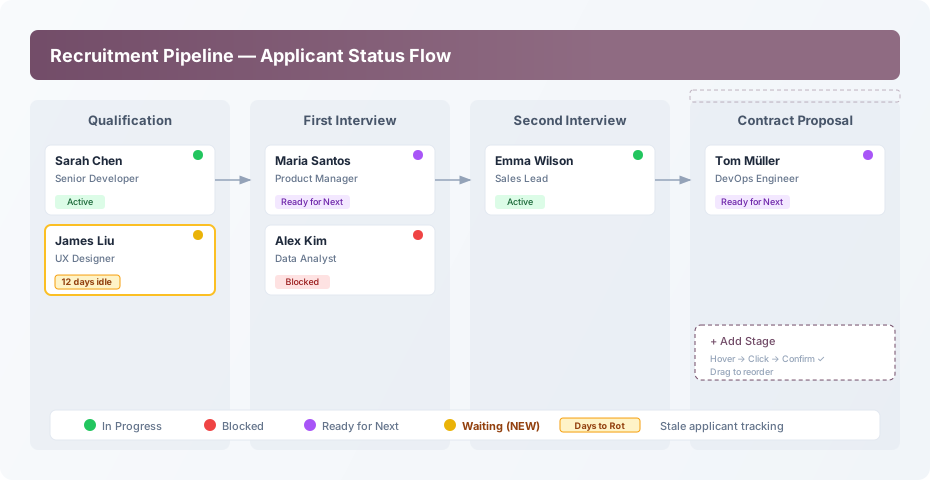
The new Waiting status shows up as a yellow indicator dot on applicant cards. It represents exactly what the name suggests: the application isn’t blocked, it isn’t progressing, it’s in a holding pattern. Maybe the candidate asked for a week before responding. Maybe you’re waiting on a reference that hasn’t come back yet. Maybe the hiring committee meets on Thursdays and today is Monday.
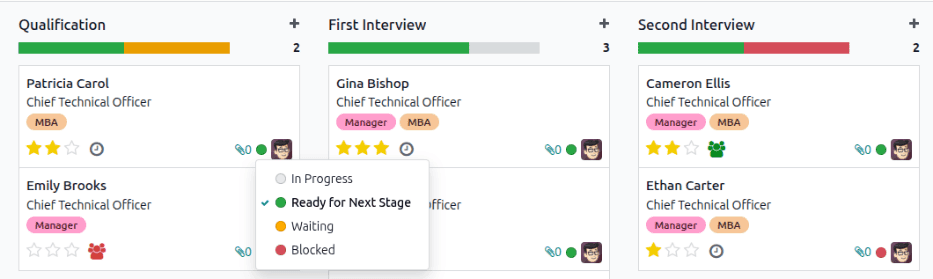
What makes this more than a cosmetic addition is how it interacts with the pipeline’s filtering and reporting. You can now filter your kanban board by status, which means a Monday morning review can start with “show me everything in Waiting” — that’s your follow-up list. No spreadsheet. No sticky notes. Just the built-in filter doing what built-in filters should have done all along.
Days to Rot: When “Waiting” Becomes “Forgotten”
The companion feature to the Waiting status is a new field called Days to Rot. It tracks how long an applicant has been sitting idle in a stage without any status change or activity. Set the threshold — say, 14 days — and any applicant who exceeds it gets flagged as stale.
This solves the single most common failure mode in recruitment operations: the candidate who was perfectly qualified, made it past the first interview, and then quietly expired in the pipeline because nobody followed up. By the time someone noticed, two months had passed and the candidate had accepted another offer. It happens more than any HR team wants to admit, and it happens because kanban boards are great at showing current state but terrible at showing elapsed time.
The Days to Rot counter changes that dynamic. It doesn’t send alarms or pop up notifications — it simply marks the card so that when you scan the board, the stale ones stand out. A subtle change, but one that turns a static snapshot into something closer to a living dashboard.
Stage Creation Gets a Complete Redesign
Creating a new stage in the recruitment pipeline used to involve clicking a plus button at the end of the kanban board. Simple enough, but the interaction had a few rough edges: the new stage appeared instantly with a default name, and reordering required navigating to a separate configuration screen.
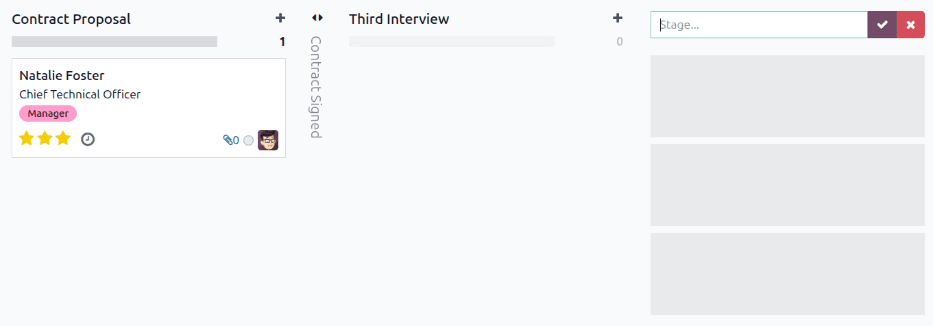
The new flow is more deliberate. Hover to the right of the last stage and an “Add Stage” prompt appears. Click it, type your stage name, and confirm with a check icon. The stage appears in place, and you can drag it to reorder without leaving the kanban view. It’s a small interaction change, but it eliminates accidental stage creation and makes the reordering process feel native rather than bolted on.
Alongside this, the first stage in the default pipeline was renamed from “Initial Qualification” to simply “Qualification.” A minor label change that makes the stage naming more consistent with how most hiring teams actually refer to their process stages.
Email Templates That Know Who You’re Writing To
The email template system in recruitment got a quiet but meaningful overhaul. Previously, when you composed an email to an applicant from the pipeline, the subject line defaulted to the job position title. That sounds reasonable until you realize it means every rejection, every interview invitation, and every offer letter for the same position started with the same subject — making inbox management a nightmare for both the sender and the recipient.
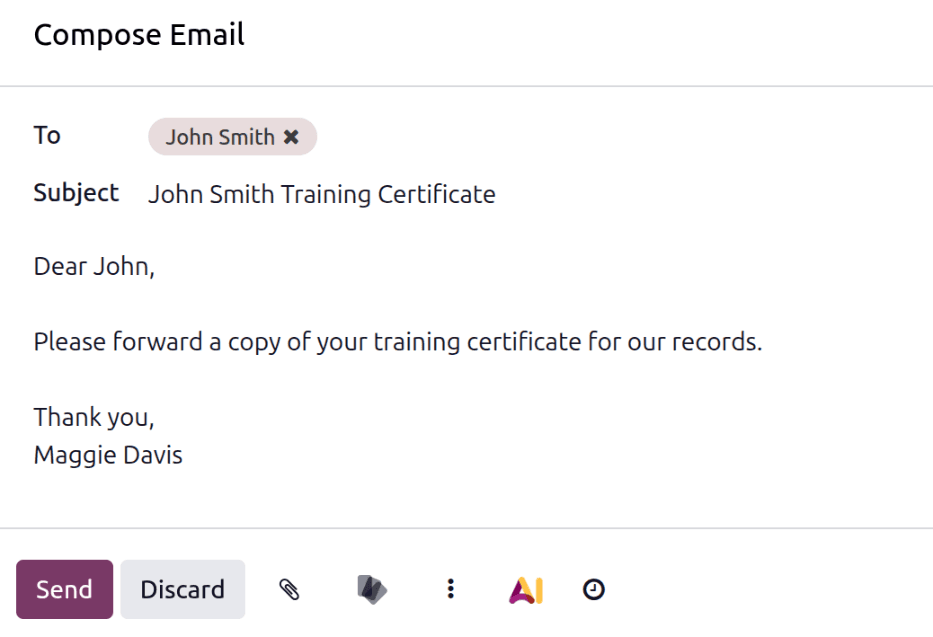
In Odoo 20, the default subject is the applicant’s name. Every email thread for a specific candidate starts with their name, making it trivially easy to find the complete communication history for any applicant in your sent folder. The template picker also got updated labels, and the “Save as Template” flow now opens a cleaner dialog that makes it easier to build your own library of recruitment-specific email templates over time.
Job Posting Controls Move Into the Settings
A new Job Posting subsection now lives inside the recruitment settings screen, giving administrators a single place to manage the Online Posting option and job board integration links. This used to be scattered across different configuration areas, and consolidating it means that the question “where do I turn on job board syndication?” now has a single, obvious answer.
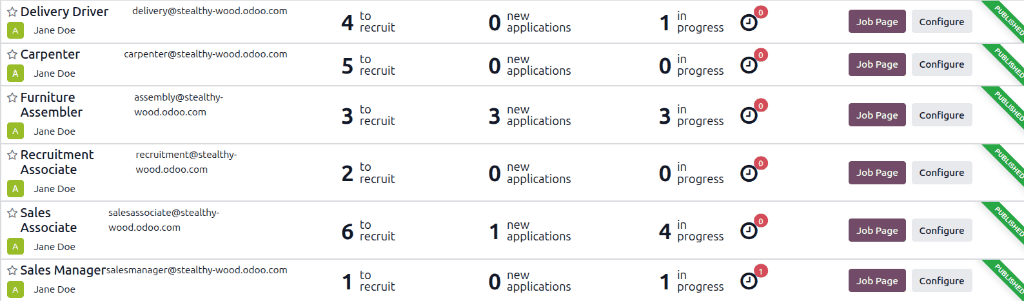
The job position kanban view also changed how you navigate into applicant lists. Instead of clicking a “New Applications” smart button on the job position card, you now click the card itself. It’s the kind of change that sounds trivial in a changelog but saves a click on every single interaction with the recruitment dashboard — and when you’re checking eight open positions every morning, those clicks add up.
What Got Removed
The Résumé Display subsection was removed entirely from the documentation, which suggests the feature either moved elsewhere in the interface or was consolidated into a different workflow. In practice, most recruitment teams had already moved to downloading resumes directly from applicant records rather than using a dedicated display view, so this is less a loss and more an acknowledgment of how the feature was actually being used.
Why These Changes Add Up
Individually, none of these changes are revolutionary. A new status color, a decay timer, a button relabeled. But recruitment modules live and die on the daily experience of scanning a pipeline, and the accumulated effect of these tweaks is a pipeline that communicates more information at a glance than it did before. The Waiting status alone eliminates an entire category of ambiguity. The Days to Rot field converts time — the invisible enemy of every open requisition — into something you can see and act on.
For teams running five or ten open positions simultaneously, these aren’t nice-to-haves. They’re the difference between a pipeline where candidates quietly expire and one where stale applications announce themselves before it’s too late.