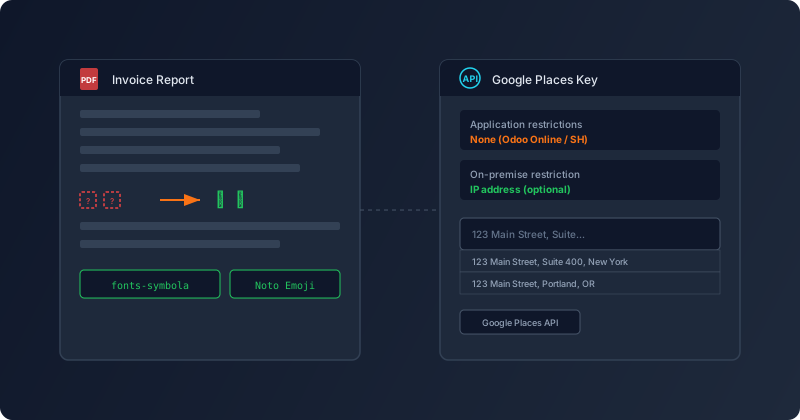
If you run Odoo on your own servers, there’s a decent chance your PDF reports have been printing little empty rectangles where emojis should be. Not broken images, not error messages — just silent, blank boxes that make invoices and quotations look like they were printed on a machine that doesn’t understand half the Unicode table. The cause is simple, the fix is simple, and until now the documentation didn’t mention either.
The wkhtmltopdf Emoji Problem
Odoo generates PDF reports using wkhtmltopdf, a tool that converts HTML to PDF by rendering it through a WebKit-based engine. The rendering is faithful to what you’d see in a browser — with one significant exception. wkhtmltopdf cannot render color emoji fonts. It needs a black-and-white emoji font that the system fontconfig can discover, and most production Linux servers don’t ship one.
The result is predictable: any emoji that shows up correctly in the Odoo web interface — in product names, customer notes, invoice descriptions — turns into an empty box when that same record is exported as a PDF. The data is there; the font to render it is not. Since emojis have become increasingly common in business communication, this affects more documents than you might expect.
Two Font Options, One apt-get Command
The fix involves installing a monochrome emoji font on the server. For Debian and Ubuntu systems, the quickest option is thefonts-symbola package, which covers the emoji set through 2017. One command, no configuration, and your PDFs start rendering emojis correctly:
sudo apt-get install fonts-symbolaFor newer emojis — anything added to the Unicode standard after 2017 — you’ll want Google’s Noto Emoji font. Download the NotoEmoji-Regular.ttf file and place it in /usr/local/share/fonts, where fontconfig will pick it up automatically. Between these two options, virtually every emoji in current use gets covered.
This has always been the fix. What’s new is that the on-premise installation guides now actually say so, in both the packages and source install paths. It’s the kind of documentation gap that’s invisible to the Odoo Online and Odoo.sh crowd — those platforms handle the font stack for you — but has quietly caused confusion for every self-hosted deployment that generates PDFs with emoji content.
Google Places API Keys: Different Rules for Different Hosting
In a separate but thematically related change, the address autocomplete documentation received a correction that matters for anyone configuring Google Places integration. The page that explains how to set up Google Places API keys for address autocompletion on contact forms had two problems.
First, the “Create a Google account” link was pointing to the Cloudflare dashboard instead of Google’s signup page. A small but genuinely confusing error — if you’re following a step-by-step guide and the first link takes you to the wrong service, the whole process feels unreliable.
Second, the guidance on API key restrictions was generic where it needed to be specific. The old text simply described the available restriction types — websites, IP addresses, apps — without telling you which to use for your hosting type. The updated documentation is direct: if you’re on Odoo Online or Odoo.sh, do not apply any application restrictions to your key. The infrastructure behind those platforms manages its own IP ranges, and restricting the key will break the integration in ways that are hard to diagnose. For on-premise deployments, an IP address restriction is available if you want it, but it’s optional.
The Pattern: Closing Gaps Between Hosting Models
Both of these changes share a common thread. Odoo’s documentation has historically been written from the perspective of the cloud-hosted experience, where font rendering and API key networking are handled by the platform. Self-hosted users inherit the same documentation but operate in a fundamentally different environment — one where they’re responsible for system packages, font stacks, and network configuration that cloud users never think about.
The emoji font addition and the API key restriction clarification are small corrections, but they address two of the more common “it works on Odoo.sh but not on my server” complaints. For the administrators who manage self-hosted Odoo deployments, these are the kinds of documentation updates that save hours of debugging — not because the fix is complex, but because finding the cause without guidance requires knowing exactly where to look.