A Quiet Change That Hits Every Purchasing Workflow
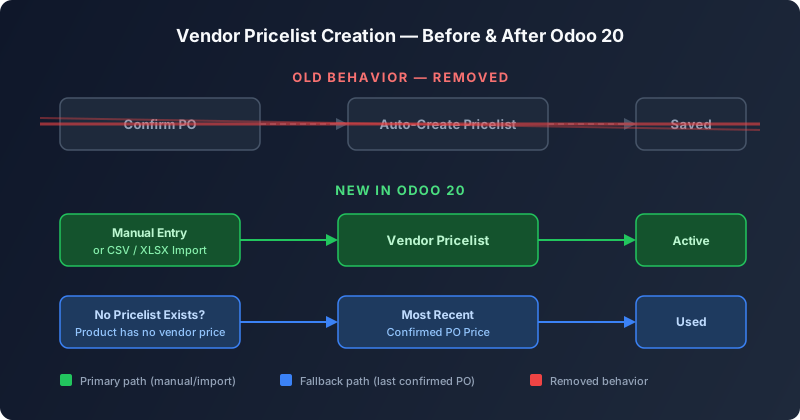
For years, Odoo’s purchase module had a convenient shortcut baked into its confirmation step: every time a purchasing agent confirmed a purchase order, the system would automatically create a vendor pricelist line for each product on that order. It was invisible, effortless, and — for a growing number of businesses — increasingly problematic. With Odoo 20, that automatic behavior is gone. Confirming a purchase order no longer writes anything to the vendor pricelist. Instead, pricing data must now arrive through deliberate action: either manual entry on the product form, or a structured import using CSV or XLSX files.
Why the Old Approach Had to Go
The auto-creation mechanism was designed for simplicity, but it created a mess at scale. Every confirmed PO silently appended a new pricelist line, regardless of whether the price was negotiated, temporary, or an outlier. Over months, a product could accumulate dozens of vendor pricelist entries — many of them stale, some contradicting each other — with no clear audit trail explaining why each one existed. Procurement managers would find themselves sorting through a graveyard of historical prices just to figure out what the current agreed rate actually was. For organizations running multiple warehouses or purchasing the same product from several vendors, the noise was even worse.
The deeper issue was data quality. Because the system created pricelist entries as a side effect of confirmation, there was no review step, no approval gate, and no way to distinguish between a one-time spot purchase and a contracted rate. The pricelist became a log of transactions rather than a source of truth for pricing, which is what downstream processes — replenishment rules, make-to-order triggers, and quantity suggestions — actually need it to be.
The New Manual and Import Workflow
In Odoo 20, vendor pricelists are now a first-class data object that purchasing teams manage explicitly. There are two primary ways to populate them. The first is direct entry on the product form, where a buyer opens the purchase tab and adds vendor pricelist lines with the vendor, price, minimum quantity, and validity dates. This works well for individual products and spot updates, and it puts the pricing decision right where it belongs — in the hands of someone who knows the negotiated terms.
The second path is import. Odoo’s vendor pricelist import tool accepts CSV and XLSX files, making it practical to load pricing from supplier catalogs, contract renewals, or ERP migrations in bulk. This is where the change really pays off for larger operations: instead of letting the system accumulate pricing data passively, the procurement team can upload a clean, validated dataset that reflects current agreements and discard everything else.
The Fallback: Most Recent Confirmed PO
Odoo’s developers clearly anticipated the question every purchasing manager would ask: what happens when a product has no vendor pricelist at all? The answer is a new fallback mechanism. When the system needs a vendor price and no pricelist line exists for that product and vendor combination, it looks up the most recent confirmed purchase order for that vendor and uses its unit price. It’s a pragmatic compromise — the system still has a number to work with, but it treats it as a last resort rather than an authoritative source.
This fallback matters most for the automated workflows that depend on vendor pricing: replenishment rules that calculate order quantities, make-to-order routes that generate purchase orders from sales demand, and the historical demand suggestions that recommend reorder points. All of these features continue to function without a pricelist, but they now draw from a single, transparent source instead of a pile of auto-generated entries.
Ripple Effects Across the Purchase Module
The pricelist change isn’t isolated to one screen. It touches five distinct workflows that previously assumed automatic pricelist creation was happening in the background. The vendor pricelist import process has been updated to reflect its new status as the primary bulk entry method. The request for quotation workflow now operates without any expectation that confirming the resulting PO will update pricing data. The historical demand suggestion tool — which recommends order quantities based on past purchasing patterns — has been adjusted to work with the new fallback logic. Temporary reordering rules, which let warehouse managers set short-term min-max thresholds, no longer rely on auto-generated pricelist entries for their calculations. And the make-to-order route, which triggers purchase orders directly from sales demand, has been updated to respect the manual-first pricelist approach.
What This Means for Existing Deployments
Teams upgrading to Odoo 20 should expect a transition period. Any workflow that relied on the implicit creation of pricelist lines — and many teams won’t realize how much they depended on it until it’s gone — will need to be replaced with an explicit data management step. The good news is that existing pricelist data isn’t deleted during the upgrade. The old entries remain in place; they just won’t be supplemented by new ones from confirmed POs anymore.
For organizations that treated the pricelist as a pricing source of truth and were frustrated by the noise, this is a welcome cleanup. For those that relied on the auto-creation as a lazy but functional way to keep vendor prices current, it’s a wake-up call to build a proper pricing maintenance process. Either way, the direction is clear: Odoo wants vendor pricing to be intentional, auditable, and under the procurement team’s control — not a side effect of placing orders.
The Bigger Picture: Odoo’s Data Quality Push
This change fits a pattern that’s been emerging across Odoo 20. The platform is systematically removing “magic” behaviors that create data silently, replacing them with explicit actions that leave a clear trail. It’s a maturity move — the kind of change that makes the software harder to set up carelessly but significantly easier to trust at scale. For purchasing teams that have spent years cleaning up after the auto-creation feature, Odoo 20 finally puts them in the driver’s seat.