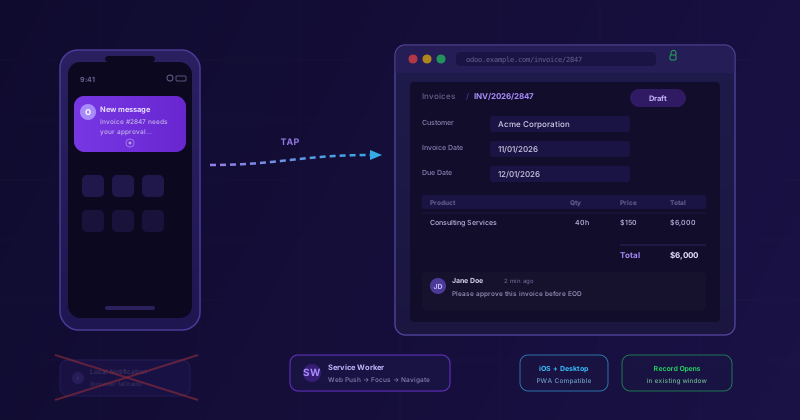
Push notifications in enterprise software are one of those features that sound simple until you try to make them work reliably across every browser, every operating system, and every possible state the application might be in when the notification arrives. Odoo has been wrestling with this problem for several major versions now, and the results have been uneven — notifications that showed up on Android but not iOS, taps that opened a new tab instead of navigating to the right record, and a fallback system that quietly degraded the experience without telling anyone.
Odoo 20 takes a different approach. Instead of patching around the edges, this release overhauls how inbox notifications are delivered, how the service worker decides what to do when a user taps one, and how the whole system behaves on Apple’s famously restrictive iOS web platform. The result is a notification pipeline that actually does what users expect: tells them something happened, and takes them directly to it when they tap.
Web Push Replaces the Local Notification Fallback
The notification architecture in previous Odoo versions had a structural problem. When the “Handle in Odoo” preference was enabled — meaning the user wanted to see notifications inside the Odoo interface rather than through email — the system suppressed push notifications for individual records even when the web client was running in the background. Inbox updates fell back to local browser notifications, which are fundamentally less reliable. They only work when the browser process is active. They can’t wake up a closed tab. And on mobile devices, they’re often silently discarded by the operating system’s battery optimization.
Odoo 20 changes the priority order. When a user has an active push subscription — meaning their browser has registered with the push service and the service worker is installed — the system now routes inbox notifications through that subscription. The service worker receives the push event, constructs the notification, and displays it through the operating system’s native notification center. This works whether the browser is in the foreground, the background, or completely closed.
Local notifications aren’t gone entirely. They serve as a fallback for browsers that don’t support push subscriptions or cases where the subscription has lapsed. But they’re no longer the default path. For the majority of users on modern browsers, the experience shifts from “maybe you’ll see a notification if the browser is still open” to “you’ll see it regardless.”
There’s a subtle improvement in how read messages are handled, too. If you read a chatter message in your Odoo Inbox before the push notification fires — say you happened to be looking at the Inbox when the message arrived — the system now correctly marks it as seen. The push notification can still be delivered later by the scheduled background job, but it won’t interrupt you for something you’ve already dealt with. It’s the kind of race condition that most users would never consciously notice, but that made the notification system feel slightly unreliable.
Tapping a Notification Now Opens the Actual Record
The second change fixes something that has been quietly frustrating Odoo users — particularly on iOS — for a long time. Picture the scenario: you receive a push notification about a new message on Invoice #2847. You tap it. On Android or desktop Chrome, a new browser tab would open, eventually loading the right record. Functional, but clumsy — you now have two Odoo tabs fighting for attention.
On iOS, it was worse. The notification tap did nothing visible. The underlying issue was that the service worker called the browser’sclients.openWindow()method for every notification, which WebKit — Apple’s browser engine — simply ignores on home screen web apps. Tapping a notification on an iPhone or iPad would leave you staring at whatever screen the app was showing before, with no indication of where the message was or how to get to it.
Odoo 20 completely reworks the tap handler. Instead of blindly calling openWindow(), the service worker now searches for an existing Odoo window. It checks every open client, including windows running under the scoped app path that iOS uses for home screen installations. When it finds one, it focuses that window and sends it a message requesting navigation to the record’s form view. The web client, on its end, listens for these messages and performs the navigation internally — opening the invoice, the sales order, the helpdesk ticket, or whatever record the notification referenced.
If no Odoo window is open at all, the system falls back toopenWindow()as before, which works fine for opening a fresh browser tab. But the common case — tapping a notification while Odoo is already open somewhere — now works the way it should have from the beginning. One window, the right record, no duplicates.
Notifications for system messages that aren’t tied to a specific record take a lighter approach: they focus the existing window without trying to navigate anywhere. The notification brought you back to Odoo, and from there you can find what you need.
Why This Matters for Mobile-First ERP Teams
The significance of these changes depends entirely on how your organization uses Odoo. If everyone sits at a desktop all day with the web client pinned in their browser, the difference is marginal — one fewer tab opening when they tap a notification.
But for teams where Odoo is accessed from phones and tablets — warehouse workers checking stock requests, field technicians reviewing work orders, managers approving purchases between meetings — the notification pipeline is one of the most important features in the entire platform. It’s the bridge between “something happened in the system” and “someone actually does something about it.”
The iOS fix in particular addresses a real blind spot. Apple added push notification support for home screen web apps in iOS 16.4, and Odoo was quick to implement it. But the navigation-on-tap part was broken from the start, because the standard browser API that every other platform supports simply doesn’t work the same way in WebKit’s progressive web app mode. It’s the kind of platform-specific bug that’s easy to miss during testing if your QA team is primarily on desktop.
For organizations that have installed Odoo as a home screen app on company iPhones — which many do, because it gives the interface a more native feel — this update finally makes notifications trustworthy. Tap the notification, see the record. No more guessing, no more manual navigation to find the thing someone just messaged you about.
The Bigger Picture for Odoo Notifications
Taken together, these two changes represent a maturation of Odoo’s real-time communication infrastructure. The push subscription model is the industry-standard approach to web notifications, and Odoo’s adoption of it as the primary delivery mechanism — rather than a supplement to local notifications — brings it in line with how platforms like Slack, Microsoft Teams, and Google Workspace handle the same problem.
The service worker’s new window-finding logic is particularly well-designed. Rather than maintaining its own window registry or requiring the web client to periodically check in, it uses the browser’s built-in client enumeration to find active sessions at tap time. This means it works even after a page refresh, a navigation to a different Odoo module, or a period of inactivity — anything that might invalidate a cached reference.
None of this is visible in a feature list or a marketing slide. Push notifications either work or they don’t, and when they don’t, users stop trusting them and fall back to checking the interface manually — which defeats the entire purpose. Odoo 20 puts in the engineering work to make them actually reliable, across every platform, in every state the application might be in. That kind of infrastructure investment doesn’t generate excitement, but it generates trust. And for an ERP platform, trust is the currency that matters most.