Every accounting system has a chatter. You can scroll through comments, see when an invoice was posted, maybe catch a note from a colleague about why a payment was adjusted. But chatters are informal records — they capture conversations, not forensics. When an auditor asks “who changed this amount, when, and what was it before,” a chatter entry that says “updated invoice” doesn’t cut it.
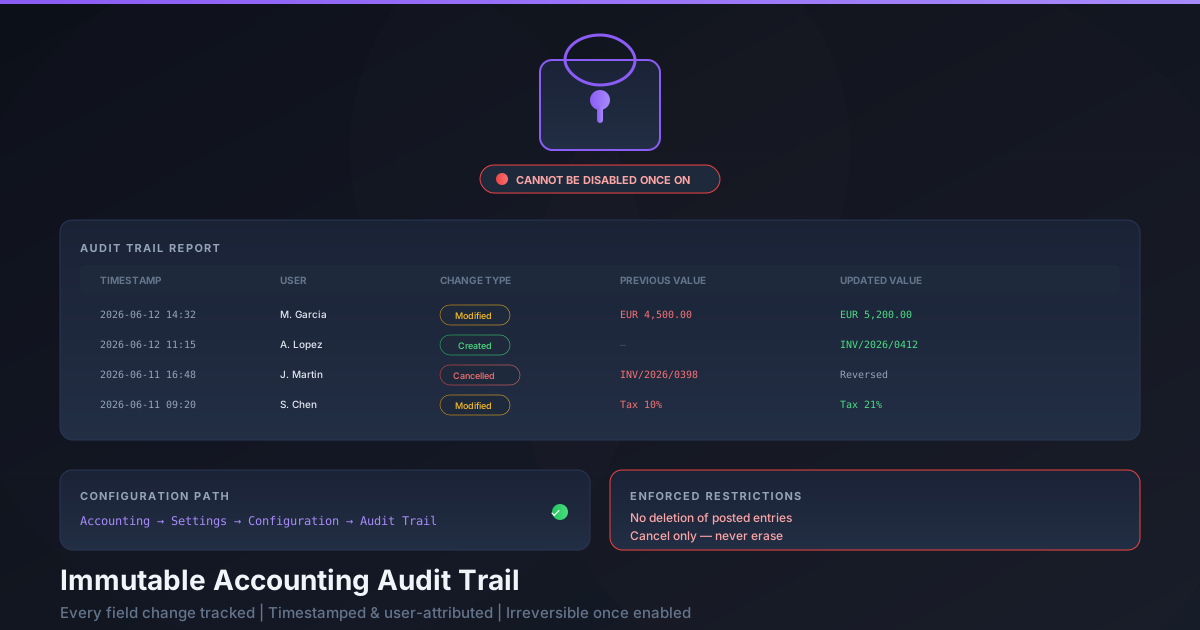
Odoo has added a proper Audit Trail to its accounting module, and it takes a harder line on data integrity than most ERP features dare to. The trail records every field modification that affects accounting: timestamps, the responsible user, the type of change, the previous value, and the updated value. All of it, in an immutable log that exists specifically for audit and compliance purposes.
And here’s the part that makes it interesting: once you turn it on, you cannot turn it off. Ever.
What the Audit Trail Actually Tracks
The Audit Trail report captures modifications to any field that has accounting significance. This goes well beyond the basic “invoice posted” and “payment registered” events that the standard chatter records. Every change to an amount, a tax line, a due date, an account assignment, a partner reference — anything that would alter the financial record — gets logged with five pieces of information.
First, the timestamp: not just the date, but the exact time the change was made. Second, the user who made the change — not the system, not “Administrator,” but the specific person logged in at that moment. Third, the change type: whether the record was created, modified, or cancelled. Fourth, the previous value before the change. And fifth, the new value after the change.

This five-column structure transforms the audit trail from a chronological narrative into a queryable forensic record. An auditor can filter by user to see everything a specific accountant touched. They can filter by date to reconstruct the state of the books at any point in time. They can filter by change type to find every cancellation. The report lives under Accounting → Reporting → Audit Trail, accessible to anyone with reporting permissions.
The One-Way Switch
Most Odoo settings are toggles. You turn a feature on, try it, and turn it off if it doesn’t work for your workflow. The Audit Trail breaks that pattern deliberately.
The setting lives in Accounting → Settings → Configuration, under a dedicated Audit Trail section. Enable the checkbox, save, and the system begins recording. From that point forward, the checkbox is locked. No administrator, no matter their access level, can disable it. The reasoning is straightforward: an audit trail that can be turned off isn’t an audit trail — it’s a suggestion.
This design choice reflects the regulatory reality in countries that require audit trails. France, Germany, and several other European nations have data inalterability requirements for accounting software. If a system offers an audit trail that can be silently disabled, it fails the compliance test before a single transaction is recorded. Making the setting irreversible means that once a company commits to audit trail compliance, the software enforces it permanently.
What Changes When the Trail Is Active
Enabling the audit trail doesn’t just start logging — it changes what operations are permitted on accounting records. Once active, posted journal entries, confirmed invoices, and vendor bills cannot be deleted. Period. The delete button doesn’t appear. The API endpoint rejects deletion requests. The only way to reverse a posted entry is to cancel it, which creates its own audit trail entry showing who cancelled what and when.

This distinction between deletion and cancellation is the core of accounting data integrity. Deletion removes the evidence that a transaction ever existed. Cancellation preserves the original record and adds a reversal — both visible, both auditable, both contributing to a complete picture of what happened and why.
For accountants who are used to cleaning up test entries by deleting them, this is a workflow change. For auditors and regulators, it’s exactly the behavior they want to see: a system that makes the easy wrong thing impossible and the right thing automatic.
Why This Is Different From the Chatter
Odoo’s chatter has always recorded some activity on accounting records. Post an invoice, and a chatter message appears. Register a payment, and it shows up in the log. But the chatter was designed for collaboration, not compliance. It captures events that the system decides are noteworthy, not every modification to every field.
The dedicated audit trail report captures modifications at the field level, regardless of whether anyone thought they were worth noting. A chatter log might tell you that an invoice was modified. The audit trail tells you that on June 12 at 2:32 PM, Maria Garcia changed the invoice amount from EUR 4,500 to EUR 5,200. One is informational. The other is evidence.
The audit trail also provides an immutable and reliable record specifically designed for audit purposes. Chatter messages can be edited or deleted by users with the right permissions. Audit trail entries cannot be touched — not edited, not deleted, not hidden. They exist as a permanent, append-only log that serves as the definitive record of what changed in the accounting data.
Who Actually Needs This
The immediate audience is businesses operating in jurisdictions that mandate audit trails for accounting software. France’s anti-fraud law requires certified accounting software to maintain inalterability of data. Germany’s GoBD regulations demand traceable documentation of all accounting modifications. Similar requirements exist across Scandinavia, the Benelux countries, and an increasing number of markets worldwide.
But the practical audience is broader than the legal mandate suggests. Any company that has been through an external audit knows the drill: the auditors ask for evidence of controls, the accounting team scrambles to reconstruct the history of specific transactions, and everyone wishes they had turned on proper change tracking six months earlier.
With the audit trail enabled from day one, that scramble disappears. Every modification is already documented. Every user action is already attributed. Every before-and-after is already recorded. The audit becomes a matter of running a report rather than reconstructing a timeline from fragments.
And because the trail cannot be disabled once it’s active, there is no risk of a gap in the record. No one can quietly turn it off during a sensitive period and turn it back on after the fact. The continuity of the audit trail is guaranteed by the software itself, not by policy or process.