Bank reconciliation is one of those tasks that happens every single day in an accounting department, yet it rarely gets the interface attention it deserves. The person doing the reconciling isn’t thinking about ERP architecture — they’re thinking about matching the next bank statement line as fast as possible. Every extra button, every unnecessary option on screen, is a small tax on their attention.
Odoo just cleaned up the reconciliation interface in a way that reflects this reality. The change is subtle but meaningful: instead of showing every possible action as its own button, the system now surfaces up to two suggested actions as prominent buttons and moves everything else behind an ellipsis menu.
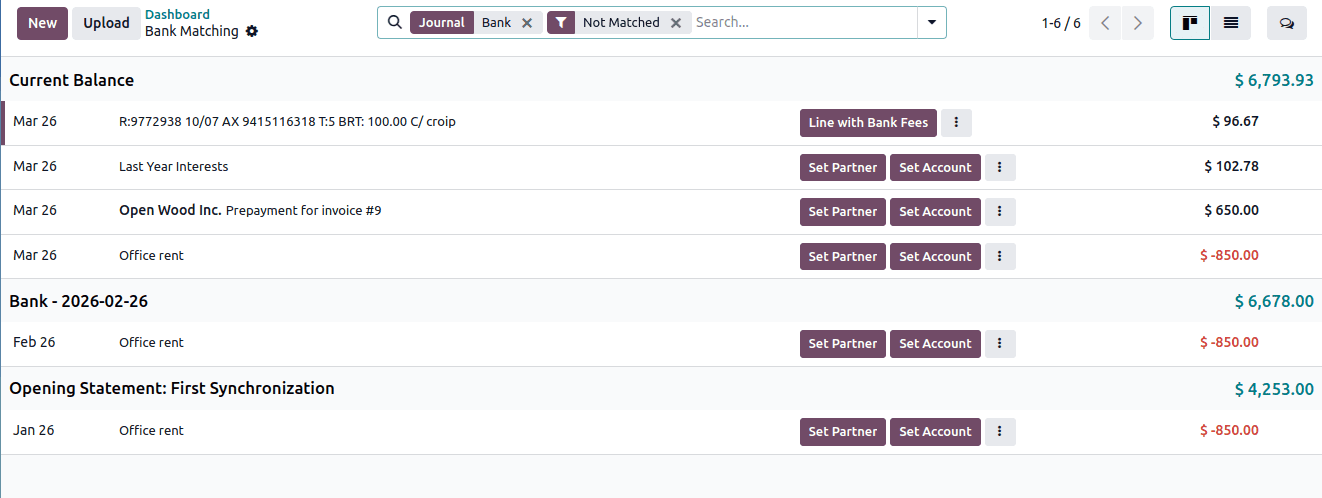
Two Buttons Instead of Many
The previous reconciliation interface displayed all available actions as individual buttons. For a given bank statement line, that could mean three, four, or more buttons competing for attention. The problem isn’t that the actions were wrong — it’s that showing them all at once forces the accountant to scan and evaluate options that are rarely relevant for any particular line.
The updated design picks the two most contextually appropriate actions and promotes them as visible buttons. If Odoo detects a likely match with an outstanding invoice, that action gets a button. If the line looks like a new vendor payment, the “create bill” action surfaces. The remaining actions — things like removing a partner, uploading a bill, or accessing less common reconciliation tools — sit behind the three-dot ellipsis menu, one click away but out of the visual flow.
Why This Matters at Scale
A company reconciling twenty bank lines a day probably won’t notice much difference. But scale that to hundreds of lines across multiple bank accounts — which is routine for mid-market companies — and the cognitive savings compound. When most lines resolve with a single click on the suggested action, the reconciliation session moves at the speed of scanning rather than the speed of decision-making.
This is a design pattern that modern productivity tools have converged on: surface the likely action, hide the rest. Email clients do it with smart replies. Code editors do it with autocomplete. The principle is the same in accounting: don’t make the user choose from a menu when the system already knows the best option.
The Ellipsis Menu Consolidation
What went into the ellipsis menu is worth understanding too. Partner management actions — like removing a linked partner from a transaction line — now live behind the three dots. So does the option to upload a bill directly from the reconciliation view. These are legitimate actions, but they’re edge cases for most reconciliation sessions.
The previous interface also included expanded line details accessed through a chevron icon. That interaction has been consolidated, keeping the reconciliation row cleaner. The information is still accessible, but the default view prioritizes the match-and-move-on workflow that defines daily reconciliation.
Contextual Intelligence in Action
The two-button approach works because Odoo’s reconciliation engine already analyzes each bank line against open invoices, bills, and recurring patterns. The system isn’t randomly selecting which actions to promote — it’s using the same matching logic that powers auto-reconciliation to determine which manual actions are most likely needed when automatic matching falls short.
For businesses already using AI-assisted accounting workflows, the cleaner reconciliation interface means less friction when the system surfaces matches for human review. The accountant sees the suggested action, confirms or adjusts, and moves to the next line. The interface gets out of the way instead of presenting a toolbar of options.
A Small Change with Compounding Returns
Interface updates in accounting software rarely make headlines, but they accumulate into significant productivity differences over weeks and months. An accountant who spends two seconds less per reconciliation line saves meaningful time across thousands of lines per year. More importantly, a cleaner interface reduces the error rate — fewer options means fewer misclicks, fewer accidental partner removals, and fewer reconciliation mistakes that require correction later.
For finance teams running Odoo Accounting, the reconciliation interface update applies automatically. No configuration changes needed. The same actions are available; they’re just organized in a way that respects how reconciliation actually works in practice — fast, repetitive, and best served by an interface that anticipates the next move.