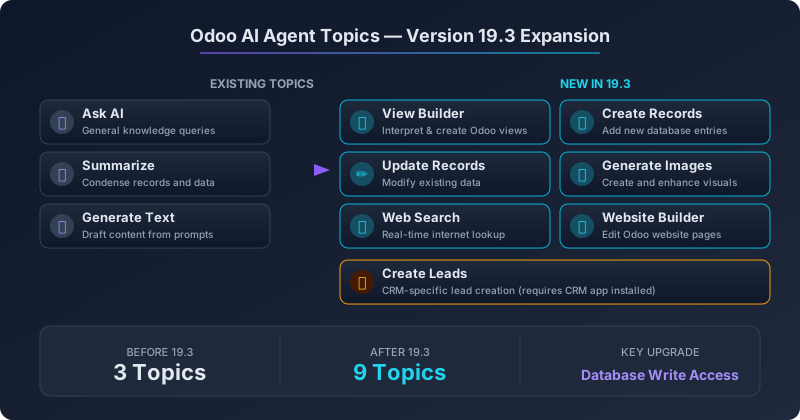
When Odoo first introduced AI agents into its ERP platform, the system was deliberately cautious. Agents could answer questions, summarize records, and draft text — useful, but firmly read-only. They could look at your data but couldn’t touch it. That guardrail made sense for a first release. Nobody wants an AI accidentally rewriting invoice records or creating phantom leads in the CRM.
Version 19.3 removes that guardrail — selectively, and with the kind of granular control that makes the shift practical rather than reckless. The AI agent system now ships with nine preconfigured topics, tripling the original three. And the most significant additions aren’t incremental improvements to text generation. They’re capabilities that let agents actually modify your database.
The Original Three: Ask, Summarize, Generate
The foundation hasn’t changed. The Ask AI topic handles general knowledge queries — questions about business processes, Odoo functionality, or domain-specific knowledge that the agent can answer from its training data and any RAG-connected knowledge bases. The Summarize topic condenses records, conversations, and datasets into digestible summaries. And the Generate Text topic drafts content from prompts, whether that’s an email response, a product description, or meeting notes.
These three topics established the interaction pattern: you talk to the agent through the chatter interface or a dedicated AI panel, and it responds with text. No side effects. No database mutations. Safe enough to hand to any employee without worrying about what they’d accidentally trigger.
Create Records and Update Records: The Database Gets a Chat Interface
The two additions that change the fundamental nature of Odoo’s AI agents are Create Records and Update Records. These topics give agents write access to the database — the ability to insert new entries and modify existing ones based on natural language instructions.
In practice, this means a sales manager can tell the agent “create a quotation for Acme Corp with 50 units of product X at our standard pricing” and the agent generates the actual sales order. A warehouse supervisor can say “update the reorder point for all Category A products to 200 units” and the agent modifies the inventory rules. An HR coordinator can ask the agent to “mark all pending leave requests from last week as approved” and watch the status fields change.
The important detail is that these topics are individually configurable. Administrators choose which agents get which topics, so you can build an agent that creates records in CRM but has no access to accounting. The per-topic permission model means write access doesn’t have to be all-or-nothing.
View Builder: Agents That Reshape the Interface
The View Builder topic is perhaps the most technically ambitious of the new additions. It lets agents interpret user queries about how they want to see data and translate them into Odoo view configurations. Ask for “a kanban board of support tickets grouped by priority with the assigned agent shown on each card” and the agent attempts to build that view.
The topic includes time-based grouping capabilities, so requests like “show me this month’s invoices grouped by week” produce views with the correct temporal bucketing. It’s essentially giving non-technical users the ability to customize their ERP interface through conversation instead of navigating the Studio app or writing XML.
Generate Images: Visual Content Without Leaving the ERP
The Generate Images topic adds image creation and enhancement directly inside the agent interface. Product managers can generate placeholder product images, marketing teams can create social media visuals, and content creators can enhance existing images — all through text prompts in the same chat interface they use for everything else.
This isn’t a standalone image generation tool bolted onto the side of the ERP. The agent has context about the record you’re working on. Ask it to “generate a product image for this item” while viewing a product form, and it knows the product name, category, and description. The context-awareness eliminates the copy-paste loop between your ERP and external AI image tools.
Web Search: Real-Time Information Inside the ERP
AI agents are only as useful as their knowledge, and until now, Odoo’s agents were limited to what they knew from training data and connected knowledge bases. The Web Search topic changes that by giving agents the ability to explore the internet in real time.
Need to check a competitor’s current pricing before finalizing a quote? The agent can look it up. Want to verify whether a regulatory requirement has changed before processing a tax filing? The agent can search for the latest published guidance. Trying to find shipping rates for an unusual destination? The agent goes and finds them.
The practical value is enormous for businesses that previously alt-tabbed between their ERP and a browser dozens of times per day. The information comes back into the ERP context where it can immediately inform the next action.
Website Builder: Edit Pages Through Conversation
For companies running their website on Odoo’s built-in website builder, the new Website Builder topic lets agents edit pages directly. Instead of opening the website editor, finding the right block, and making manual changes, users can describe what they want: “add a testimonials section below the hero banner on the homepage” or “update the pricing table to show our new Enterprise tier.”
Combined with the AI website configurator that shipped in an earlier 19.3 release, this creates a two-phase workflow: generate a site from scratch with the configurator, then refine individual pages through agent conversations. The website never needs to leave the Odoo ecosystem.
Create Leads: A CRM-Specific Shortcut
The final new topic is Create Leads, which is narrower than the general Create Records topic but optimized for CRM workflows. It appears only when the CRM application is installed, and it streamlines the specific process of adding leads to the pipeline.
The distinction matters because lead creation in CRM involves specific field logic — assigning sales teams, setting lead scores, mapping to campaigns — that a generic record creation topic might handle clumsily. The dedicated Create Leads topic understands CRM-specific semantics, so “add a lead for the company I just spoke with on the phone” produces a properly structured CRM lead rather than a bare database record.
What This Means for Odoo Deployments
Going from three read-only topics to nine topics with database write access represents a philosophical shift in how Odoo positions its AI capabilities. The agents aren’t just assistants that help you work faster — they’re becoming operators that can execute tasks on your behalf.
The per-topic configuration model is what makes this practical for real deployments. An organization can start conservatively — enable only Ask, Summarize, and Generate Text for most users — and gradually expand access as trust builds. The agents that handle sensitive operations like record creation or view building can be restricted to specific roles, while the information retrieval and content generation topics remain broadly available.
For businesses that have been using Odoo’s AI features since version 19.0, the upgrade path is straightforward: the new topics appear in the agent configuration, and administrators opt in to each one individually. For those evaluating whether to enable AI agents at all, version 19.3 makes the value proposition significantly stronger. The agents can finally do things, not just talk about them.