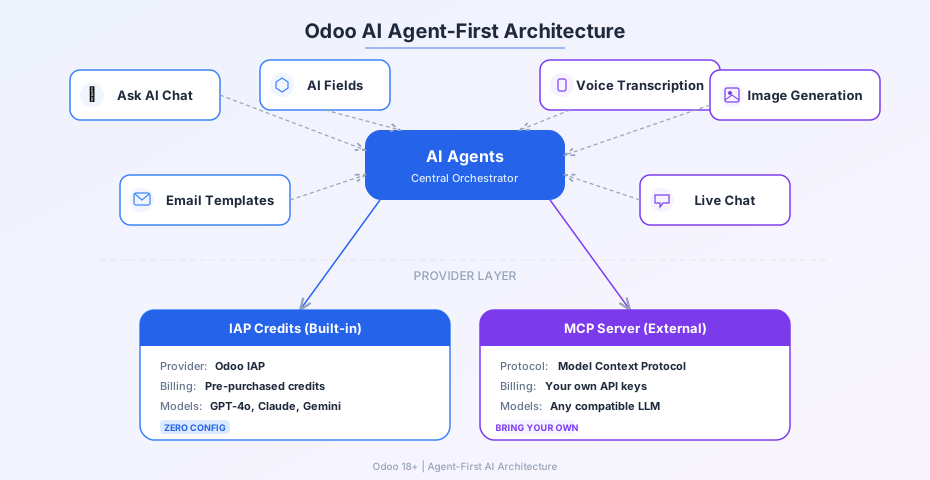
For the past several releases, Odoo’s AI features have been growing in different directions — a chat interface here, a field-level suggestion engine there, image generation bolted onto the website builder. Each piece worked, but the overall picture was fragmented. The latest documentation overhaul draws a clear line through all of it: AI agents are now the central abstraction, and everything else — chat, field suggestions, voice transcription, image generation — is a surface that agents power.
The shift is more than cosmetic. It changes how businesses think about configuring and extending Odoo’s AI capabilities, particularly with the addition of MCP server support for external agent providers.
Agents Move to the Center
The previous documentation treated the “Ask AI” chat as the primary AI feature, with other capabilities listed as separate tools. The rewrite flips that hierarchy. AI agents are now presented as the foundational layer — autonomous components that can reason about business data, trigger actions, and respond to user requests across the entire system.
This framing matters because it positions the chat interface, AI-powered fields, and automated workflows as different ways to interact with the same underlying agent infrastructure. A sales rep asking the AI to draft an email and an automated server action that scores leads are both agent operations, just initiated differently.
One Access Point Instead of Two
Odoo previously maintained two distinct entry points for AI interaction: the Ask AI chat and the AI button that appeared on specific forms and fields. The update merges these into a unified access model. Users reach the AI through a single icon in the interface or through the command palette shortcut (Ctrl+K). The “Open in Discuss” option remains for users who want to continue a conversation in a threaded format, but the starting point is now singular.
The consolidation eliminates a common source of confusion. New users previously had to learn which AI features lived behind the chat and which required the button — a distinction that mapped to implementation details rather than user intent.
Feature Pages Branch Out
With agents as the organizing principle, the individual AI capabilities now live on dedicated feature pages rather than being crammed into a single overview. AI fields — the smart suggestions that appear on form views — have their own documentation. Email template generation, voice-to-text transcription, and AI-powered image generation each get standalone pages that cover configuration, usage patterns, and limitations.
Live Chat receives its own AI section, documenting how agents can handle initial customer interactions, route conversations to the right department, and provide suggested responses to human operators. This was previously buried in the general AI overview, making it easy to miss.
MCP Server Opens the Door to External Providers
The most significant technical addition is MCP (Model Context Protocol) server support. Until now, Odoo’s AI ran exclusively through its built-in IAP (In-App Purchase) credit system — users bought credits from Odoo, and all AI operations consumed those credits. The MCP server integration adds a second path: businesses can connect their own external AI providers, routing agent requests through custom infrastructure instead of Odoo’s hosted service.
This is a significant shift for enterprises with existing AI investments. A company already running its own language models or paying for a specific cloud AI service can now pipe those capabilities directly into Odoo’s agent framework. The IAP credit system remains the default — and likely the simpler option for most users — but the MCP path removes the lock-in concern that has kept some organizations from adopting Odoo’s AI features.
Automation Gets Its Own Category
AI-powered automation — server actions that run without user interaction and document sorting that categorizes incoming records — is now documented as a distinct category rather than a footnote on the agent page. This separation acknowledges that automation and interactive AI serve different user profiles. An HR manager using Ask AI to draft a job description and an IT administrator configuring automatic lead scoring based on email sentiment are fundamentally different workflows, even though both rely on the same agent infrastructure.
The documentation cleanup also removes several sections that had accumulated over previous releases: the response options list, default prompt notes, warnings about agent error handling, and the common requests examples. These were artifacts of an earlier, more cautious approach to AI documentation that treated every feature as needing extensive hand-holding. The new pages assume users understand what AI can do and focus on how Odoo specifically implements it.
What This Signals
The agent-first rewrite is less about new features and more about how Odoo sees its AI future. By making agents the primary abstraction and adding MCP server support, the platform is positioning itself as an AI-native ERP rather than an ERP with AI bolted on. The unified access point, the feature page breakout, and the provider flexibility all point in the same direction: AI in Odoo is no longer a collection of tools. It’s an architecture.