When Odoo first introduced MCP server support for connecting external AI providers to the ERP, the security story was straightforward but thin: you pasted an API key into the settings panel, and the system used it for every request. It worked for proof-of-concept deployments and smaller teams comfortable managing shared secrets. It did not work for enterprises with security review boards, compliance audits, and centralized identity management.
The latest update to Odoo 20 closes that gap. MCP server connections now authenticate through a full OAuth 2.0 flow, bringing token-based authorization, admin consent screens, automatic credential rotation, and revocation controls to the AI integration layer.
Why API Keys Were Not Enough
Static API keys have a well-documented set of problems in production environments. They don’t expire unless someone manually rotates them. They grant the same level of access to every request, with no way to scope permissions per session or per user. If a key leaks — through a log file, a misconfigured backup, or a departing employee’s notebook — the only remediation is to regenerate it and update every system that depends on it.
For an AI integration that processes business data — customer records, financial figures, internal communications — that risk profile was always uncomfortable. The MCP connection carries context about the ERP’s state to the external AI provider, which means the authentication layer is also the authorization layer for what business information leaves the system. A static key couldn’t distinguish between a routine field suggestion and a bulk data export.
The OAuth 2.0 Flow in Practice
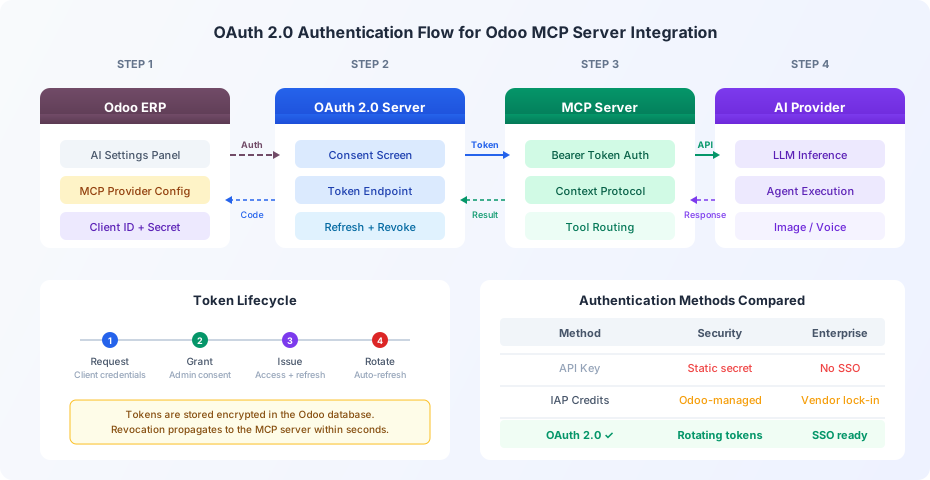
Setting up an OAuth-authenticated MCP connection starts in Odoo’s AI settings panel, where administrators now register a client application with the OAuth provider that guards their MCP server. This is typically the organization’s identity provider — Azure AD, Okta, Google Workspace, or a self-hosted Keycloak instance — rather than the AI provider itself.
The configuration requires a client ID, client secret, authorization endpoint, and token endpoint. Odoo stores the secret encrypted in the database and never exposes it in the UI after initial entry. When the system needs to reach the MCP server, it presents the client credentials to the OAuth server, receives a short-lived access token, and attaches that token as a bearer credential on every MCP request.
The first time an administrator configures the connection, the OAuth flow redirects to a consent screen hosted by the identity provider. This screen shows exactly what scopes the MCP integration is requesting — typically read access to the AI model endpoints and write access for submitting context payloads — and requires explicit approval before any tokens are issued. The consent is recorded on the identity provider side, so security teams have a centralized audit trail of which applications can reach which services.
Token Rotation Happens Automatically
Access tokens issued through the OAuth flow have a configurable expiration, typically measured in minutes rather than months. When a token expires, Odoo uses the accompanying refresh token to obtain a new access token without requiring another round-trip through the consent screen. This rotation happens silently in the background — AI features continue working without interruption.
The refresh token itself has a longer lifespan but is also subject to rotation. Each time it’s used, the OAuth server can issue a new refresh token and invalidate the previous one, a pattern known as refresh token rotation. If an old refresh token is presented — suggesting it was intercepted — the OAuth server revokes the entire token family and forces re-authentication.
This mechanism eliminates the “set it and forget it” problem that plagued API keys. Even if a token is somehow captured in transit, its useful window is measured in minutes, not months.
Revocation Reaches the MCP Server in Seconds
Administrators can revoke an MCP connection’s authorization from two places: directly in Odoo’s AI settings, or from the identity provider’s application management console. Either path triggers token revocation on the OAuth server, and the MCP server rejects the next request that carries the now-invalid bearer token.
This matters for incident response. If an organization suspects that its AI integration has been compromised, or if it needs to immediately cut off data flow to an external provider — say, because of a contract dispute or a regulatory demand — the revocation is near-instantaneous. There’s no key to rotate across multiple configuration files, no cache to clear, no deployment to push.
SSO Integration Comes for Free
Because the OAuth flow runs through the organization’s existing identity provider, the MCP connection inherits whatever single sign-on infrastructure is already in place. Companies that enforce multi-factor authentication, conditional access policies, or device-based trust through their IdP get those protections on the AI integration automatically.
This is a significant shift for IT departments that previously had to treat the AI connection as a special case in their security posture. The MCP OAuth flow fits into the same governance framework as every other enterprise application — same audit logs, same access reviews, same compliance reporting.
IAP Credits Still Work the Same Way
The OAuth addition is specific to the MCP server path — the route for connecting external AI providers. Odoo’s built-in IAP credit system, which handles AI billing for users who run through Odoo’s own hosted service, remains unchanged. Credits are purchased, consumed per request, and managed through the existing IAP dashboard.
This means Odoo now supports two distinct AI provider models with appropriately different security postures. The IAP path uses Odoo-managed authentication because Odoo is both the platform and the provider. The MCP path uses OAuth because the provider is external, and the trust boundary between the ERP and the AI service needs to be explicitly managed.
What This Changes for Deployment Planning
The practical effect is that MCP server integration moves from a “technically possible but hard to approve” category to a “fits our existing security architecture” one. Organizations that blocked external AI connections because of static credential concerns now have a standards-based authentication layer that their security teams already know how to evaluate.
The setup is more involved than pasting an API key — it requires configuring an OAuth client, setting up the consent flow, and ensuring the identity provider’s token policies align with the desired session behavior. But that complexity is the point. The previous simplicity came at the cost of security guarantees that enterprise deployments cannot compromise on.
For teams already running Odoo with centralized identity management, adding the MCP OAuth configuration is a matter of registering one more application in their IdP. For teams considering external AI providers for the first time, the OAuth requirement ensures they start with the right security foundation rather than retrofitting it later.