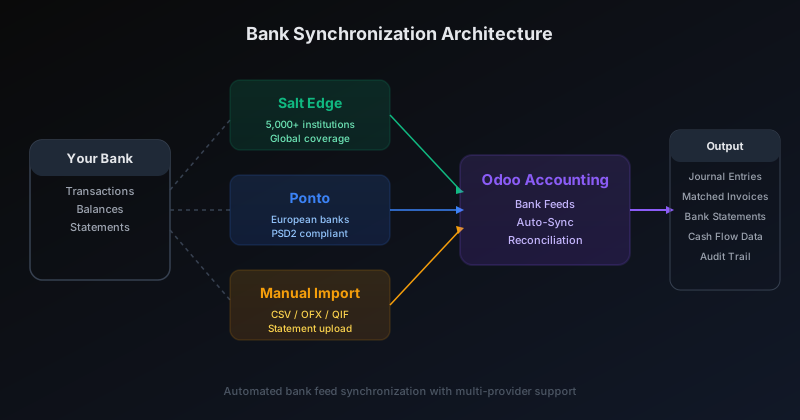
Bank synchronization in an ERP sounds straightforward until you actually try to build it. Every country has different banking standards, every financial institution exposes data differently, and the regulatory landscape — particularly in Europe under PSD2 — shifts faster than most software teams can keep up with. Odoo’s answer is a wholesale rewrite of its bank feed infrastructure that replaces aging integrations, adds a major new provider, and pushes the total number of supported financial institutions past 20,000.
The changes aren’t cosmetic. Odoo dropped PayPal as a bank feed source entirely, added Salt Edge as a first-class integration partner, rebuilt its Ponto documentation with modern workflows, and split the configuration path so online, on-premise, and Odoo.sh deployments each get instructions that match their environment.
Salt Edge Enters the Stack With 5,000+ Institutions
The most significant addition is Salt Edge, a financial data aggregator that connects to over 5,000 banking institutions across multiple continents. For Odoo users, this means a single integration point that handles the authentication, session management, and data normalization across thousands of banks that would otherwise require individual API connections.
Salt Edge’s consent-based workflow fits the modern banking security model. Users authenticate directly with their bank through Salt Edge’s secure portal, grant specific data access permissions, and Odoo receives a clean transaction feed without ever handling banking credentials. The integration covers account selection, consent management, and automatic transaction polling — all configured from within Odoo’s accounting module.
For businesses operating outside of Europe, Salt Edge fills a gap that Ponto — which focuses primarily on European banks — doesn’t cover. The combination of both providers gives Odoo a banking network that spans most of the developed world.
Ponto Gets a Complete Documentation Refresh
Ponto, the European bank aggregation service built on PSD2 open banking standards, has been part of Odoo’s bank feed infrastructure for several years. But the integration documentation had fallen behind the product. Screenshots showed outdated interfaces, the account linking workflow had changed, and the organizational setup steps were missing critical details.
The refresh addresses all of it. New screenshots walk users through the complete Ponto setup: creating an organization, adding bank accounts through the consent flow, selecting which accounts to synchronize, and verifying the connection from Odoo’s dashboard. The account selection interface is particularly important — businesses with multiple accounts at the same institution need to explicitly choose which ones feed into the ERP, and the old documentation glossed over this step.
PayPal Dropped as a Bank Feed Source
In a move that signals where Odoo sees the future of payment data integration, the platform removed PayPal as a bank synchronization option entirely. The integration — which treated PayPal as a bank-like transaction feed — was deleted from the documentation along with its associated setup screenshots and configuration guides.
This doesn’t mean Odoo users can’t work with PayPal. Payment processing through PayPal remains available through Odoo’s payment provider integrations. What’s gone is the ability to treat a PayPal account as a bank feed for reconciliation purposes — a feature that was always somewhat awkward, since PayPal transactions don’t follow standard bank statement formats and often required manual cleanup.
The removal makes architectural sense. Rather than maintaining a custom PayPal integration alongside proper banking providers, Odoo’s team chose to funnel all bank-like synchronization through dedicated aggregators (Salt Edge and Ponto) that handle the data normalization at scale.
Regional Coverage: Plaid for North America, Aggregators for the Rest
The rewritten bank synchronization stack makes the geographic coverage strategy explicit for the first time. Plaid handles the United States and Canada, connecting to major banks and credit unions through its established API network. Ponto covers European banks under PSD2. Salt Edge fills in everything else — and overlaps with both where additional coverage is useful.
This multi-provider approach is pragmatic. No single bank aggregator covers every institution in every country. By supporting multiple providers simultaneously, Odoo lets each user connect through whichever service works best for their specific bank. A US business with a European subsidiary can use Plaid for the domestic accounts and Ponto for the European ones, all feeding into the same reconciliation engine.
Separate Paths for Online, On-Premise, and Odoo.sh
One of the subtle but important improvements in the rewrite is splitting the setup documentation by deployment type. Odoo Online users get the simplest path — bank synchronization modules are pre-installed and the provider connections are pre-configured. For on-premise deployments, the documentation now clearly explains which modules to install, which system dependencies are required, and how to configure the provider credentials.
Odoo.sh falls somewhere in between, with module installation handled through the platform’s deployment pipeline but credential management still requiring manual configuration. The split documentation means users stop encountering instructions that don’t apply to their setup — a common frustration with the previous single-path approach.
Troubleshooting Gets Its Own Section
Bank feeds break. Authentication tokens expire, institutions change their APIs, and network timeouts interrupt synchronization runs. The rewrite adds a dedicated troubleshooting section that addresses the two most common failure modes: synchronization errors and synchronization disconnections.
Error states now come with clear recovery paths — when to re-authenticate, when to check the provider’s status page, and when to contact support. Disconnection handling explains the difference between a temporary network issue and a revoked consent that requires re-authorization through the bank’s portal. For databases created before December 2020, a migration guide walks users through the transition to the new provider infrastructure.
What 20,000 Institutions Actually Means
The headline number — 20,000 supported institutions — is the combined reach of all providers in Odoo’s bank feed network. It’s a marketing-friendly figure, but it represents something real: for most businesses in most countries, there’s now a supported path to automatic bank reconciliation that doesn’t involve manually downloading CSV files every morning.
The manual import option still exists for institutions not covered by any provider, supporting CSV, OFX, and QIF formats. But the goal of the rewrite is clearly to push as many users as possible toward automatic synchronization. When your bank transactions appear in your ERP without anyone lifting a finger, the reconciliation workflow that follows becomes dramatically faster. And for accounting teams processing hundreds or thousands of transactions per month, that speed compounds into real time savings.