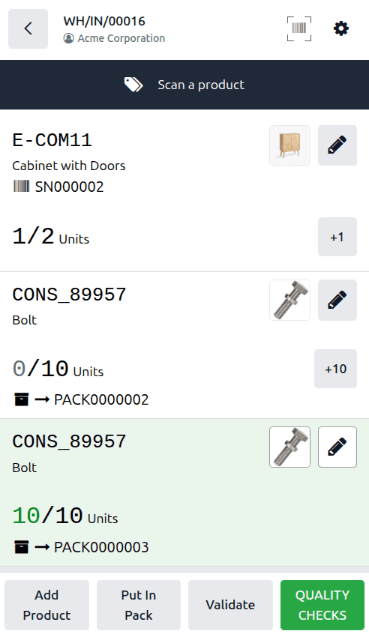
Warehouse receiving floors deal in packages, not individual items. A pallet arrives with four boxes, each box contains a known mix of products, and the receiver needs to confirm everything showed up without scanning every single SKU individually. Until now, the Barcode app treated receipts and deliveries as item-level operations — useful for accuracy, but slow when processing high-volume shipments where the package is the unit of trust.
That gap is now closed. The Barcode app supports package-level scanning during both receipt and delivery operations. Scan a package barcode, and the system processes every product line inside that package at once. For warehouses that receive goods in pre-packed configurations, this turns a multi-scan operation into a single beep.
Three Package Fields That Cover Every Scenario
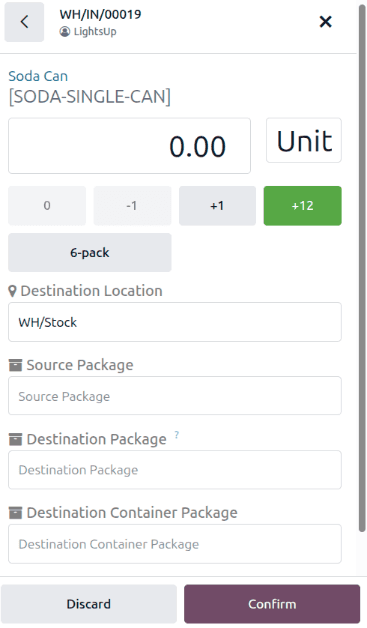
When the Packages feature is enabled in Inventory settings, three new fields appear in the Barcode app’s product line editor for receipt and delivery operations.
Source Packageidentifies which incoming package contains the product. During a receipt, this tells the system “these 10 bolts came in PACK000003.” Scanning the package barcode automatically fills this field for all product lines associated with that package.
Destination Packagespecifies where the product should be stored within the warehouse. This is the put-away package — the bin, tote, or shelf container where the items end up after receiving. Receivers can assign destination packages on the fly or use pre-configured put-away rules.
Destination Container Packagehandles the pack-in-pack scenario. When a warehouse stores smaller packages inside larger containers — boxes on a pallet, vials in a tray, components in a kit — this field nests the destination package inside a parent container. It’s a niche feature, but for operations that track inventory at multiple packaging levels, it eliminates the manual record keeping that previously required.
How a Typical Receipt Works Now
Consider a purchase order for 20 bolts and 2 cabinets, arriving in two packages. Each package contains 10 bolts and 1 cabinet. In the old workflow, the warehouse worker would scan the receipt, then individually scan or enter each product line — bolts, quantity 10, cabinet, quantity 1, repeat for the second package.
With package scanning, the worker opens the receipt in the Barcode app and scans the first package barcode. The system recognizes the package, looks up its contents, and processes 10 bolts and 1 cabinet in a single action. Scan the second package, and the remaining 10 bolts and 1 cabinet are processed. Two scans instead of eight manual entries.
The interface clearly shows what’s been processed and what’s outstanding after each scan. Partial processing is fully supported — if only one of the two packages arrives, the worker processes what’s there and leaves the rest pending for a backorder.
Deliveries Get the Same Treatment
The package scanning workflow mirrors itself on the outbound side. During delivery operations, the same three fields appear in the product line editor, and scanning a package barcode confirms all items inside it for shipment.
This is especially useful for pick-and-pack operations where warehouse workers assemble orders into packages at a packing station, then a second worker at the shipping dock scans each package to confirm the delivery. The package scan validates the entire contents without requiring the shipping worker to know or verify what’s inside — that responsibility stays with the packer.
The Efficiency Math
The time savings scale with package size and shipment volume. A warehouse receiving 50 packages per day, each containing an average of 5 product lines, goes from 250 individual scan-and-confirm operations to 50 package scans. At 10 seconds saved per product line, that’s roughly 30 minutes of receiving time recovered daily — meaningful for operations running tight dock-to-stock targets.
Beyond speed, package-level scanning reduces data entry errors. When a worker manually enters quantities for individual product lines, transposition errors and miscounts are inevitable at volume. When the system reads a package barcode and processes known contents automatically, the error vector narrows to package-level mistakes: wrong package scanned, or package contents not matching the expected manifest. Both are easier to catch and correct than line-level data entry problems.
For warehouses already using Odoo’s Barcode app for inventory operations, this feature activates through the existing Packages setting with no additional modules or configuration. It’s the kind of incremental improvement that compounds into real operational gains when processing volume is high enough to feel the difference.