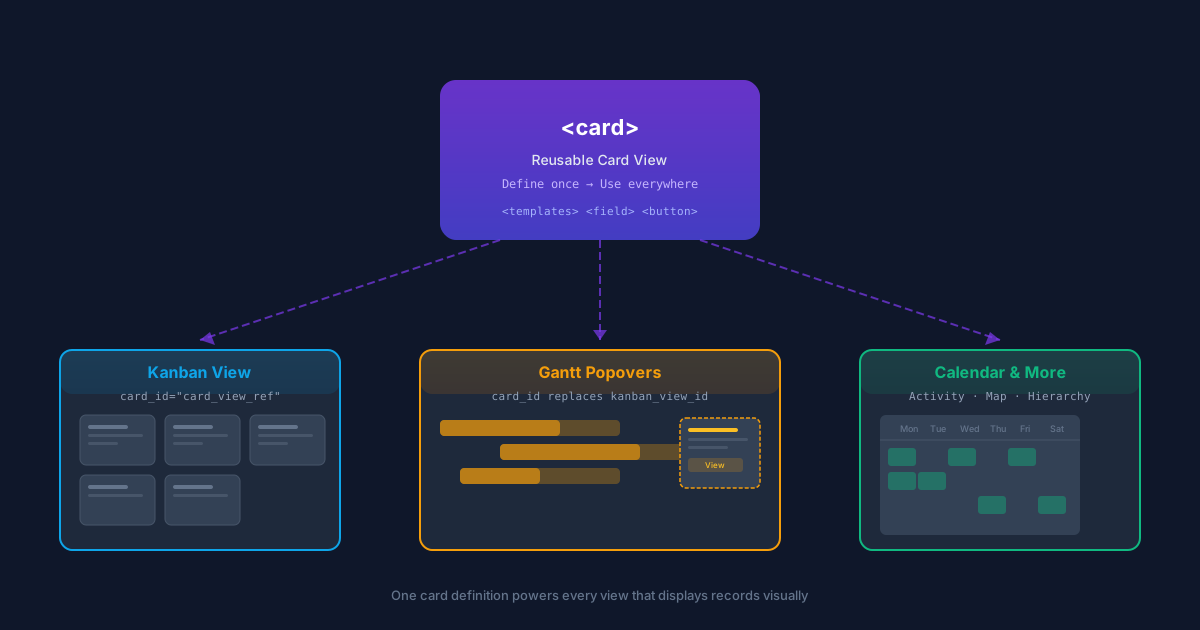
For as long as Odoo has had a kanban board, developers have been writing the same kind of template over and over: a chunk of QWeb that defines how a record looks when it shows up as a card. The problem is that cards don’t just live inside kanban views. They appear in gantt chart popovers, calendar event previews, activity streams, map pins, and hierarchy diagrams. And until now, each of those contexts maintained its own copy of the card rendering logic — subtly different, independently maintained, and collectively impossible to keep consistent.
That changes with the introduction of the card view, a new first-class view type in Odoo’s framework. The idea is deceptively simple: define a card template once as a standalone view record, then reference it from any view that needs to render records visually. One definition, many consumers, zero duplication.
What a Card View Actually Looks Like
A card view is an XML record with a <card> root element. Inside it, a <templates>block contains QWeb templates that define the card’s structure. The minimum requirement is a single template named card, which serves as the entry point for rendering. Optionally, a second template named menucan define a dropdown that appears behind the vertical ellipsis icon in the card’s corner.
The root element accepts three optional attributes — create, edit, and delete — that control whether those operations are available from the card context. Fields declared inside the templates render as formatted spans by default, though widget attributes can override that behavior. Fields declared outside the templates block are fetched but not displayed, making them available for conditional logic without cluttering the visual layout.
One important constraint: these are QWeb templates, not Owl templates. That means event-binding directives like t-on-clickaren’t available. Interactivity comes through buttons and links with special typeattributes — action to trigger server actions, object to call model methods, and in kanban contexts, additional types like open, delete, archive, and set_cover.
The card_id Pattern: Define Once, Render Everywhere
The real power isn’t in the card view itself — it’s in how other views consume it. Any view that renders records as cards can now include a card_id attribute pointing to an external card view record. When the view loads, the framework automatically inlines the referenced card template, producing the same result as if the template had been written directly inside the consuming view.
This is what makes the feature architectural rather than cosmetic. A CRM pipeline’s kanban board and a project’s gantt chart popover can reference the same card definition. When the design team decides that opportunity cards should show the expected revenue below the customer name instead of beside it, they change one view record. Every surface that references it picks up the change automatically.
Before this, achieving visual consistency across views required either meticulous manual synchronization or accepting that the same record would look different depending on where you encountered it. Neither option scaled well, and across Odoo’s thirty-plus modules, the inconsistencies had compounded.
Gantt Popovers Get a Clean Break From Kanban
One of the most visible consequences of this change is in the gantt view. Previously, gantt charts could display record details in popovers by referencing a kanban view through a kanban_view_idattribute. It worked, but it was a hack — the gantt popover doesn’t need kanban-specific features like drag-and-drop columns or stage grouping. It just needs the card template.
The kanban_view_id attribute is now replaced by card_id. Gantt popovers reference card views directly, getting exactly the template they need without the overhead of a full kanban view definition. The popover API has also been restructured around three semantic zones — popover-header, popover-body, and popover-footer— giving developers explicit control over how record information is laid out in the constrained popover space.
This isn’t just a rename. By decoupling popovers from kanban views, Odoo removes a dependency that forced developers to maintain kanban view records solely for the purpose of feeding content to gantt charts. Modules that use gantt views but don’t need kanban boards no longer need to define one just to get a decent-looking popover.
Flexbox Layout and Semantic Structure
Cards render as flexbox containers with column direction by default. Bootstrap utility classes handle layout customization, which keeps the card view definition clean and avoids introducing a parallel styling system. A <footer> element sticks to the bottom of the card and switches to row direction, useful for action buttons and status indicators. The combination of <aside> and <main> elements with a flex-row class lets developers place images or avatars alongside card content without fighting the default column flow.
The template context provides access to the full record object, with each field exposing both a formatted value and a raw raw_value. There’s also a widget object with editable and deletable flags, the current action context, and a read_only_mode boolean. Date manipulation comes through the Luxon library, which is available directly in the template scope.
What This Means for Module Developers
If you maintain custom modules that define kanban views, the immediate takeaway is that you can now extract your card templates into standalone card view records and reference them with card_id. The benefit is real but not urgent — existing kanban views with inline templates continue to work exactly as before.
Where the migration becomes more pressing is for modules that use gantt views with kanban_view_id. That attribute is being replaced by card_id, and the old pattern of referencing a kanban view from a gantt popover will eventually stop working. If your module displays record previews in gantt chart popovers, extracting those templates into card views and switching to the new attribute should be on your upgrade checklist.
The broader shift here is philosophical. Odoo is moving toward a model where the visual representation of a record is defined independently of the view that displays it. A contact card is a contact card whether it appears on a kanban board, inside a gantt popover, on a calendar day cell, or pinned to a map. The card view is the mechanism that makes that possible, and its introduction touches more than thirty modules across the core platform — HR, project management, manufacturing, mail, and e-commerce among them.
For teams building on Odoo, this is the kind of infrastructure change that pays compounding dividends. The first benefit is less code to maintain. The second is visual consistency across every surface that shows records. The third, and arguably the most valuable, is that future views can consume card templates without any additional work from module developers — the template exists, the framework handles the rest.