The contact form in Odoo has always had an identity crisis. Create an individual? One form. Create a company? A different one. The distinction made sense when the system treated people and organizations as fundamentally different record types. But over time, that separation created friction — duplicate fields, confusing navigation, and a “Create Contact” window that forced users to make a choice before they could start typing.
Odoo 19.3 ends the split. There’s now a single, unified contact form that handles both individuals and companies. The old “Create Contact” popup is gone, replaced by a cleaner layout that adapts based on the data you enter. And alongside the form overhaul, the contacts module now ships with five distinct navigation views that give teams different lenses on their contact database.
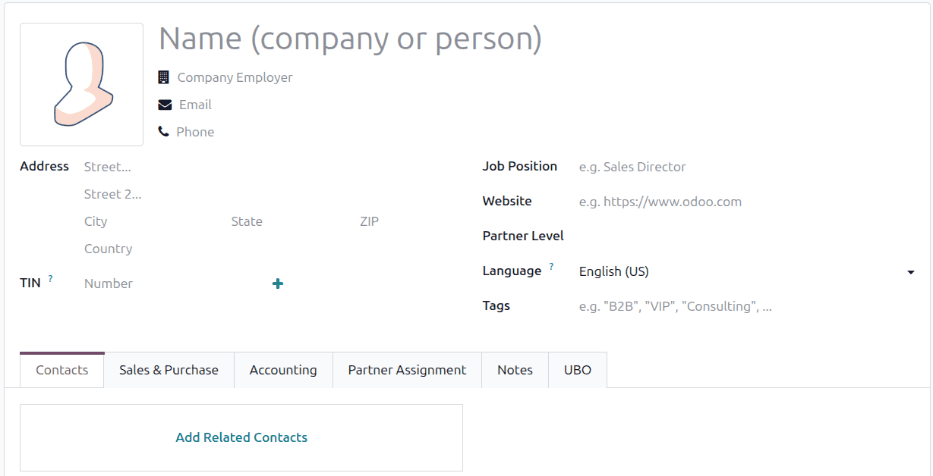
One Form to Replace Two
The unified form doesn’t just merge two layouts — it rethinks how contact data is structured. The “Add Contact” button in the Contacts tab has been renamed to Add Related Contacts, and the child form it opens is now called Create Related Contactsinstead of the generic “Create Contact.” The distinction matters because it makes the parent-child relationship between organizations and people explicit in the UI rather than implicit in the data model.
A new FACe Centeroption has been added to delivery address types, targeting businesses that interact with Spain’s electronic invoicing platform for public administration. It’s a niche addition, but it reflects how Odoo is baking localization-specific fields directly into the core contact form rather than hiding them in separate modules.
DUNS numbers — the nine-digit identifiers used globally to track business entities — can now be added to any contact record through a plus button on the form. Previously, this required either a custom field or a third-party module. Having it native means companies that deal with procurement, government contracts, or international trade can store their DUNS data where it belongs: right next to the company name and tax ID.
Five Views for Different Working Styles
The contacts module now offers five navigation views, each designed for a different task:
List viewgives you the traditional tabular layout for bulk operations — selecting multiple contacts, exporting data, or scanning a filtered set. Kanban viewarranges contacts as cards, useful for visual scanning and quick actions. Map view plots contacts geographically, which matters for field sales teams, delivery route planning, or any business where physical proximity drives decisions.
Hierarchy viewis the interesting addition. It renders contacts as an organizational chart, showing parent-child relationships between companies, subsidiaries, and individuals. For businesses managing complex corporate structures — holding companies with multiple subsidiaries, franchise networks, or multi-entity partnerships — this view turns a flat contact list into a navigable tree. And Activities viewsurfaces pending tasks, follow-ups, and scheduled actions tied to each contact, giving CRM and support teams a task-oriented lens on their relationships.
Smaller Changes That Add Up
The Purchase section has been restructured with clearer grouping options and expanded field descriptions. Invoice Follow-Ups documentation has been removed and replaced with Peppol ID information, reflecting the shift toward European e-invoicing standards. The Partner Assignment section now integrates Resellers documentation inline rather than linking to it as a separate reference — a small change that keeps users in context instead of sending them on a documentation detour.
The archiving workflow has been updated to handle multiple contact selection and simplify the unarchive process. And across the board, field descriptions have been rewritten from passive constructions (“The position…”) to active ones (“This field captures…”), making the documentation read like instructions rather than definitions.
Why Unified Forms Matter More Than They Sound
Merging two forms into one sounds like a UI cleanup, and at the surface level it is. But the downstream effects are significant. Every integration that creates contacts — website forms, e-commerce checkouts, CRM lead conversion, POS customer creation — now feeds into the same form. That means fewer edge cases where a contact gets created as the wrong type, fewer data quality issues from mismatched fields, and a simpler mental model for anyone who touches the contacts module.
The five-view system is the more consequential change for daily use. Most teams interact with contacts through a single view and never discover the alternatives. Having hierarchy and map views available by default — rather than buried in Studio customization — makes spatial and organizational thinking a standard part of contact management instead of an afterthought.