Every Odoo developer has written throwaway scripts to generate test data. Need 500 sale orders to stress-test a custom report? Write a Python script that creates partners, products, and orders in a loop. Need realistic inventory movements for a demo? Another script, another set of hardcoded values, another thing that breaks when the model schema changes.
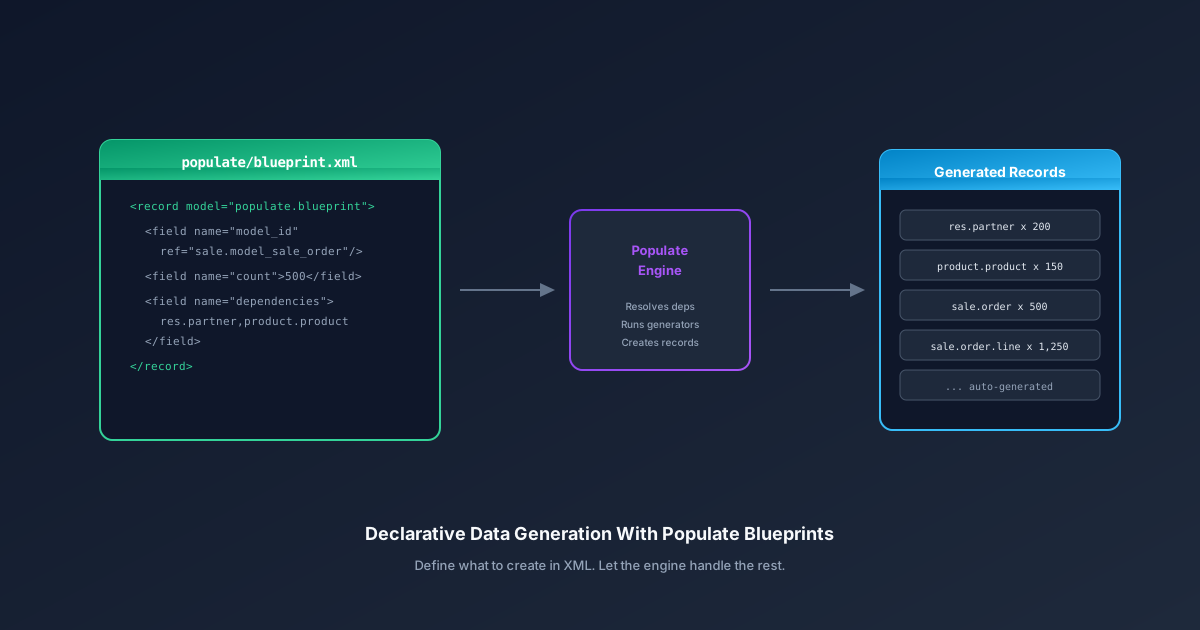
The new Populate module replaces this ad-hoc approach with a structured framework. Instead of writing imperative code that callscreate()in nested loops, developers define blueprints — declarative XML records that describe what data to generate, how much, and in what dependency order. The module handles the rest.
Blueprints Over Scripts
The core concept is the populate.blueprintrecord. Each blueprint targets a specific model, declares how many records to create, and lists its dependencies — other models whose records must exist before generation starts.
A blueprint for sale orders, for example, would declare dependencies on res.partner and product.product. When the Populate module runs, it reads all blueprints, resolves the dependency graph, and generates records in the correct order. Partners first, then products, then sale orders that reference both. No manual orchestration needed.
This is a meaningful shift from how demo data traditionally works in Odoo. Demo XML files are static — they create a fixed number of predefined records that never change. The Populate module generates dynamic data at scale, which is what you actually need for performance testing, QA environments, and customer demos that need to look realistic.
The Directory Convention
Blueprints live in a populate/ directory inside the module, following the same convention as data/,views/, and security/. XML blueprint files go directly in the directory and are loaded automatically when the Populate module is installed or upgraded.
If the populate/directory is also a valid Python package — meaning it contains an __init__.py— the module imports it at startup. This is where custom generators live: Python classes that extend the default generation logic with field-specific value creation, realistic distributions, or integration with external data sources.
The separation is deliberate. Simple data generation requires nothing beyond XML. Complex scenarios that need, say, realistic date distributions across a fiscal year or geographically coherent addresses can layer Python on top without cluttering the basic blueprint structure.
What Happened to the Old Populate CLI
Odoo previously had a command-line populate feature that worked differently — it was more of a database duplication tool than a data generation framework. As part of this change, the old CLI command has been renamed to “duplicate” to avoid confusion. The naming now reflects the actual function: the CLI duplicates existing databases, while the Populate module generates fresh data from blueprints.
This cleanup matters because the old naming led to developers conflating two very different operations. Duplicating a database gives you an exact copy of production data with all its inconsistencies and sensitive information. Generating data from blueprints gives you a clean dataset shaped specifically for testing. Different tools, different purposes, and now different names.
Where This Fits in the Development Workflow
The Populate module slots into a gap that Odoo developers have been working around for years. Unit tests use minimal fixtures — a partner here, a product there — enough to validate logic but not enough to surface performance problems or realistic edge cases. Demo data is too static and too small. Production copies are too sensitive and too large.
Blueprints fill the middle ground. A module developer can ship apopulate/ directory alongside their module that generates 500 orders, 200 partners, and 50 products with realistic field values. Anyone who installs the module with the Populate module enabled gets a pre-configured test environment without writing a single script.
This is particularly valuable for the Odoo ecosystem beyond the core team. Third-party module developers can now include data generation as part of their module distribution. An integration partner setting up a demo environment for a client can use blueprints to create a realistic dataset that showcases the module’s capabilities without manually entering data for three hours.
The Custom Generator Escape Hatch
For straightforward models, XML blueprints alone are sufficient. The Populate module knows how to generate reasonable default values for standard field types. But some fields need domain-specific intelligence — a sale order date that falls on a business day, a partner address that geocodes correctly, a product price that follows a believable distribution.
Custom generators handle this. A Python class registered as a generator for a specific model can override how individual fields are populated. The generator receives context about the blueprint — how many records are being created, what dependencies are available — and returns field values that the Populate engine uses during record creation.
The architecture avoids the trap of making the simple case complex. If all you need is 500 records with default values, write an XML blueprint and be done. If you need those records to look like real data, add a generator. The complexity scales with the requirement, not with the framework.
Why Declarative Matters Here
The imperative approach to test data — writing Python scripts that call ORM methods directly — breaks in predictable ways. Model schemas change, required fields get added, compute methods start depending on related records that the script doesn’t create. Every schema migration is a potential script-breaking event.
Blueprints abstract away the creation mechanics. The Populate module handles field defaults, required fields, and record dependencies at the framework level. When a model adds a new required field with a default value, existing blueprints continue working because the engine fills in defaults automatically. When a dependency changes, the graph resolver adapts.
This doesn’t make blueprints maintenance-free — significant model restructuring will still require blueprint updates. But it moves the maintenance burden from fragile scripts that touch every field to declarative definitions that only specify what the developer actually cares about. The framework handles the rest, and that turns data generation from a recurring chore into a one-time setup that ages gracefully.