Developer documentation lives or dies on navigation. You can write the most thorough API reference in the world, but if people can’t find what they’re looking for on a phone — and increasingly, developers do reach for their phones when troubleshooting — the effort is wasted. Odoo has clearly been paying attention to this problem, because the platform’s documentation site just received its most significant interface overhaul in years.
The Mobile Navigation Problem
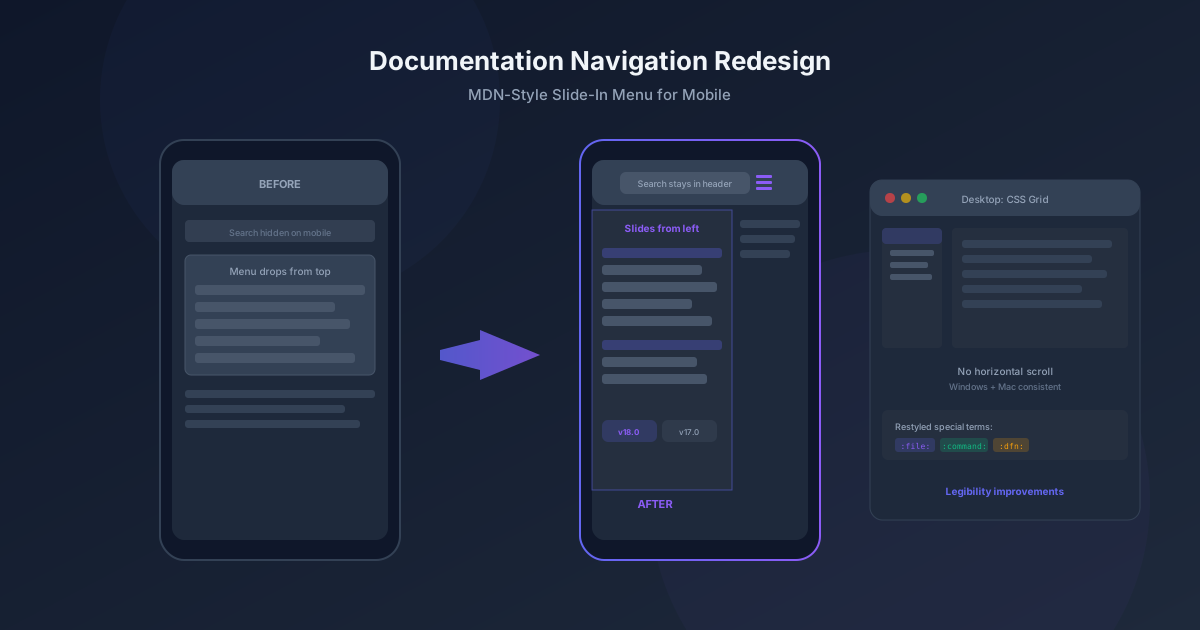
The old mobile experience had a fundamental layout issue. When you tapped the menu on a phone, the navigation dropped down from the top of the screen, pushing the content below it out of view. The version switchers — the dropdown that lets you toggle between Odoo 17, 18, and other releases — were completely hidden on mobile. And the search box, arguably the most important element on any documentation site, got squeezed out of the header when the screen was narrow enough.
The redesign borrows a pattern from MDN Web Docs, Mozilla’s developer documentation, which is widely considered one of the best-navigated technical reference sites on the web. Instead of dropping down from the top, the navigation now slides in from the left edge of the screen as a sidebar panel. The search box stays permanently in the header. The version switchers move to a new sub-navigation bar that’s always visible, regardless of screen size.
CSS Grid Kills the Horizontal Scroll
A particularly irritating bug plagued Windows users for a long time: a mysterious horizontal scrollbar that appeared on the documentation site. Mac users never saw it, because macOS handles overflow differently. The root cause turned out to be a roughly one-rem discrepancy in how the two operating systems calculated content width.
Previous fixes tried adding or subtracting that one rem to the content’s max-width calculation, but this created a visible gap on Mac. The real solution was more elegant: switching the entire page layout from traditional CSS positioning to CSS grid. With grid, the max-width calculations and left-positioning relative to the sidebar became unnecessary. The browser handles the layout math, and both platforms render identically.
Special Terms Get Their Own Visual Language
Technical documentation uses inline markup to distinguish different types of references — file paths, terminal commands, UI labels, defined terms. In Odoo’s reStructuredText source files, these are roles like :command:, :file:, and :dfn:. Previously, they all rendered with generic italic or bold styling, making them visually indistinguishable from each other and from regular emphasis.
The restyling gives each role its own visual treatment. Commands look different from file paths, which look different from defined terms. This isn’t just cosmetic — it lets documentation writers use semantic markup knowing that readers will be able to tell at a glance whether a piece of text is something to type into a terminal, a file to open, or a concept being introduced for the first time.
Reference Pages Get a Structural Refresh
The API reference pages — the ones developers visit most frequently when building Odoo modules — received a dedicated redesign pass. Code elements that previously rendered with awkward spacing (like odoo.models .BaseModel with a stray space) have been tightened up. More importantly, the pages now include visual indicators for parent-child relationships between classes, using a left border treatment that makes inheritance hierarchies scannable without reading every line.
Under the Hood: A Smaller, Cleaner Stylesheet
The visible changes sit on top of a significant infrastructure cleanup. The documentation theme’s SCSS codebase went through a consolidation pass that removed unused legacy code dating back to much older versions of the site. Variables were cleaned up, duplicated values were replaced with Bootstrap variable references, and the admonition (alert box) system was rebuilt to be more maintainable.
Font sizes that previously broke the typographic scale by hardcoding pixel values were replaced with proper scale calculations. The overall effect is a smaller CSS bundle that loads faster and behaves more consistently across browsers — the kind of work that users never notice directly but that compounds over time into a noticeably smoother experience.
For a documentation site that serves as the daily reference for tens of thousands of developers and business users, these aren’t minor polish items. They’re the difference between a reference that people tolerate and one they actually prefer to use.