Shipping in Odoo used to mean picking a lane. You set up DHL Express, or you set up FedEx, or you wired Sendcloud for European carriers. Each connector lived in its own module, had its own credential flow, and produced its own labels. If your warehouse shipped through four carriers depending on the destination, you configured four integrations and maintained four sets of API keys.
EasyPost takes a different approach, and Odoo now supports it natively. Instead of connecting to each carrier individually, EasyPost acts as a single aggregation layer. One account, one API key, and suddenly UPS, USPS, FedEx, DHL, and dozens of regional carriers are all accessible from the same delivery method form. The integration has technically existed in Odoo for a few versions, but it never had dedicated documentation or a proper setup guide — which meant most teams either didn’t know it existed or couldn’t figure out how to configure it.
The Setup Is Simpler Than Any Single-Carrier Connector
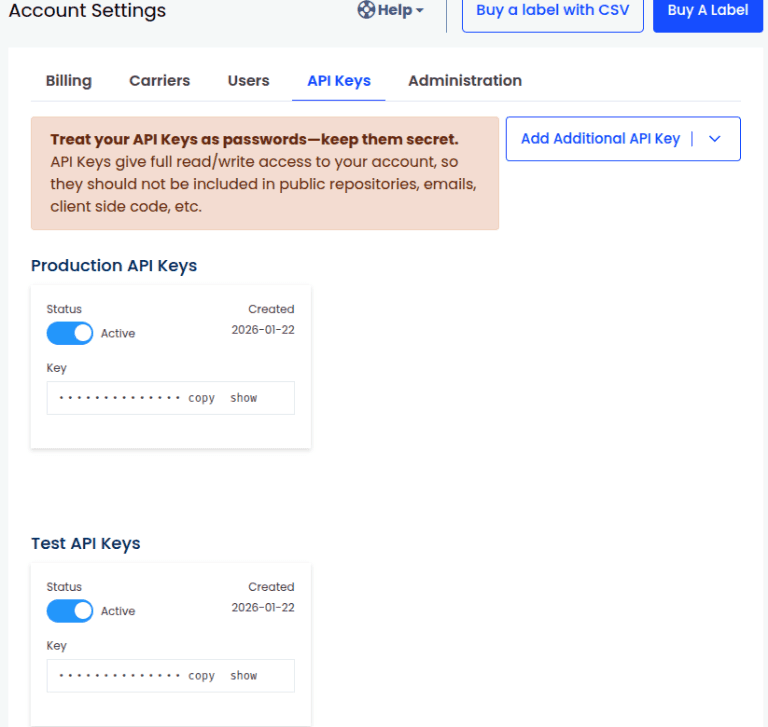
Creating an EasyPost account is free. No charges accrue until you actually create a shipment. That alone removes the friction that stops warehouse managers from testing new carriers. With a traditional connector, you need a production account with the carrier before you can even explore the integration. With EasyPost, you sign up, get API keys, and start testing immediately.
Some carriers come pre-enabled. USPS and DHL Express are automatically available on new EasyPost accounts without any additional setup. For other carriers, EasyPost offers two paths: wallet carrier accounts, where EasyPost brokers the relationship and bills through your EasyPost balance, or bring-your-own-account, where you connect your existing carrier credentials through the EasyPost dashboard.
Two API Keys, Two Environments
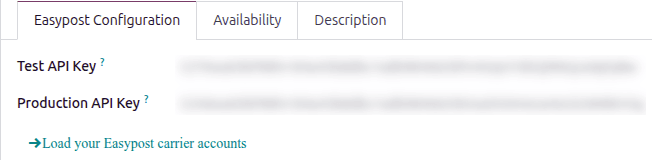
The Odoo configuration mirrors EasyPost’s two-environment model. Inside the Inventory app, you create a new delivery method and select EasyPost as the provider. Two fields appear: Test API Key and Production API Key. The test key lets you generate labels and calculate rates against EasyPost’s sandbox without incurring charges. The production key connects to live carrier accounts and real shipments.
A smart button on the delivery method form toggles between test and production environments. This is useful during rollout: you can validate label formatting, rate accuracy, and carrier availability in test mode, then flip the switch when you’re ready to ship real packages.
Loading Carrier Accounts in One Click
Once the API keys are in place, a button on the delivery method form pulls all your EasyPost carrier accounts into Odoo. Instead of manually entering carrier details, the system queries EasyPost’s API and populates a list of available carriers. Each carrier shows up with its service levels, and you can set defaults for the delivery method.
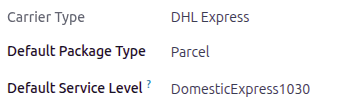
The package type and service level selectors work together. You pick a default package type — which determines dimensions and weight for rate calculation — and a default service level, which tells EasyPost which tier of service to quote (ground, express, priority, and so on). These defaults apply automatically to new shipments but can be overridden per order.
Four Label Formats for Every Warehouse Setup
Label printing is where shipping integrations often fall apart. The wrong format means reprinting, manual workarounds, or warehouse staff taping laser-printed labels onto boxes instead of using thermal printers. EasyPost through Odoo supports four label formats: PNG for standard printers, PDF for document management workflows, and ZPL and EPL2 for Zebra and other thermal label printers. You select the format once on the delivery method form, and every label generated through that method uses it.
Return labels are equally straightforward. A toggle on the delivery method form enables automatic return label generation alongside every outbound label. No separate return shipping setup, no manual label creation — the return label is generated at the same time as the outbound label and attached to the delivery order.
Why This Beats the One-Carrier-Per-Module Approach
The real advantage isn’t any single feature — it’s the architectural simplification. A warehouse that ships via USPS for lightweight domestic packages, UPS Ground for heavy freight, and DHL Express for international orders traditionally needs three separate Odoo shipping modules, three credential setups, and three maintenance windows when APIs change. With EasyPost, all three carriers run through one delivery method. Rate comparison happens at the EasyPost level, and Odoo just sees one provider.
For businesses that add carriers seasonally — a regional carrier for holiday surge, a specialized freight service for oversized items — EasyPost lets them activate new carriers from the EasyPost dashboard without touching Odoo configuration at all. The new carrier shows up automatically the next time carrier accounts are loaded.
Debug logging is available for teams that need visibility into API interactions. A toggle on the delivery method form enables detailed logging of every request and response between Odoo and EasyPost, which is essential for diagnosing rate discrepancies or label generation failures during the initial setup phase.
The Gap This Fills
EasyPost has been available in Odoo’s module library for several versions, but without documentation, it was effectively invisible. Teams that needed multi-carrier shipping either cobbled together multiple single-carrier modules or turned to third-party aggregators outside Odoo entirely. The native integration was there the whole time — it just didn’t have a setup guide.
That gap is now closed. The integration is documented, the setup is clean, and the free account model means there’s no cost to testing it. For any warehouse shipping through more than one carrier in the US, this is worth an afternoon of setup time.