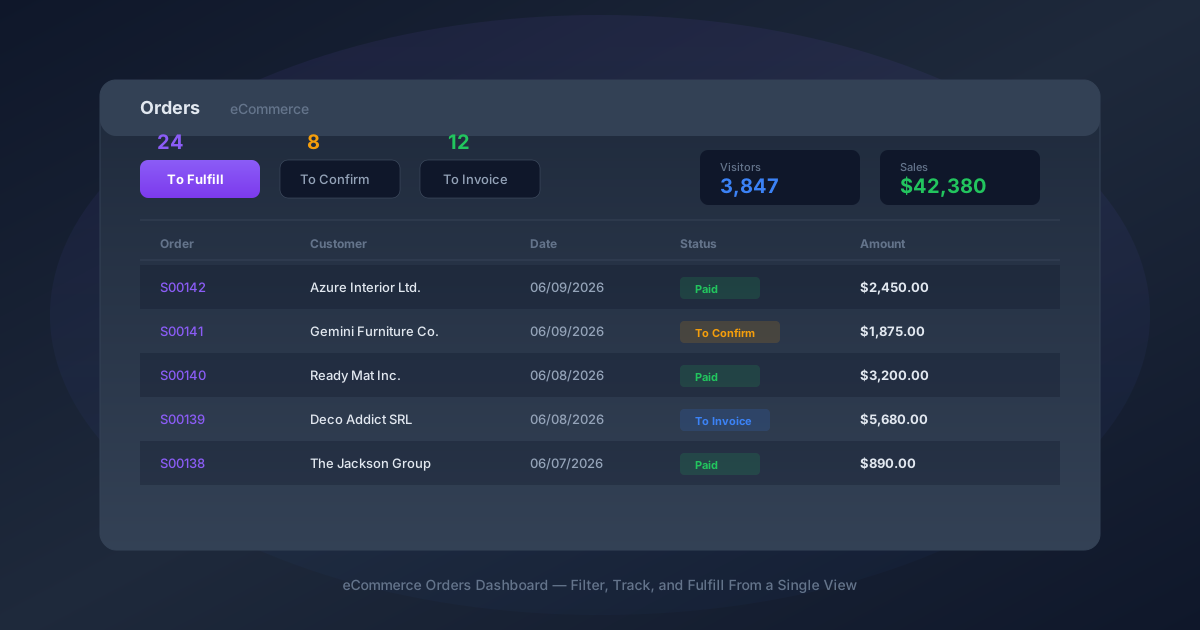
If you’ve ever opened the Orders page in Odoo’s eCommerce module and felt like you were staring at a spreadsheet with no context, you weren’t alone. The old interface dropped you into a raw list of every order, with no indication of which ones needed attention, which were waiting for payment, or how the store was performing overall. Finding the orders that actually required action meant scrolling, filtering manually, or just knowing which status labels to look for.
That changes with the addition of a proper sales dashboard at the top of the Orders page. It’s not a separate reporting screen buried in a menu — it sits right above the order list, giving store operators an immediate read on what needs doing before they even start scrolling.
Three Filters That Sort the Noise From the Work
The dashboard introduces three filter buttons that carve the order list into the categories that actually matter for daily operations: orders to fulfill, orders to confirm, and orders to invoice.

To Fulfillsurfaces confirmed, paid orders — the ones where the customer has completed checkout and payment has cleared. These are genuine sales orders ready for the warehouse. Clicking this filter strips away everything else and shows only the orders that need picking, packing, and shipping.
To Confirmcatches the orders that haven’t crossed the commitment threshold yet. These are sent but unconfirmed quotations — customers who started the checkout process or received a quote but haven’t completed payment or confirmation. For stores that use manual order confirmation or offer payment on delivery, this filter becomes the follow-up queue.
To Invoiceshows confirmed orders that are ready for invoicing but haven’t been billed yet. This matters for B2B eCommerce operations where invoicing happens separately from order fulfillment, or for businesses that batch their invoicing on a weekly or monthly cycle rather than invoicing at the moment of sale.
Real-Time Store Metrics Without Leaving the Orders Page
The right side of the dashboard displays three numbers that store operators previously had to dig through analytics reports to find: visitor count, order count, and total sales amount for the current period.
These aren’t vanity metrics. The visitor count tells you whether traffic is normal, spiking, or dropping off — context that matters when you’re looking at an order queue and trying to understand whether a slow day is a traffic problem or a conversion problem. The sales amount gives immediate revenue visibility without switching to an accounting report.
For store managers who check the Orders page first thing every morning, having these numbers visible at a glance eliminates the tab-switching ritual of checking Google Analytics for traffic, then the Orders page for fulfillment, then a sales report for revenue. The dashboard consolidates the morning check into a single screen.
A Small Change With Outsized Operational Impact
This is the kind of improvement that sounds minor in a changelog but changes daily workflows in practice. Before the dashboard, a store operator’s morning routine involved opening the Orders page, applying a custom filter to find paid-but-unshipped orders, mentally counting them, then switching filters to check for pending confirmations, then navigating to a separate report for revenue figures.
With the dashboard, all of that information is visible the moment the page loads. The filter buttons aren’t just visual indicators — they’re functional. Click “To Fulfill” and the order list below immediately filters to show only those orders. Click it again to remove the filter. The interaction is immediate, with no page reload or separate filter panel to configure.
For stores processing dozens or hundreds of orders daily, the time savings compound. But even for smaller operations handling a handful of orders per day, the cognitive benefit is real: instead of wondering “did I miss any orders that need shipping?” the dashboard tells you exactly how many are waiting, and one click shows you which ones.
Where This Fits in Odoo’s eCommerce Direction
The orders dashboard is part of a broader pattern in recent Odoo releases: making operational information visible at the point of action rather than buried in dedicated reporting modules. The same thinking drove the addition of smart buttons on event forms, stock level indicators on product pages, and production status bars on manufacturing orders.
For eCommerce specifically, the dashboard fills a gap that competing platforms like Shopify and WooCommerce have addressed for years. Shopify’s order management screen has always led with fulfillment status filters and revenue summaries. Odoo’s eCommerce module — powerful in its integration with inventory, accounting, and CRM — has historically lagged behind dedicated eCommerce platforms in this kind of operator-facing polish.
This update closes that specific gap. It doesn’t reinvent order management, but it makes the existing order management workflow significantly faster for the people who use it every day. And for an eCommerce tool, that’s exactly the kind of improvement that matters most.