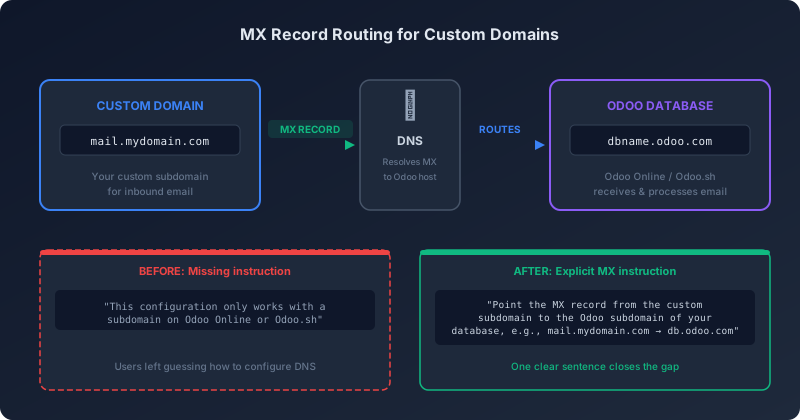
For months, Odoo’s email server documentation told users they could use a custom subdomain for inbound email on Odoo Online and Odoo.sh — something like mail.mydomain.com — but never explained the one DNS step that makes it work. The documentation said the feature existed. It did not say how to configure it. That single omission sent administrators down a rabbit hole of DNS trial and error, forum posts, and support tickets.
The fix is exactly one sentence long.
What Was Missing
The original documentation for inbound email servers stated that custom subdomain configuration “only works with a subdomain on the Odoo Online or Odoo.sh infrastructure.” That sentence told users the constraint but not the action. There was no mention of MX records, no DNS configuration example, no indication of what the target hostname should be. Anyone setting up mail.mydomain.com as their inbound email address had to figure out on their own that the MX record needed to point somewhere specific.
The One-Sentence Fix
The updated documentation now reads: “Point the MX record from the custom subdomain to the Odoo subdomain of your database, e.g., from mail.mydomain.com to dbname.odoo.com.” That’s the entire change. One sentence with a concrete example that tells administrators exactly what DNS record to create, what the source domain is, and what the target domain should be.
It sounds trivial — and in terms of character count, it is. But this is the kind of documentation gap that generates disproportionate support volume. Email configuration is a first-week task for most Odoo deployments. When it fails silently because a DNS record points to the wrong host, administrators rarely suspect the documentation. They suspect their DNS provider, their hosting setup, their Odoo configuration. The debugging cycle burns hours before someone finds the right answer in a forum thread.
How the Routing Works
For context, Odoo’s inbound email architecture on its hosted platforms works through a subdomain delegation model. You create a subdomain on your own domain — typically something like mail.yourdomain.com — and configure its MX record to point at your Odoo database’s subdomain on odoo.com. When an email arrives at that subdomain, DNS routes it to Odoo’s mail servers, which then match it to your database based on the hostname and deliver it to the correct inbox or mail alias.
The reason a subdomain is required rather than a top-level domain is straightforward: your primary domain’s MX records likely already point to your existing email provider (Google Workspace, Microsoft 365, or similar). Using a subdomain lets you route Odoo-specific email traffic without disrupting your main email infrastructure.
The Lesson in Minimal Documentation Changes
This update is a case study in how small documentation gaps create large operational problems. The feature worked. The code was correct. The only thing missing was one explicit instruction in the documentation. For administrators who already understood DNS and MX records, the omission was an annoyance. For those encountering custom email configuration for the first time — which describes a significant portion of Odoo’s small-business user base — it was a blocker.
The change also demonstrates why concrete examples matter more than abstract descriptions in configuration documentation. “Point the MX record from X to Y” with actual domain names tells users what to type. “Configure your DNS appropriately” tells them nothing.