Virtual and hybrid events have become permanent fixtures, but most event platforms still treat video conferencing as something that happens elsewhere — a Zoom link in an email, a Teams invite in a calendar, a third-party networking tool that attendees have to sign up for separately. The experience is fragmented by design.
Odoo’s Events module now includes Community Chat Rooms, a feature that embeds Jitsi-powered video conferencing directly into the event website. Attendees can join topic-based video rooms without leaving the event page, and organizers can create structured networking spaces without configuring external tools.
How Organizers Set Up Rooms
Community Chat Rooms are enabled through the Events settings panel. Once activated, a “Rooms” button appears on each event form, giving organizers a dedicated space to create and manage meeting rooms for that specific event.
Each room gets its own configuration: a topic name that describes the conversation focus, a summary for additional context, target audience settings, capacity limits, and language preferences. Organizers can create as many rooms as the event warrants — from a single general networking room to a dozen topic-specific breakout spaces.

The Attendee Side
Published rooms appear under a Community submenu on the event website. Attendees see a list of available rooms showing the topic title, a brief summary, and real-time participant counts. Joining a room launches a Jitsi video conference directly in the browser — no app downloads, no account creation, no meeting codes to enter.
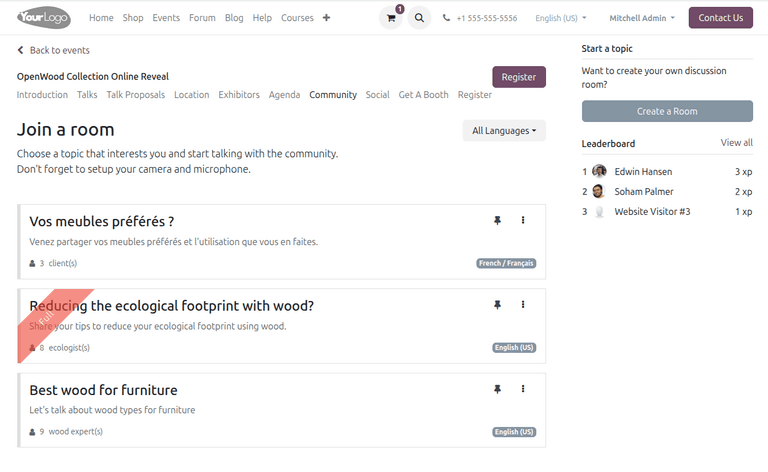
What makes this interesting is the self-service angle: attendees can also create their own rooms through a “Create a Room” button on the community page. They fill in a topic, summary, target audience, language, and capacity — and the room goes live for other attendees to discover and join. This turns the community page from a static list of organizer-planned sessions into an organic networking space where conversations form around whatever topics attendees actually care about.
Why Jitsi Instead of a Custom Solution
The choice of Jitsi as the video backend is deliberate. Jitsi is open-source, requires no user accounts, runs entirely in the browser, and handles the video infrastructure that would otherwise require significant engineering investment. For Odoo, it means community rooms work out of the box without licensing fees or complex server provisioning. For attendees, it means zero friction — clicking a room name is all it takes to join a live video conversation.

Where This Fits in the Event Stack
Community Rooms sit alongside Odoo’s existing event features — registration, ticketing, tracks, sponsor booths, and exhibitor management — as another native tool that eliminates a third-party dependency. The pattern is consistent with how Odoo has approached its platform strategy: instead of building integrations with external event networking tools, they built the capability directly into the event module.
For hybrid events, this is particularly useful. The same event page that handles in-person registration and badge printing now also hosts virtual networking rooms. Attendees who couldn’t make it in person can still participate in the conversations happening around the event, and in-person attendees can continue discussions after the physical sessions end.
The Capacity Question
Each room supports a configurable capacity limit, which prevents the common problem of video rooms becoming unusable when too many people join. For large events, organizers can create multiple rooms around the same theme with staggered capacity, naturally distributing attendees across parallel conversations. The participant count displayed on the community page gives attendees the information they need to pick a room that isn’t already full or find where the active discussion is happening.
It’s a straightforward addition that solves a real gap in event management: giving attendees a reason to stay on the event platform instead of drifting to WhatsApp groups and LinkedIn DMs for the conversations that matter most.