Small interface changes in ERP software rarely make headlines. But for anyone who has managed multi-session events in Odoo — conferences with workshop tracks, training programs with multiple time slots, multi-day festivals with per-session registration — a new smart button on the event form solves a daily navigation friction that was more annoying than it had any right to be.
Until now, the only way to access the slots dashboard from an event form was to find the small “# Slot(s)” link next to the Multiple Slots checkbox, buried somewhere in the configuration fields. If you had a long event form with dozens of configured fields, that link sat below the fold. You’d scroll past the event description, past the ticket configuration, past the communication settings, hunting for a tiny hyperlink that told you how many time slots existed and let you manage them.
The Fix: A Calendar Icon at the Top of the Form
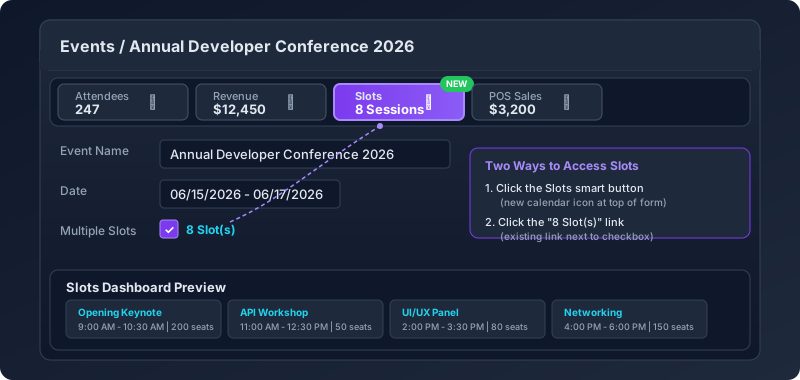
Odoo 19.2 adds a Slots smart button to the row of smart buttons that sits at the very top of the event form. It appears alongside Attendees, Revenue, POS Sales, and any other smart buttons already pinned there. The button uses a calendar icon and displays the total number of configured slots — the same information that was previously only available through the checkbox link, now elevated to the same visual priority as attendee counts and revenue figures.
Click it, and you land directly on the slots dashboard: a structured view of every time window, its capacity, its current registration count, and its schedule position within the event. No scrolling. No searching. One click from anywhere on the event form.
Why Smart Button Placement Matters in ERP
Smart buttons in Odoo serve a specific design function: they surface the most operationally relevant data about a record at a glance. When you open a sales order, you see the delivery status and invoice count in the smart button bar before you read a single line item. When you open a contact, you see their opportunity count and purchase history.
For events with multiple slots, the session count is equally operationally relevant. An organizer opening an event form typically wants to know three things immediately: how many people are registered, how much revenue the event has generated, and how the schedule is structured. The first two had smart buttons. The third didn’t. Now it does.
Two Paths to the Same Dashboard
The original Slot(s) link next to the Multiple Slots checkbox hasn’t been removed. Organizers now have two entry points to the slots dashboard: the new smart button for quick access from the top of the form, and the existing inline link for access while actively editing the multi-slot configuration settings.
This dual-path approach is consistent with how Odoo handles similar navigation patterns elsewhere. Purchase orders have both a Receipt smart button and inline links to individual receipts within the order lines. Manufacturing orders have both a Work Orders smart button and detailed status indicators on individual operations. The pattern gives power users fast navigation while preserving contextual links for users working through the form sequentially.
The Multi-Slot System in Context
The smart button addition arrives as the multi-slot system itself continues to mature. Introduced as a major feature that lets organizers divide a single event into bookable time windows, the multi-slot system has become central to how Odoo handles conference-style events, workshop series, and any gathering where attendees register for specific sessions rather than the event as a whole.
Each slot gets its own capacity limit, its own registration flow, and its own calendar position. The slots dashboard — now one click away — is where organizers monitor fill rates across sessions, identify which time windows are undersold, and adjust capacity or scheduling before the event goes live.
For event teams managing dozens of sessions across multi-day conferences, the difference between scrolling to find a link and clicking a button at the top of the form compounds across hundreds of interactions per event cycle. It’s the kind of change that doesn’t show up in feature comparison charts but shows up immediately in daily workflow speed.
A Minor Edit With an Outsized Usability Payoff
The change itself is minimal — a few modified lines in the events documentation template and a single UI element addition to the form view. But interface improvements don’t need to be architecturally complex to be valuable. Sometimes the right fix is just putting a button where people are already looking.
For organizations running Odoo 19.2 or later with the Events module and multi-slot scheduling enabled, the smart button appears automatically. No configuration changes needed, no module updates to install. Open an event with multiple slots, and the calendar icon is already there at the top of the form, right where it should have been from the start.