For years, Odoo treated expense reimbursement as a three-lane highway where all lanes were equally valid: pay through a payslip, cut a check, or hand over cash. The documentation presented these options side by side, implying they were interchangeable. In practice, they’re not. Most companies with a functioning payroll system reimburse expenses through the next pay cycle because it’s cleaner for accounting, simpler for compliance, and doesn’t require someone to process a separate payment.
Odoo has now restructured its expense reimbursement workflow to reflect this reality. Payslip-based reimbursement is the primary method, with individual cash, check, and direct deposit as a secondary fallback. The change isn’t just cosmetic — the entire flow has been reorganized with new navigation paths, clearer status requirements, and dedicated procedures for both individual and bulk payslip processing.
The New Default: Reimburse Through Payroll
The updated workflow centers on a simple premise: if an expense has been approved and posted to an accounting journal, it should flow into the next payslip automatically. The system now enforces a clear prerequisite — only expenses with both anApproved and Posted status qualify for payslip reimbursement. This gate prevents half-processed expenses from leaking into payroll and creating reconciliation headaches later.
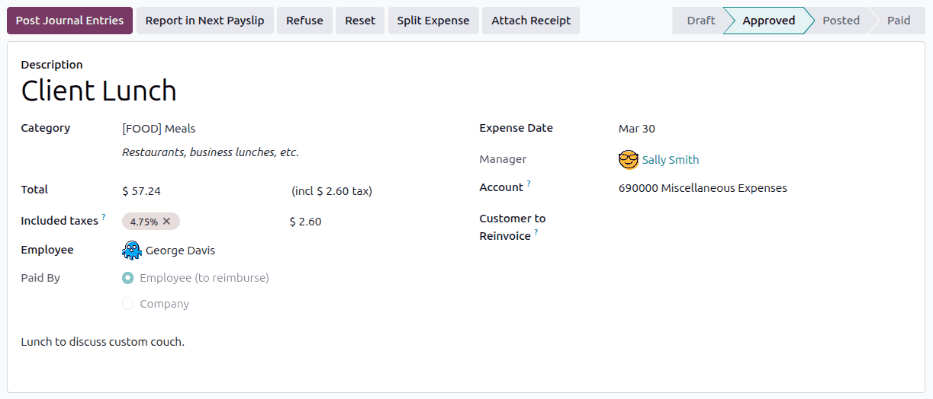
Two distinct payslip reimbursement paths are now documented. Individual payslip reimbursementlets managers process a single expense directly from the expense form, attaching it to the employee’s next pay run. Bulk payslip reimbursementhandles multiple expenses at once, pulling all eligible expenses for a department or pay period into a single processing queue. For companies that close expense windows on a schedule — the 15th and the last day of the month, for example — the bulk path eliminates the one-at-a-time clicking that made month-end reimbursement tedious.
Cash and Checks Get Demoted, Not Removed
The cash, check, and direct deposit path is still available, but it’s now positioned as the exception rather than the default. The payment registration interface has been cleaned up with a simpler popup that presents payment method options without the previous clutter.
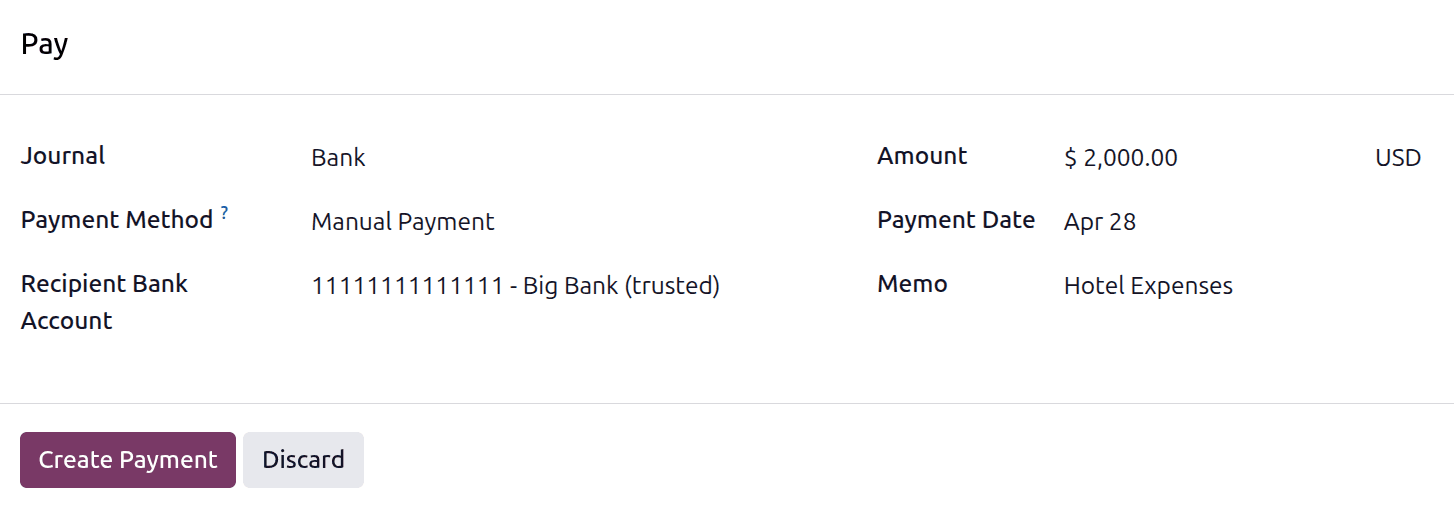
The old “Manual Payment (Cash)” option label has been removed in favor of letting the payment method options surface dynamically based on what’s configured. For companies with payroll localizations installed, additional reimbursement options appear automatically — a subtle but important change that means the interface adapts to the company’s actual payment capabilities rather than showing a fixed list that may not apply.
Why the Order Matters
Putting payslip reimbursement first isn’t just about documentation hierarchy — it shapes how new users learn the system. When an HR administrator sets up expense management for the first time, the documentation they follow determines which workflow becomes the company default. Previously, the equal presentation of all three methods meant many teams defaulted to manual cash payments because it was listed first and seemed simplest. The result was a shadow payment process that bypassed payroll, created accounting gaps, and made tax reporting harder than it needed to be.
The restructured flow also aligns with how auditors think about expenses. When reimbursements flow through payroll, they’re automatically tied to a pay period, an employee record, and a journal entry. When they’re processed manually, the audit trail depends on whoever registered the payment remembering to attach the right references. Defaulting to the more traceable path reduces compliance risk without adding process overhead.
What to Check in Your Current Setup
If your company already uses payslip-based reimbursement, nothing changes operationally. The workflow is the same; only the documentation emphasis has shifted. If you’re currently processing expenses through manual payments and want to switch, the new documentation provides step-by-step navigation paths for both individual and bulk payslip reimbursement that weren’t previously documented as distinct procedures.
The key prerequisite to verify: expenses must reach both Approved and Posted status before they’re eligible for payslip reimbursement. If your current approval workflow stops at Approved without automatically posting to the journal, you’ll need to add that step or expenses will sit in limbo between approval and payday.