Here’s a sentence nobody expected to read: Odoo has removed expense reports. Not simplified them, not renamed them — removed them entirely. The concept of grouping individual expenses into a bundled report before submitting for approval is gone from version 19. In its place, every expense is now processed individually from a dedicated dashboard.
This is one of those changes that sounds minor on paper but rewires how every company using Odoo handles employee reimbursements. If you’ve ever watched an employee wait three days to submit a $12 parking receipt because they wanted to “batch it” with other expenses into a report, you understand why the old model needed to die.
What the Old Workflow Looked Like
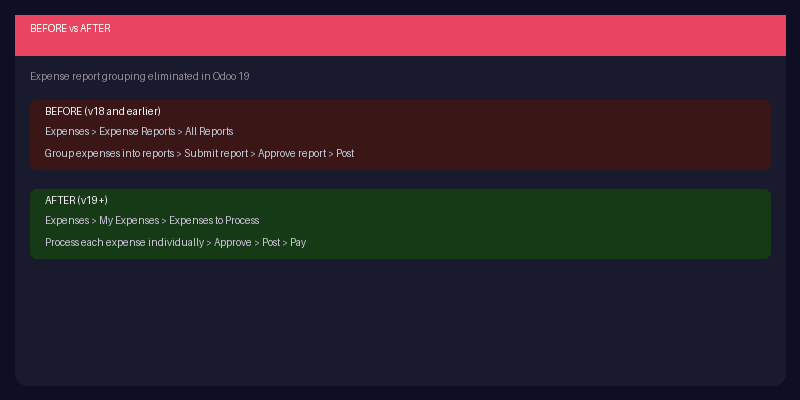
In previous versions, the expenses module worked on a two-tier system. Employees created individual expense entries — meals, mileage, supplies — and then grouped them into an expense report. The report was the unit of approval: managers reviewed and approved entire reports, not individual line items. The navigation path was Expenses > Expense Reports > All Reports, with status filters for To Submit, Submitted, Approved, Posted, and Done.
This model made sense when expense processing was a monthly ritual — employees collected receipts all month, compiled them into a report, and submitted at period end. But modern expense management is more real-time. Employees photograph receipts on their phone immediately, submit expenses as they happen, and expect approval within days, not weeks.
The New Per-Expense Model
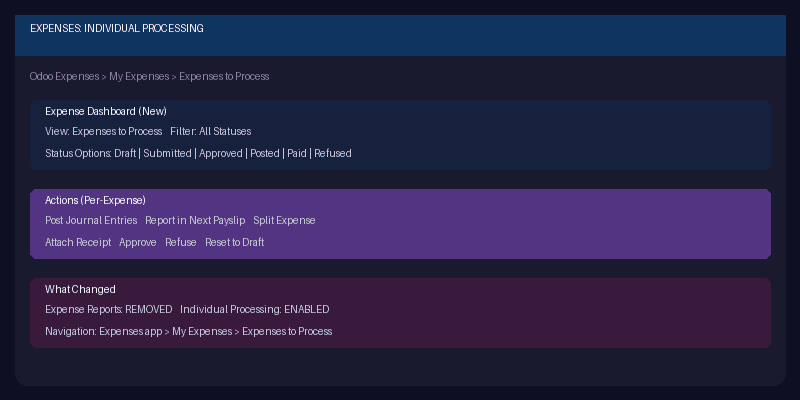
The new navigation path is Expenses > My Expenses > Expenses to Process. Every expense shows up as its own actionable item. Approvers (anyone with at least “Team Approver” rights) see a dashboard of individual expenses with expanded status options: Draft, Submitted, Approved, Posted, In Payment, Paid, and Refused.
The action buttons are new too. Beyond the familiar Approve and Refuse, managers now get “Post Journal Entries” to push approved expenses directly to accounting, “Report in Next Payslip” for reimbursement through payroll, “Split Expense” for dividing a single entry across cost centers or projects, and “Attach Receipt” for adding documentation after the fact.
Why Killing Reports Was the Right Call
Expense reports were a relic of paper-based accounting. They existed because it was inefficient to process approvals one receipt at a time when everything was physical. In a digital system where each expense is already a discrete database record with its own receipt attachment, approval status, and accounting entry, the report layer was pure overhead.
It also created weird incentive problems. Employees would delay submitting small expenses because creating a report for a single coffee felt excessive. Managers would approve entire reports without scrutinizing individual items because the batch presentation discouraged line-by-line review. The grouping mechanism that was supposed to make processing efficient actually made it less rigorous.
Per-expense processing fixes both issues. A $4 parking fee gets submitted and approved the same day. A $2,000 conference registration gets the same individual attention as a lunch receipt. And the new “Split Expense” action handles the one case where grouping was genuinely useful — when a single purchase needs to be allocated across multiple departments or projects.
What This Means for Existing Odoo Deployments
If your team is upgrading to Odoo 19, the expense workflow changes immediately. Any custom automation, approval workflows, or reporting built around expense reports will need updating. The database model has changed — this isn’t a cosmetic reskin that can be ignored.
The good news is that the new workflow is simpler. Less training needed for new employees, fewer steps to reimbursement, and clearer audit trails since every expense has its own approval record. The teams that will feel this most are large organizations where expense report compilation was someone’s actual job responsibility. That role just became unnecessary.