Anyone who has built integrations against Odoo’s external API knows the pain of key management. You generate an API key through the web interface, paste it into your integration config, and then forget about it until something breaks — or worse, until a security audit asks when it was last rotated. The answer was usually “never,” because rotating meant manual intervention: log in, generate a new key, update every service that uses the old one, hope nothing falls over in the gap.
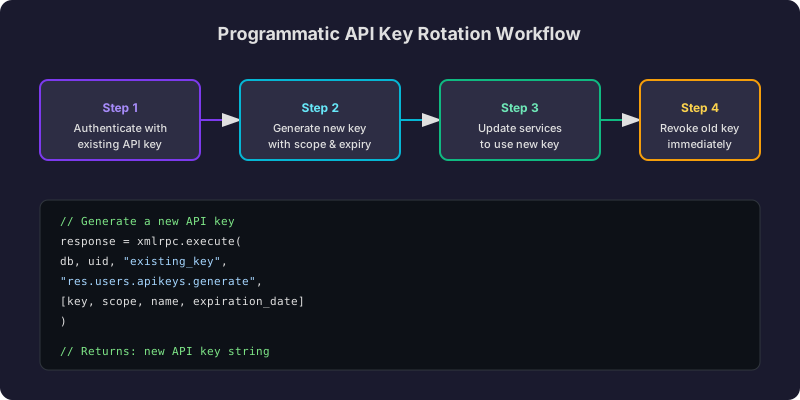
That changes now. Odoo ships two new RPC methods — res.users.apikeys.generate and res.users.apikeys.revoke— that handle the entire lifecycle programmatically. Generate a key with an expiration date, swap it into your services, revoke the old one. All through code, all without touching the browser.
How Key Generation Works
The generatemethod accepts four parameters: the existing API key for authentication, an optional scope string, a human-readable name, and an expiration date in ISO 8601 format. It returns the new key as a plain string — the only time you’ll ever see the full key value, since Odoo stores only a hash internally.
Scoping is worth understanding. An unscoped key has full access to everything the user can reach. A scoped key restricts access to a specific integration context. The documentation recommends matching scopes between old and new keys during rotation, though you can create scoped keys from an unscoped parent when setting up more granular access for the first time.
There’s a hard limit of 10 active keys per user by default, configurable through the system parameter base.programmatic_api_keys_limit. This prevents runaway automation from generating keys endlessly without revoking old ones — a safeguard that catches misconfigured rotation scripts before they become a security problem.
Revocation Is Instant and Irreversible
The revoke method kills a key immediately. No grace period, no soft-delete, no undo. Any request authenticated with that key after revocation fails outright. This makes the order of operations during rotation critical: always generate the new key and confirm it works before revoking the old one.
One subtlety the documentation highlights: the authorization key used to call the revoke method doesn’t have to be the same key being revoked. The recommended pattern is to authenticate with the newly generated key when revoking the old one. This proves the new key works before you destroy its predecessor — if authentication fails, the old key survives and nothing breaks.
The Six-Step Rotation Pattern
Odoo recommends a specific sequence for zero-downtime rotation:
- Generate a new key with an appropriate expiration date using the existing key for authentication
- Store the new key securely in your secrets manager or environment configuration
- Update all services and integrations to use the new key
- Verify the new key works by making a test API call
- Revoke the old key using the new key for authentication
- Confirm revocation succeeded and log the rotation event
This pattern ensures there’s never a moment where both keys are invalid. The overlap period — where both old and new keys work simultaneously — lasts only as long as it takes your deployment pipeline to propagate the credential change.
Access Control and Prerequisites
By default, only users with Settings administration rights can call these methods. This makes sense for most deployments: you don’t want every user writing scripts that generate API keys. But for organizations running dedicated integration service accounts, the system parameter base.enable_programmatic_api_keys can be set to True to unlock the methods for non-admin users.
The implementation works across all three of Odoo’s supported RPC transports — XML-RPC, JSON-RPC, and the newer REST-style endpoints. Code examples cover Python, JavaScript, and Bash (via curl), so regardless of what language your integration layer speaks, there’s a reference implementation to work from.
Why This Matters Beyond Compliance Checkboxes
Automated key rotation is one of those capabilities that sounds like a compliance requirement but actually solves real operational problems. Keys get leaked in logs. Employees with access leave the company. Integration partners get added and removed. Without programmatic rotation, each of these events triggers a manual process that often gets deprioritized until something goes wrong.
With these two methods, a cron job or CI/CD pipeline step can rotate every key on a schedule — weekly, monthly, whatever the security posture requires. The key never lives long enough to become a liability, and the rotation never requires a human to remember to do it.
For teams running Odoo as the backbone of multi-system architectures — where warehouse management, e-commerce frontends, and reporting tools all authenticate against the same API — this is the difference between hoping keys stay safe and knowing they rotate on schedule.