If you manage perishable inventory — food, pharmaceuticals, cosmetics, chemicals — the difference between a product that ships on time and one that expires on the shelf comes down to a single number: the removal date. Not the expiration date, which is what most people think of first. The removal date. It’s the point at which a product must leave the warehouse to reach the customer while it’s still usable. And Odoo has just rewritten its entire FEFO (First Expired, First Out) documentation to make this distinction impossible to miss.
Removal Date Moves to the Front of the Line
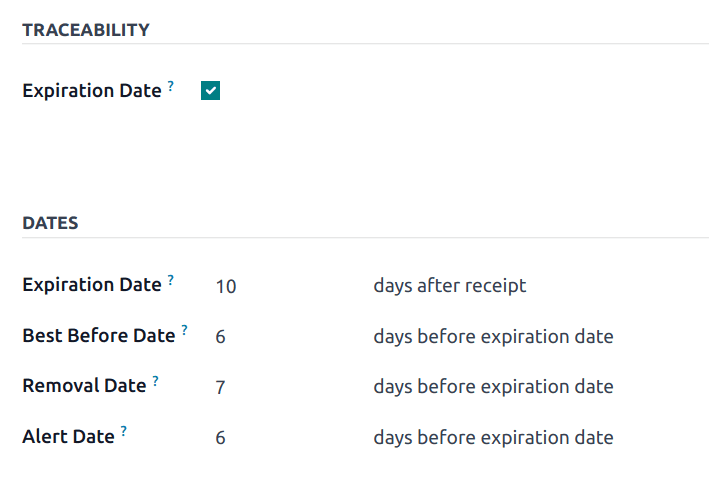
The previous FEFO documentation buried the removal date concept inside a section called “Removal date,” several scrolls below the configuration instructions. The updated version moves it to the introduction. The very first thing users read now explains that products must be removed from inventory before their removal date, and that this date is calculated by subtracting a configurable number of days from the expiration date.
This isn’t a documentation reshuffling exercise. It’s a recognition that the removal date — not the expiration date — is what drives warehouse operations. The expiration date tells you when a product becomes unusable. The removal date tells you when you need to act. In a warehouse where picks happen based on system recommendations, getting this distinction wrong means the system might suggest picking a product that will expire in transit.
Configuration Gets Renamed and Restructured
The setup sections have been reorganized with clearer headings. What was previously called “Enabling the FEFO removal strategy” is now simply Configuration. “Setting dates” becomes Set FEFO dates. “Assigning lots and serial numbers” becomes Assign lots and serial numbers. And “Setting removal strategies” becomes Set removal strategies.
The “Track Inventory” field reference has been updated to simply Tracking, matching the current interface label. And navigation references have been modernized — “Inventory” is now consistently referred to as “Inventory app” and “Expiration Date” becomes “Expiration Dates” (plural) in the configuration section, reflecting the fact that multiple date types are configured together.

How the Pick Logic Actually Works
When a warehouse uses FEFO as its removal strategy, every outgoing operation — delivery orders, manufacturing component picks, internal transfers — prioritizes lots with the earliest removal date. The system looks at all available lots for a product, compares their removal dates, and suggests picking from the lot closest to its removal threshold first.
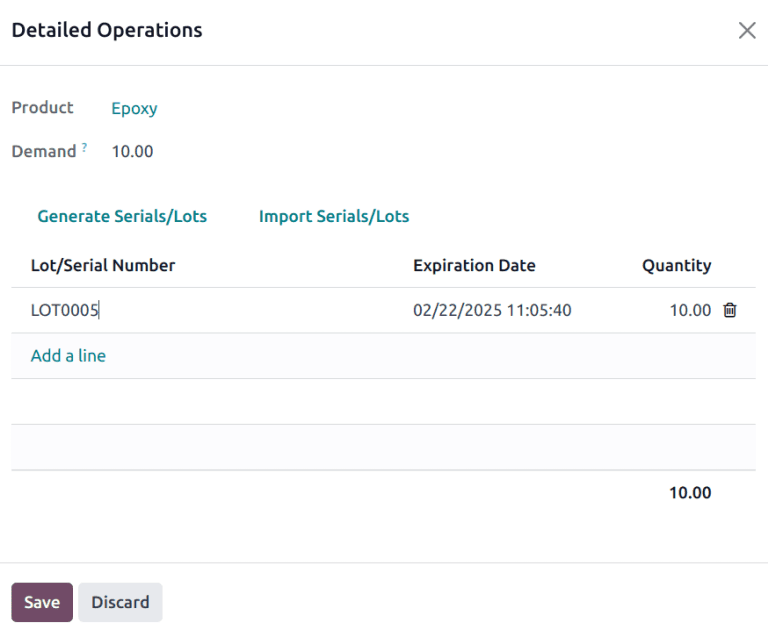
The detailed operations popup — the screen warehouse operators actually interact with during picks — now uses cleaner formatting with italicized field names instead of the previous:guilabel:markup rendering. It’s a small visual change, but it makes the screen less cluttered during the rapid-fire scanning that happens on a warehouse floor.
Why “Because” Replaced “Since”
One of the quieter changes in the rewrite is replacing the word “Since” with “Because” in the example narratives. In English, “since” is ambiguous — it can mean “from the time that” or “because.” In documentation about dates and time-sensitive operations, that ambiguity is a problem. When you read “Since the removal date has passed,” your brain has to decide whether that means “from the time the removal date passed” or “because the removal date has passed.” Swapping to “Because” eliminates the parse. It’s the kind of editorial precision that separates documentation you can follow while operating a forklift from documentation you have to re-read at your desk.
The Practical Takeaway for Warehouse Teams
If you’re already running FEFO in your warehouse, the operational workflow hasn’t changed. Products still get tracked by lot or serial number, expiration dates still drive the removal date calculation, and the system still suggests picks in removal-date order. What’s changed is that the setup documentation now matches how the feature actually works in the current interface, with field names and navigation paths that correspond to what you’ll actually see on screen.
For teams setting up FEFO for the first time, the restructured documentation means fewer wrong turns. The old guide had you enabling a setting, then jumping to date configuration, then back to lot assignment, then forward to strategy selection — a sequence that made sense logically but not operationally. The new flow follows the order you’d actually configure things: enable tracking, set your dates, assign your lots, pick your strategy.