If you’ve ever customized a Gantt chart in Odoo, you know the popover — that small floating panel that appears when you hover over or click a record bar. It shows contextual information without leaving the chart. Until now, building a custom popover meant writing a single monolithic QWeb template called gantt-popover, working with a GanttRowwidget object, and hoping your template didn’t break when the underlying API shifted.
That entire approach has just been replaced. The new popover API splits the content into three independent template slots — header, body, and footer — and aligns the rendering model with the same system that powers Odoo’s Card views. It’s a change that makes Gantt popovers composable, predictable, and significantly easier to maintain.
The Old Way: One Template, One Widget, Good Luck
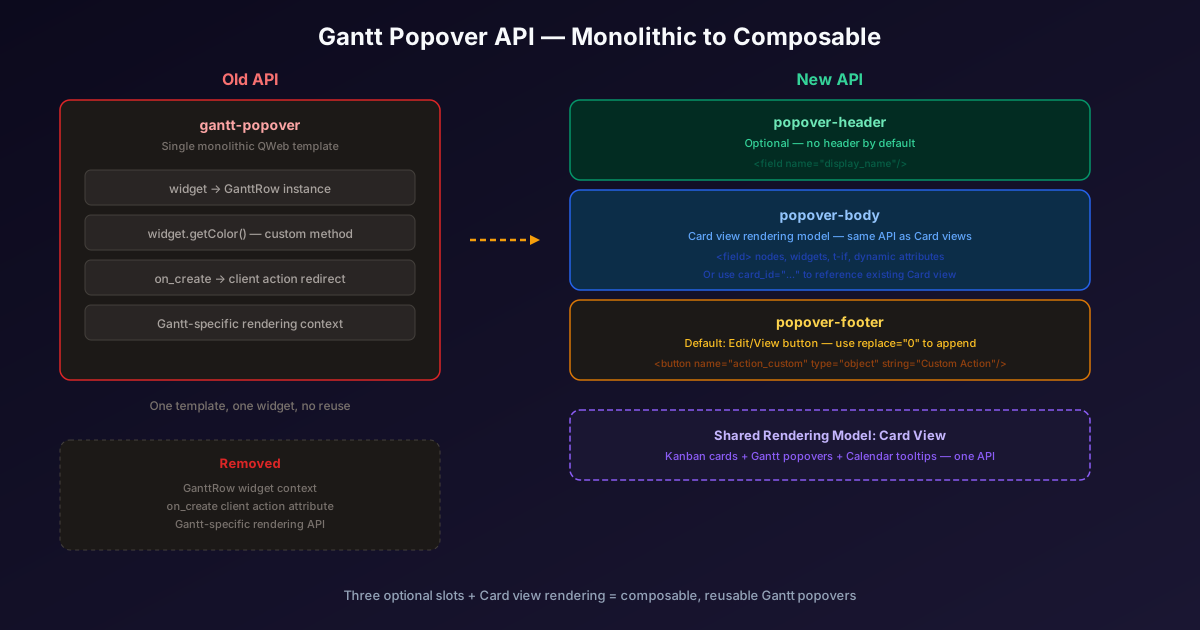
The previous Gantt popover API relied on a single QWeb template named gantt-popover, defined inside a<templates> element in the Gantt view XML. When a user hovered over a record, Odoo rendered that template with a context object containing a widget property pointing to the current GanttRow instance. Developers could pull field values, call getColor, and access row metadata through this widget.
The problem wasn’t that it didn’t work — it did. The problem was that it was a one-off API. No other view type in Odoo used a GanttRow widget context. No other view type expected a template named gantt-popover. If you learned how to build popovers for Card views or Kanban views, none of that knowledge transferred to Gantt. And vice versa.
Three Slots Replace One Template
The new API introduces three named template slots:popover-header, popover-body, andpopover-footer. Each is optional, and each has sensible defaults. If you skip the header, no header renders. If you skip the body, the popover shows the start and stop date fields. If you skip the footer, you get a single “Edit” or “View” button (depending on the user’s access rights).
The footer supports a particularly elegant pattern: settingreplace="0"on the footer template keeps the default button and appends your custom content after it. That means you can add a “Custom Action” button next to the built-in “Edit” button without reimplementing the default behavior. It’s the kind of detail that saves developers from subtle bugs down the line.
Card View Rendering, Everywhere
The most significant architectural change isn’t the three-slot structure — it’s that the templates now use the Card view rendering model. Instead of accessing a widgetobject and calling methods on it, developers declare<field> nodes, attach widgets, uset-ifconditionals, and apply dynamic attributes. It’s the same syntax used in Card views, which means developers who’ve built Card templates can now build Gantt popovers without learning a new API.
This convergence has been a pattern across Odoo’s UI framework for the past several releases. The Card view itself was recently introduced as a reusable template that unifies rendering across Kanban, Gantt, and Calendar views. By aligning the Gantt popover with that same system, Odoo is methodically eliminating the one-off APIs that made each view type feel like its own mini-framework.
The card_id Shortcut
For developers who have already defined a Card view for their model, there’s an even faster path. The new card_idattribute on the <gantt> element lets you point directly to an existing Card view definition. The popover body renders using that Card view, and you can still override the header and footer through the <templates> element.
This is a genuine force multiplier for teams maintaining complex Odoo modules. Instead of duplicating field layouts across the Kanban card, the Gantt popover, and the Calendar tooltip, you define the layout once as a Card view and reference it everywhere. When you update the card, every view that references it updates automatically. One source of truth, multiple rendering contexts.
What Got Removed
The on_create attribute is gone. Previously, you could set on_createon the Gantt view to redirect the “add” button to a specific client action (like a wizard). That functionality was removed from the popover documentation entirely. Developers who relied on it will need to find alternative patterns — likely through custom footer buttons that trigger the same client actions.
The GanttRow widget context is also gone from the template rendering. Any template that accessedwidget.getColor or other GanttRowmethods will need to be rewritten using the Card view field syntax. For most use cases, this is a straightforward migration — replace widget.field_name with<field name="field_name"/>— but custom method calls may require rethinking.
Why This Matters Beyond Gantt Charts
This change is part of a broader strategy to make Odoo’s frontend view system more uniform. Every time a view type shares rendering logic with another, the framework gets easier to learn, easier to debug, and easier to extend. A developer who understands Card view templates now understands Gantt popovers. That compounding of knowledge is what turns a complex ERP customization platform into something that teams can actually maintain long-term.
For agencies and integrators who build custom Gantt views for project planning, manufacturing scheduling, or resource allocation, the immediate benefit is clearer: less bespoke code, more reusable patterns, and a popover system that finally behaves like the rest of the framework.