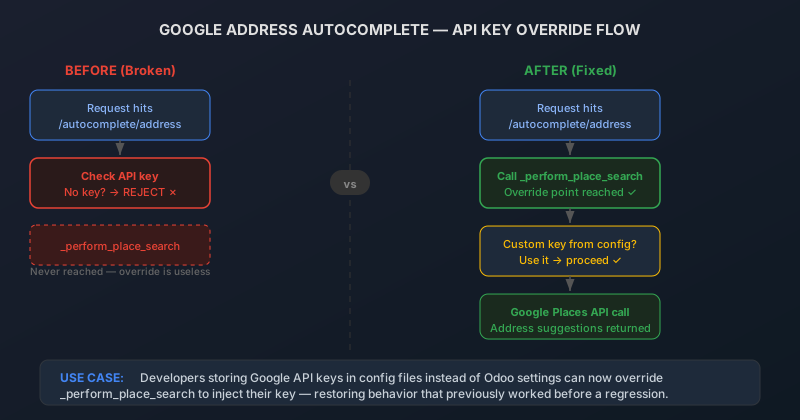
When an ERP platform makes address autocomplete work out of the box, it’s a small quality-of-life feature that saves a few seconds per form entry. When that same platform breaksaddress autocomplete for everyone who wasn’t using the default API key setup, it becomes a deployment-blocking regression that forces custom module maintainers into emergency patches.
That’s what happened with Odoo’s Google Address Autocomplete module. A change to the API key validation logic introduced a short-circuit that rejected requests before they reached the override method, effectively locking out every deployment that stored its Google Places API key outside of Odoo’s built-in settings.
How the Override Used to Work
Odoo’s address autocomplete feature connects to the Google Places API to provide real-time address suggestions as users type. The standard setup stores the Google API key in Odoo’s system settings, and the /autocomplete/addressendpoint reads it from there when constructing the Places API request.
But not every deployment stores credentials in Odoo’s database. Organizations with strict security policies often manage API keys through environment variables, configuration files, or secrets management systems like HashiCorp Vault. For these setups, Odoo provided a clean extension point: the_perform_place_search method. A custom module could override this method, inject the API key from whatever source the organization used, and pass it along to the Google Places API call. The key never touched the Odoo database, the security team was happy, and address autocomplete worked exactly as expected.
What Broke
At some point, a validation check was added near the top of the/autocomplete/address endpoint logic. Before calling_perform_place_search, the code now checked whether an API key was present in Odoo’s settings. If no key was found, the request was immediately rejected — no API call, no results, no address suggestions.
The intent was reasonable: don’t waste a round trip to Google if there’s no key configured. But the check was positioned beforethe override method, which meant it didn’t know about keys provided through custom code paths. For deployments using the standard Odoo settings, nothing changed. For deployments with custom key injection, the endpoint became permanently broken. Every request hit the early rejection before the custom code ever had a chance to run.
The failure mode was particularly frustrating because it was absolute. There was no fallback, no degraded mode, no error message that hinted at the actual problem. The autocomplete endpoint simply returned empty results, as if Google had no address suggestions for the query. Developers who debugged the issue from the client side saw what looked like a Google API problem, when the Google API was never actually being called.
The Fix: Move the Check Downstream
The correction relocated the API key validation to a pointafter the _perform_place_searchmethod is called. This means the override point is reached first, giving custom modules the opportunity to inject their credentials before any key-presence check runs. If the override provides a key, the request proceeds normally. If no key is available from any source — neither the Odoo settings nor a custom override — the request fails with the same rejection as before.
The behavioral difference is subtle but critical. For standard deployments, the experience is identical: no key in settings means no autocomplete. For custom deployments, the experience goes from “completely broken” to “works exactly as it did before the regression.” The fix restores the extension contract that custom modules were built against.
Why This Matters Beyond Address Autocomplete
This incident is a textbook example of a pattern that affects extensible software platforms. When you add validation or short-circuit logic upstream of an extension point, you effectively disable the extension point for any use case that the validation doesn’t anticipate. The validation was correct for the default case but blind to the override case, and in an extensible framework, the override case is the entire value proposition.
For Odoo implementers who store API credentials outside the database — a practice that’s increasingly standard in enterprise deployments — the fix means the Google Address Autocomplete module is usable again without maintaining a monkey-patch or workaround. The override path works as designed, the key injection happens transparently, and the autocomplete suggestions flow to the end user without any visible difference from a standard setup.
If your deployment was affected, the upgrade is drop-in. No configuration changes are needed. The custom module that overrides_perform_place_searchwill start working again as soon as the fix is applied, because the override was never the problem — the check that prevented it from running was.