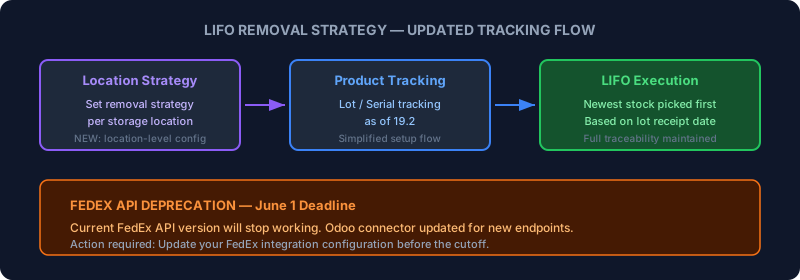
Two inventory updates landed in Odoo this week that affect very different parts of the supply chain but share a common thread: both change how goods move through the system, and both require warehouse teams to revisit their configuration.
LIFO Gets Location-Level Strategy Configuration
Last-In, First-Out removal has always been available in Odoo’s inventory module, but the way it connected to product tracking was clunky. You’d enable LIFO as a removal strategy, then separately configure lot or serial number tracking on each product, and hope the two settings played nicely together. Version 19.2 rewrites this relationship.
The headline change is that removal strategies can now be set at the storage location level, not just the product category level. This means a warehouse with mixed storage policies — LIFO for perishable goods in cold storage, FIFO for shelf-stable items in dry storage — can configure each zone independently without creating artificial product categories just to assign different removal rules.
The product tracking side has been simplified too. Setting up lot or serial number tracking as of 19.2 follows a cleaner path, with fewer intermediate steps between enabling tracking and having it apply to inventory operations. The documentation now links location-level strategy configuration directly to the tracking setup, so administrators can see how the two features connect without flipping between different sections.
Reassigning Lots and Serials Gets Clearer Screenshots
A related update reworks the documentation around reassigning lot and serial numbers to existing inventory. This is the workflow you use when physical stock arrives without tracking information and needs to be assigned lot numbers after the fact — common in receiving operations where suppliers don’t provide serialized packing slips.
The previous screenshots were dense and hard to parse. The updated versions are cropped to show exactly the relevant fields, with clearer visual hierarchy. It’s a documentation improvement rather than a feature change, but it matters because lot reassignment is one of those operations where a wrong click creates inventory discrepancies that take hours to untangle.
FedEx API Deprecation: Update Before June 1
The more urgent update affects every Odoo user shipping through FedEx. The current FedEx API version that Odoo’s shipping connector uses is being deprecated, and FedEx has set a hard cutoff date of June 1. After that date, the old API endpoints will stop responding, which means label generation, rate calculations, and tracking queries will all fail.
Odoo has pushed an update to its FedEx integration module that targets the new API version. The connector update is being forward-ported across active Odoo branches, so users on 19.0 and later versions should see the update in their next module refresh. But the timing is tight — with barely a week between now and the cutoff, operations teams that rely on automated FedEx label printing need to verify their connector is updated and test a shipment before the deadline.
The new API endpoints maintain the same functionality from the Odoo user’s perspective: rates, labels, tracking, and service level selection all work the same way. The change is entirely on the transport layer. But “works the same way” assumes you’ve actually applied the update, which is why the urgency matters.
CipherLab RFID Scanners Get a Direct Download Link
In a smaller but welcome change, CipherLab RFID scanner users can now download the multi-tag output APK directly from a public link instead of contacting their supplier or CipherLab’s sales team. Previously, getting the APK file that enables CipherLab’s UHF RFID scanners to work with Odoo’s Barcode app required going through a distributor — a friction point that slowed down hardware deployments.
The public download link removes that bottleneck. Warehouse teams deploying CipherLab RS36 or RS38 series scanners can now grab the APK, install it, and start scanning without waiting on third-party communication. It’s the kind of small change that matters disproportionately during rollout — nobody wants a scanner deployment stalled because an email to a supplier hasn’t been answered.
What to Do Right Now
If you ship through FedEx via Odoo, check your connector version immediately. The June 1 deadline is not flexible, and debugging a broken shipping integration on the day it breaks is significantly more painful than testing the update in advance. Run a test shipment with the updated module and confirm labels generate correctly.
For the LIFO and tracking changes, the urgency is lower but the opportunity is real. If your warehouse uses mixed removal strategies and you’ve been working around product category limitations to get different zones on different policies, the location-level configuration in 19.2 lets you clean that up. Fewer workaround categories means fewer places where a misconfigured setting can cause the wrong stock to get picked.