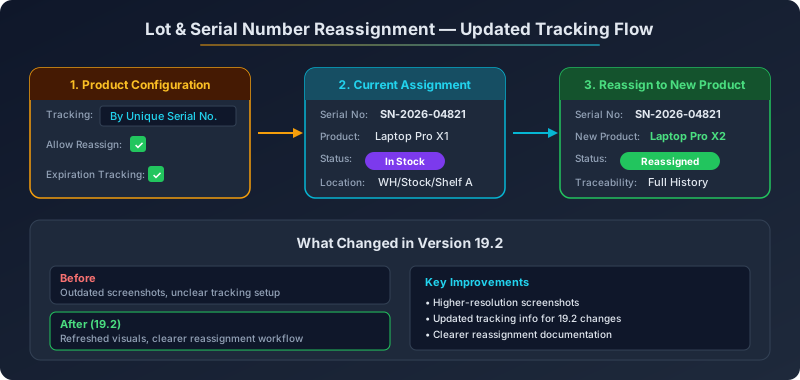
Reassigning lot and serial numbers between products is one of those warehouse operations that sounds straightforward until you actually try to do it. A component gets reclassified. A finished good gets rebranded. A serialized asset gets transferred between product lines during a merger. The physical item stays the same, but its product identity in the system needs to change — and the traceability chain needs to survive the transition intact.
Odoo has supported lot and serial number reassignment for several versions, but the documentation describing how it works had fallen behind the interface. Screenshots showed outdated layouts. Configuration steps referenced field placements that had moved. The tracking behavior described in the guide didn’t perfectly match what users saw when they followed it. Version 19.2 closes that gap with a documentation refresh that brings the reassignment guide in line with the current product.
What Changed in the Documentation
The update touches two areas: visual accuracy and procedural clarity. Every screenshot in the reassignment documentation has been replaced with captures from the current 19.2 interface. Field positions, button labels, and menu paths now match what users actually see when they navigate the product tracking configuration.
Beyond the screenshots, the text itself has been revised to describe the tracking behavior as it exists in 19.2. Odoo introduced changes to how tracking configuration works at the product level in this release, and the reassignment documentation now reflects those changes. Users following the guide from start to finish will encounter the same screens, the same field options, and the same workflow steps that the documentation describes.
How Lot and Serial Reassignment Works
The reassignment workflow serves a specific inventory management need: moving a tracked item’s identity from one product to another without losing the chain of custody. This matters in regulated industries where traceability isn’t optional — pharmaceutical companies tracking drug batches, aerospace manufacturers tracking serialized components, food producers tracking ingredient lots through processing stages.
The process starts with product configuration. Both the source and destination products need tracking enabled — either by lot or by unique serial number. The product being reassigned from must have the reassignment option explicitly enabled in its tracking settings. Without this flag, the system blocks the transfer to prevent accidental product identity changes.
Once configured, the reassignment itself is a controlled inventory operation. The system moves the lot or serial number from its current product assignment to the new product, creating a documented trail that shows when the reassignment happened, who initiated it, and what the original product assignment was. The traceability report for that lot or serial number preserves the full history across both product identities.
Why Documentation Accuracy Matters for Tracked Inventory
For most ERP features, slightly outdated documentation is an inconvenience. For inventory tracking operations, it’s a compliance risk. When a warehouse operator follows a reassignment guide that doesn’t match the current interface, they might skip a configuration step they can’t find, enable the wrong tracking option, or miss a validation that the documentation didn’t mention because it was added after the guide was written.
In regulated environments, every deviation from the documented procedure creates an audit question. If the SOP says “navigate to Inventory > Configuration > Settings” and the actual path has changed, the operator either improvises (risky) or escalates to someone who knows the current path (slow). Neither outcome is acceptable when you’re processing dozens of reassignments per shift.
The Broader Pattern: Tracking Configuration in 19.2
This documentation refresh is part of a broader trend in Odoo 19.2 where inventory tracking configuration has been restructured. Earlier updates moved FIFO tracking settings from the Inventory tab to the General Information tab. FEFO removal got mandatory expiration dates. Serial number tracking received a terminology overhaul.
The reassignment documentation update fits into this pattern: as the underlying tracking system evolves, the guides that describe how to use it need to keep pace. For organizations running Odoo 19.2, the updated reassignment documentation ensures that this particular workflow — one that sits at the intersection of inventory management and regulatory compliance — is documented accurately enough to build SOPs around.
The refreshed guide is available for version 19.2 onward, and the changes have been forward-ported through the documentation chain to ensure consistency across all supported versions. If your warehouse operations include lot or serial number reassignment, the updated screenshots and procedures are worth a fresh read — especially if your team built their training materials from the previous version of the guide.